
Image2Studio
Examples

gpt-image-2

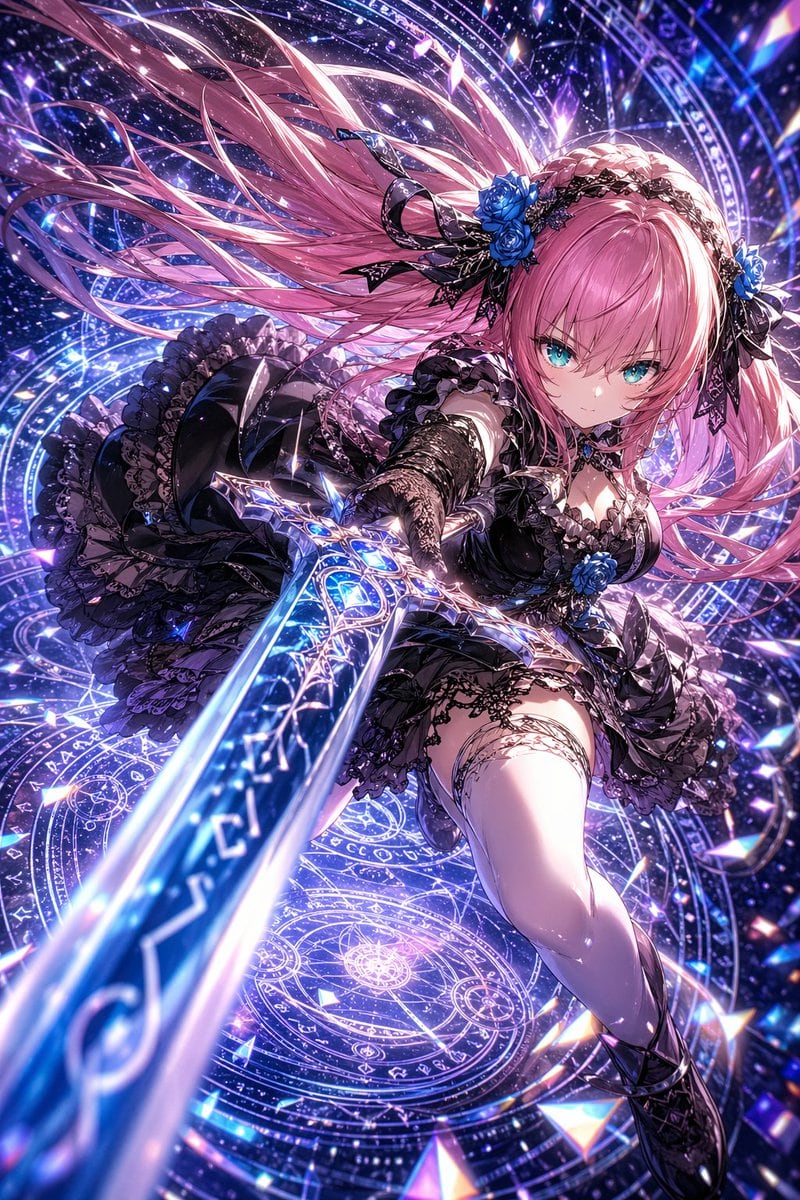
Hyper-detailed Anime Fantasy Action Illustration Of A Fierce Young Woman

A hyper-detailed anime fantasy action illustration of a fierce young woman lunging toward the viewer with a glowing magical sword, shown in an extreme foreshortened low-angle perspective...

A hyper-detailed anime fantasy action illustration of a fierce young woman lunging toward the viewer with a glowing magical sword, shown in an extreme foreshortened low-angle perspective...
Prompt

A hyper-detailed anime fantasy action illustration of a fierce young woman lunging toward the viewer with a glowing magical sword, shown in an extreme foreshortened low-angle perspective where the blade dominates the foreground and points straight at the camera. She has {argument name="hair color" default="long pastel pink"} hair streaming dramatically behind her in many windblown strands, bright {argument name="eye color" default="turquoise blue"} eyes, and a focused, determined expression. She wears an elaborate black gothic-lolita battle dress with layered ruffles, lace trim, corset shaping, detached lace sleeves or gloves, thigh garter details, and dark armored boots. Her outfit is accented with exactly 3 vivid blue roses: 2 in a black lace headpiece and 1 at the center of her chest. The sword is ornate and elegant, with a silver filigree guard and a luminous blue blade filled with glowing rune-like patterns. Surround her with multiple overlapping circular magic sigils, arcane rings, starfield particles, sparkling shards, and cosmic light trails in a {argument name="background palette" default="violet, indigo, and electric blue"} celestial backdrop. Add crystalline prism fragments and glittering highlights across the scene, with intense bloom, high contrast, intricate lace and fabric detail, and a polished premium gacha-game key visual look. The composition should feel dynamic, cinematic, and magical, as if {argument name="character name" default="a gothic magical swordswoman"} is mid-strike in an astral dimension.

Prompt structure
  • Modelgpt-image-2
  • Use casesocial-media-post
  • Styleluxury, cinematic, photorealistic, anime
  • Aspect ratioFlexible
Best used for
  • Use casesocial-media-post
  • Styleluxury, cinematic, photorealistic, anime
  • Recommended specs1:1, 4:5, 16:9, or 9:16
  • ModelGPT Image 2
How to customize

Use this Hyper-detailed Anime Fantasy Action Illustration Of A Fierce Young Woman prompt as a base. Replace the subject, product details, environment, lighting, brand colors, and output ratio while keeping the social-media-post intent and luxury, cinematic, photorealistic, anime direction stable.

Editable variables
  • SubjectReplace the product, person, scene, interface, or object being generated.
  • Use caseKeep or rewrite the destination as social media post, ad creative, cover image, poster, or ecommerce hero.
  • FrameChoose 1:1, 4:5, 16:9, or 9:16 based on the final placement.
  • Brand cuesAdd colors, materials, props, text-safe space, and the platform where the image will be used.
Recommended specs

Choose the frame for the destination first, then use 1K, 2K, or 4K based on output quality needs. Product images and posters usually benefit from higher resolution.

Pre-generation checklist
  • CheckSubject, lighting, composition, and frame are specific enough to review.
  • CheckText-safe space is included when the image will carry a headline or ad copy.
  • CheckResolution, credit cost, and final destination are checked before generation.
Why this prompt works

Hyper-detailed Anime Fantasy Action Illustration Of A Fierce Young Woman works because it starts from the image job, then controls subject, composition, lighting, style, and frame. It is best for social media post while keeping the luxury, cinematic, photorealistic, anime direction stable.

Common questions
  • Can I use it directly?Yes. Replace the subject, brand cues, and frame, then generate in Image2Studio.
  • Which ratio should I use?Choose 1:1, 4:5, 16:9, or 9:16 based on the destination.




