
Image2Studio
Examples

gpt-image-2

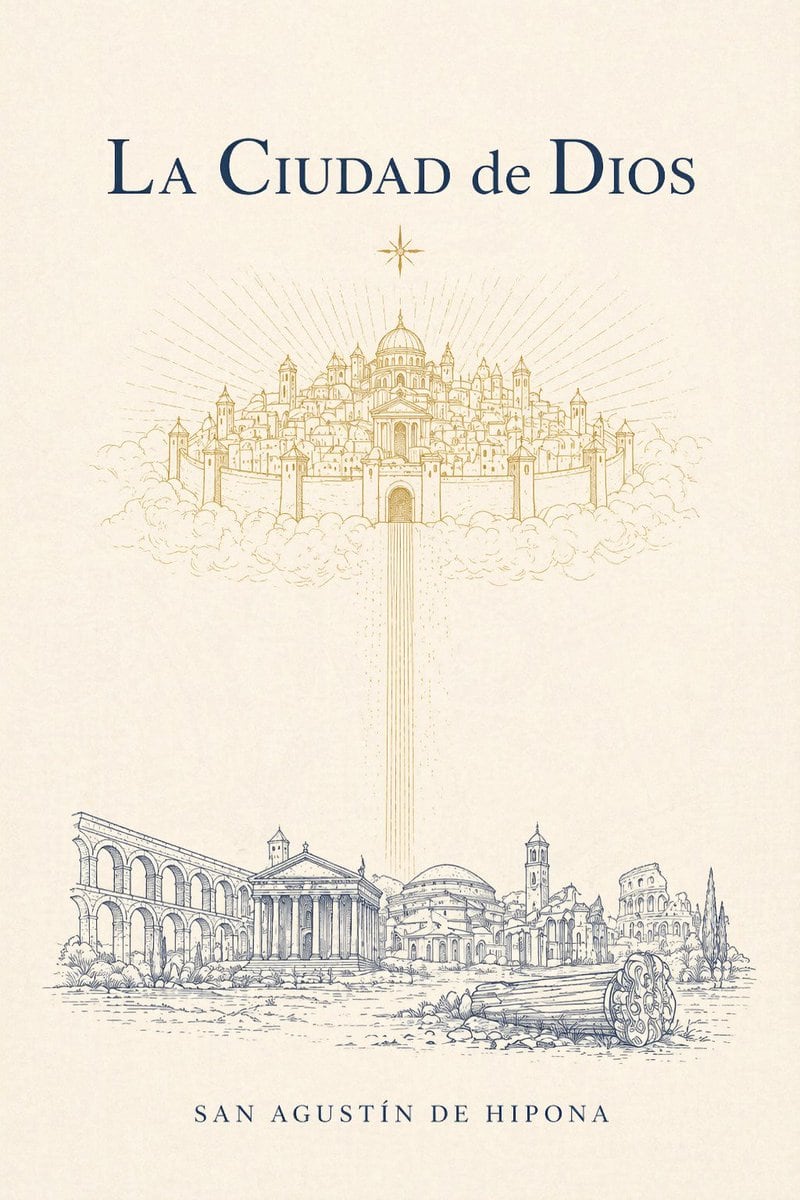
Minimalist Elegant Vintage Book Cover Design On Warm Ivory Textured Pape

A minimalist, elegant vintage book cover design on warm ivory textured paper for La Ciudad de Dios. Center the title near the top in large classical serif typography, dark navy blue, with...

A minimalist, elegant vintage book cover design on warm ivory textured paper for La Ciudad de Dios. Center the title near the top in large classical serif typography, dark navy blue, with...
Prompt

A minimalist, elegant vintage book cover design on warm ivory textured paper for {argument name="book title" default="La Ciudad de Dios"}. Center the title near the top in large classical serif typography, dark navy blue, with refined spacing and a literary feel. Directly below it, place 1 small eight-point star in gold. In the upper middle, illustrate a heavenly walled city floating on clouds, drawn as delicate gold line art: a symmetrical sacred city with 1 central domed cathedral, many clustered towers, spires, walls, and gates, surrounded by soft clouds, with radiant sunburst lines spreading outward behind it. From the central gate of the celestial city, send down 1 vertical column of thin golden light beams toward the lower half of the cover. In the bottom third, depict an earthly ancient Roman landscape in fine blue-gray ink line art: 5 main architectural ruins and monuments arranged horizontally, including a long arcade on the left, a classical temple with columns near left-center, a domed building in the middle, a bell tower and surrounding ruins near right-center, and a colosseum-like ruin on the far right, plus a broken fallen column drum in the right foreground and sparse shrubs and ground texture. Keep the composition airy, symmetrical, and contemplative, with abundant negative space between heaven and earth. Place the author name {argument name="author name" default="SAN AGUSTÍN DE HIPONA"} centered at the bottom in spaced small caps serif, dark navy blue. Use only 3 visible text elements total: the title, the author name, and no subtitle. Palette limited to ivory, gold, and dark navy blue, with precise engraved linework and a sacred, timeless, classical theological mood.

Prompt structure
  • Modelgpt-image-2
  • Use casesocial-media-post
  • Styleluxury, minimal
  • Aspect ratioFlexible
Best used for
  • Use casesocial-media-post
  • Styleluxury, minimal
  • Recommended specs1:1, 4:5, 16:9, or 9:16
  • ModelGPT Image 2
How to customize

Use this Minimalist Elegant Vintage Book Cover Design On Warm Ivory Textured Pape prompt as a base. Replace the subject, product details, environment, lighting, brand colors, and output ratio while keeping the social-media-post intent and luxury, minimal direction stable.

Editable variables
  • SubjectReplace the product, person, scene, interface, or object being generated.
  • Use caseKeep or rewrite the destination as social media post, ad creative, cover image, poster, or ecommerce hero.
  • FrameChoose 1:1, 4:5, 16:9, or 9:16 based on the final placement.
  • Brand cuesAdd colors, materials, props, text-safe space, and the platform where the image will be used.
Recommended specs

Choose the frame for the destination first, then use 1K, 2K, or 4K based on output quality needs. Product images and posters usually benefit from higher resolution.

Pre-generation checklist
  • CheckSubject, lighting, composition, and frame are specific enough to review.
  • CheckText-safe space is included when the image will carry a headline or ad copy.
  • CheckResolution, credit cost, and final destination are checked before generation.
Why this prompt works

Minimalist Elegant Vintage Book Cover Design On Warm Ivory Textured Pape works because it starts from the image job, then controls subject, composition, lighting, style, and frame. It is best for social media post while keeping the luxury, minimal direction stable.

Common questions
  • Can I use it directly?Yes. Replace the subject, brand cues, and frame, then generate in Image2Studio.
  • Which ratio should I use?Choose 1:1, 4:5, 16:9, or 9:16 based on the destination.




