
Image2Studio
Examples

gpt-image-2

Create A Clean

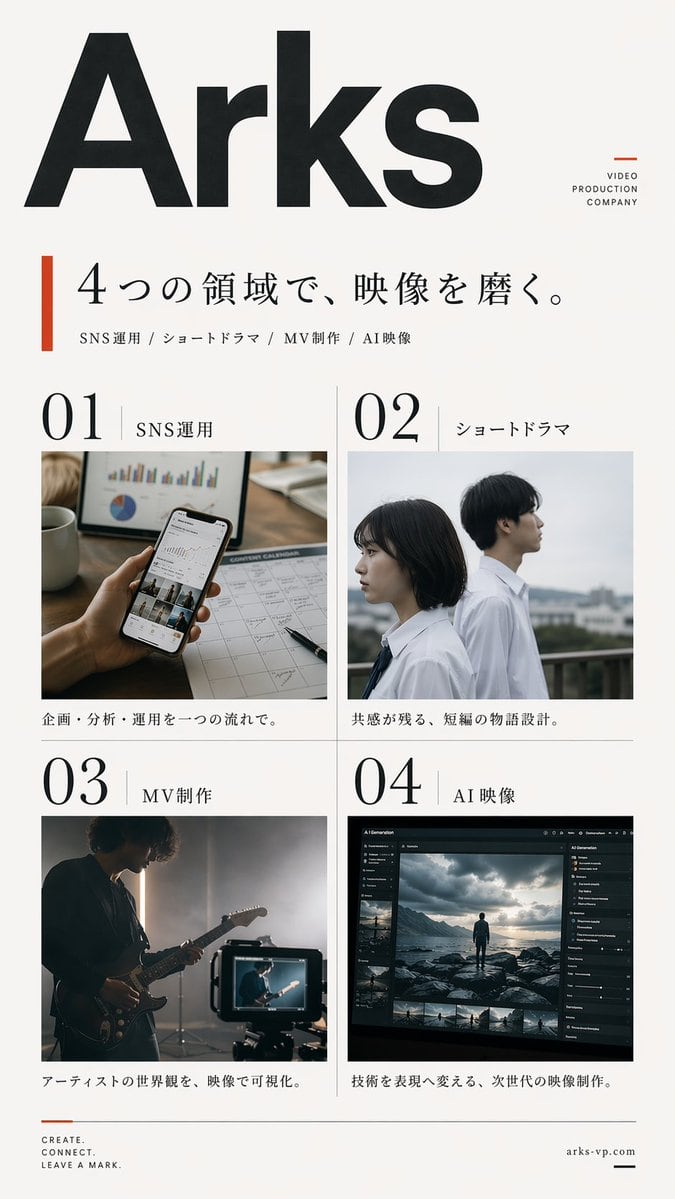
Create a clean, premium Japanese corporate poster for a Arks video production company, in a minimalist editorial layout on an off-white background with lots of negative space. Portrait or...

Create a clean, premium Japanese corporate poster for a Arks video production company, in a minimalist editorial layout on an off-white background with lots of negative space. Portrait or...
Prompt

Create a clean, premium Japanese corporate poster for a {argument name="company name" default="Arks"} video production company, in a minimalist editorial layout on an off-white background with lots of negative space. Portrait orientation, A4-like poster proportions. At the very top left, place an oversized bold black sans-serif logotype reading {argument name="company name" default="Arks"}, spanning nearly the full width of the page. In the upper right, add a small stacked brand mark in thin uppercase letters: "VIDEO" on one line, "PRODUCTION" on the next, "COMPANY" on the third, with a small burnt-orange geometric accent nearby. Below the logo, add a vertical burnt-orange bar on the left and a large elegant Japanese headline in black Mincho-style serif: {argument name="headline text" default="4つの領域で、映像を磨く。"}. Directly underneath, add a smaller service line in Japanese with slash separators: "SNS運用 / ショートドラマ / MV制作 / AI映像". The main body is a 2 by 2 grid of exactly 4 service panels with thin light-gray divider lines. Each panel has a large black editorial number and a Japanese label. Panel 1 label: "SNS運用" with the number "01"; image shows a close-up hand holding a smartphone displaying social media analytics, on a desk with charts, a calendar sheet, a pen, and a coffee mug, in warm natural office lighting; caption below in Japanese: "企画・分析・運用を一つの流れで。" Panel 2 label: "ショートドラマ" with the number "02"; image shows exactly 2 Japanese high-school-age students in white shirts standing outdoors on a rooftop or balcony, one female and one male, side-profile composition, muted overcast daylight, cinematic shallow depth of field; caption below: "共感が残る、短編の物語設計。" Panel 3 label: "MV制作" with the number "03"; image shows a moody musician playing electric guitar in a dim studio, backlit by soft haze, with a camera monitor in the foreground showing the same performer; caption below: "アーティストの世界観を、映像で可視化。" Panel 4 label: "AI映像" with the number "04"; image shows a dark professional AI video-generation or image-editing software interface on a monitor, with a cinematic scene of a lone figure standing on rocks under dramatic clouds, plus thumbnail timeline images and side control panels; caption below: "技術を表現へ変える、次世代の映像制作。" At the bottom left, place a small three-line English slogan in uppercase: {argument name="tagline text" default="CREATE.\nCONNECT.\nLEAVE A MARK."} with a small burnt-orange line accent above it. At the bottom right, place the website {argument name="website" default="arks-vp.com"} in small serif text with a short black horizontal line beside it. Use a refined mix of bold modern sans-serif for the large logo and numbers, and elegant Japanese serif for headlines and labels. Color palette: black, charcoal, warm off-white, light gray rules, and restrained burnt-orange accents. The overall feel should be realistic, polished, contemporary, Japanese editorial advertising design, with accurate Japanese typography and natural image tones.

Prompt structure
  • Modelgpt-image-2
  • Use casesocial-media-post
  • Styleminimal, editorial, cinematic, photorealistic
  • Aspect ratioFlexible
Best used for
  • Use casesocial-media-post
  • Styleminimal, editorial, cinematic, photorealistic
  • Recommended specs1:1, 4:5, 16:9, or 9:16
  • ModelGPT Image 2
How to customize

Use this Create A Clean prompt as a base. Replace the subject, product details, environment, lighting, brand colors, and output ratio while keeping the social-media-post intent and minimal, editorial, cinematic, photorealistic direction stable.

Editable variables
  • SubjectReplace the product, person, scene, interface, or object being generated.
  • Use caseKeep or rewrite the destination as social media post, ad creative, cover image, poster, or ecommerce hero.
  • FrameChoose 1:1, 4:5, 16:9, or 9:16 based on the final placement.
  • Brand cuesAdd colors, materials, props, text-safe space, and the platform where the image will be used.
Recommended specs

Choose the frame for the destination first, then use 1K, 2K, or 4K based on output quality needs. Product images and posters usually benefit from higher resolution.

Pre-generation checklist
  • CheckSubject, lighting, composition, and frame are specific enough to review.
  • CheckText-safe space is included when the image will carry a headline or ad copy.
  • CheckResolution, credit cost, and final destination are checked before generation.
Why this prompt works

Create A Clean works because it starts from the image job, then controls subject, composition, lighting, style, and frame. It is best for social media post while keeping the minimal, editorial, cinematic, photorealistic direction stable.

Common questions
  • Can I use it directly?Yes. Replace the subject, brand cues, and frame, then generate in Image2Studio.
  • Which ratio should I use?Choose 1:1, 4:5, 16:9, or 9:16 based on the destination.




