
Image2Studio
Examples

gpt-image-2

Premium Infographic-style Visual

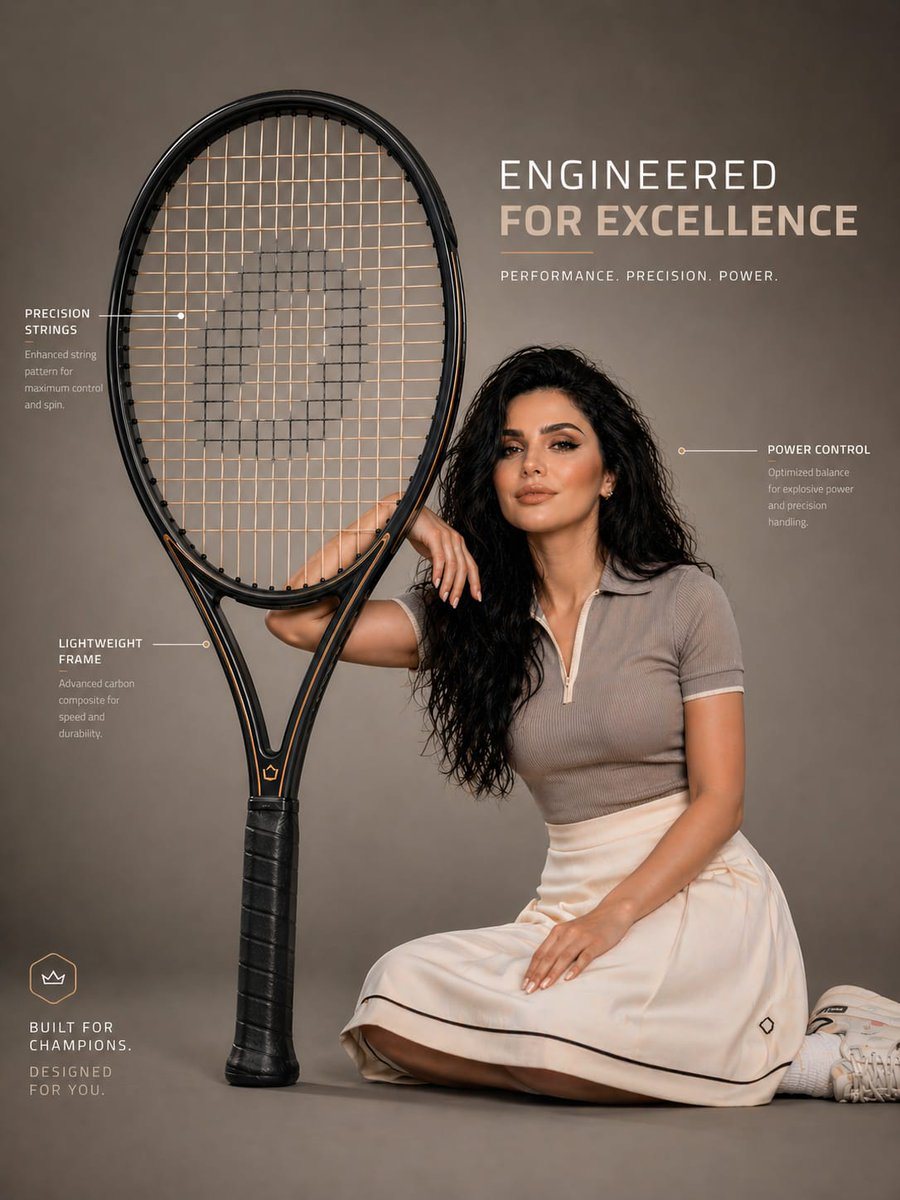
A premium infographic-style visual featuring an oversized tennis racket placed beside a young woman. The racket is scaled to be nearly the same size as her entire seated body, creating a...

A premium infographic-style visual featuring an oversized tennis racket placed beside a young woman. The racket is scaled to be nearly the same size as her entire seated body, creating a...
Prompt

A premium infographic-style visual featuring an {argument name="object" default="oversized tennis racket"} placed beside a young woman. The racket is scaled to be nearly the same size as her entire seated body, creating a bold and surreal proportion. The woman sits casually leaning against the racket, one arm resting on the frame, interacting naturally with it in a relaxed yet stylish pose. Her face must closely match the provided reference image — accurate facial structure, skin tone, hairstyle, and expression — sharp, realistic, and visually appealing. The tennis racket is ultra-detailed with visible string pattern, frame texture, grip wrapping, and realistic material finish. Clean, premium sports design with sharp detailing. The model is wearing an {argument name="outfit" default="attractive, modern outfit — a stylish fitted top paired with a skirt extending slightly over her knees"} — elegant, sporty, and visually balanced. Outfit should complement the racket’s color palette. Composition is modern and minimal, set in a clean studio or soft gradient background. Include subtle infographic-style elements such as thin annotation lines and {argument name="annotations" default="minimal callouts highlighting features like “precision strings,” “lightweight frame,” or “power control,”"} keeping everything sleek and uncluttered. Lighting is soft studio lighting with controlled highlights and shadows, giving a high-end commercial look. Balanced composition, sharp focus, and slight depth of field for realism. Color grading is crisp and slightly vibrant, with a premium sports advertisement aesthetic. Style: high-end product infographic, sports fashion editorial, clean UI-inspired annotations Resolution: ultra high resolution, 4K, highly detailed, photorealistic Optional boosters: 85mm lens, f/2.8 commercial sports ad no distortion, accurate proportions clean typography, modern layout

Prompt structure
  • Modelgpt-image-2
  • Use casesocial-media-post
  • Styleminimal, luxury, photorealistic, editorial
  • Aspect ratioFlexible
Best used for
  • Use casesocial-media-post
  • Styleminimal, luxury, photorealistic, editorial
  • Recommended specs1:1, 4:5, 16:9, or 9:16
  • ModelGPT Image 2
How to customize

Use this Premium Infographic-style Visual prompt as a base. Replace the subject, product details, environment, lighting, brand colors, and output ratio while keeping the social-media-post intent and minimal, luxury, photorealistic, editorial direction stable.

Editable variables
  • SubjectReplace the product, person, scene, interface, or object being generated.
  • Use caseKeep or rewrite the destination as social media post, ad creative, cover image, poster, or ecommerce hero.
  • FrameChoose 1:1, 4:5, 16:9, or 9:16 based on the final placement.
  • Brand cuesAdd colors, materials, props, text-safe space, and the platform where the image will be used.
Recommended specs

Choose the frame for the destination first, then use 1K, 2K, or 4K based on output quality needs. Product images and posters usually benefit from higher resolution.

Pre-generation checklist
  • CheckSubject, lighting, composition, and frame are specific enough to review.
  • CheckText-safe space is included when the image will carry a headline or ad copy.
  • CheckResolution, credit cost, and final destination are checked before generation.
Why this prompt works

Premium Infographic-style Visual works because it starts from the image job, then controls subject, composition, lighting, style, and frame. It is best for social media post while keeping the minimal, luxury, photorealistic, editorial direction stable.

Common questions
  • Can I use it directly?Yes. Replace the subject, brand cues, and frame, then generate in Image2Studio.
  • Which ratio should I use?Choose 1:1, 4:5, 16:9, or 9:16 based on the destination.




