
Image2Studio
Examples

gpt-image-2

Clean Warm

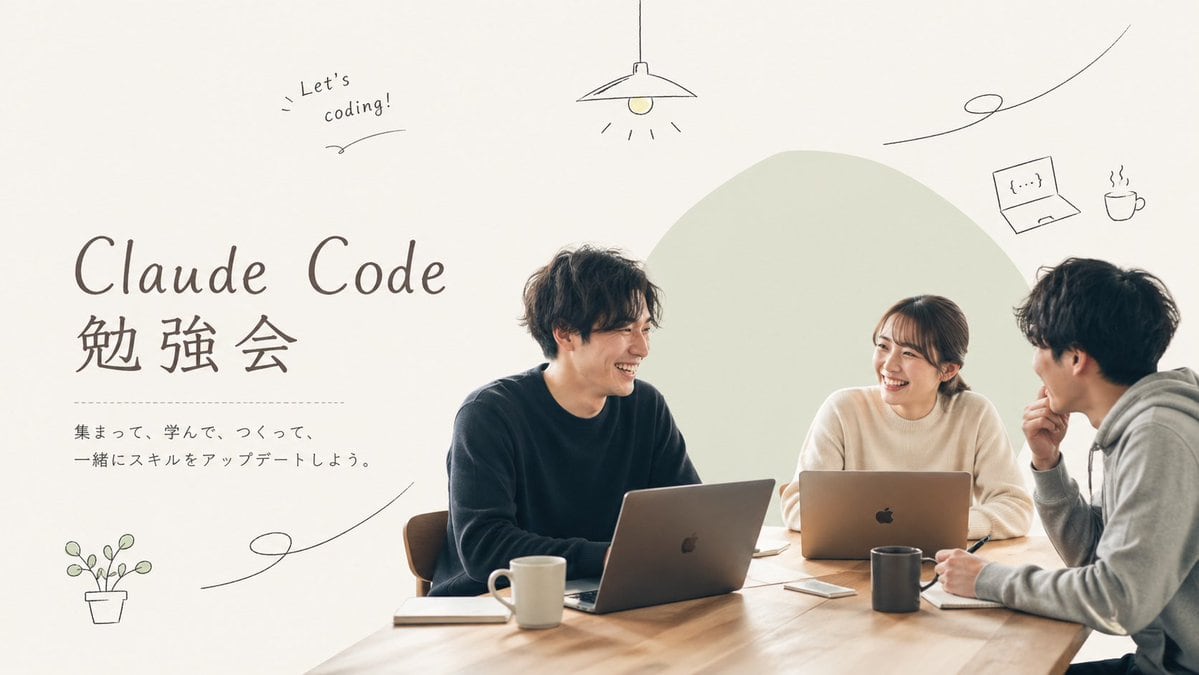
A clean, warm, minimalist promotional poster for a coding study meetup, in a soft lifestyle-photography plus editorial design style. Show 3 young adults seated around a light wooden table...

A clean, warm, minimalist promotional poster for a coding study meetup, in a soft lifestyle-photography plus editorial design style. Show 3 young adults seated around a light wooden table...
Prompt

A clean, warm, minimalist promotional poster for a coding study meetup, in a soft lifestyle-photography plus editorial design style. Show 3 young adults seated around a light wooden table in a bright neutral room, collaborating with laptops and notebooks. The group consists of 2 men and 1 woman, all casually dressed in muted colors; the person on the left wears a dark navy sweater, the woman in the center-right wears an off-white knit top, and the person on the far right wears a light gray hoodie in side profile. Their faces are softly obscured and not detailed. Place 2 open silver laptops on the table, 2 ceramic mugs, 2 notebooks, 1 smartphone, and 1 pen visible near the right person’s hand. Compose the people on the right half of the image, with a large pale sage-green organic blob shape behind them as a graphic backdrop. Keep the lighting soft, natural, airy, and slightly warm, with lots of negative space on the left. On the left side, add large elegant headline typography reading {argument name="headline text" default="Claude Code"} on one line and {argument name="subheadline text" default="勉強会"} below it in large Japanese characters. Under the headline, add a thin dotted horizontal divider line, then 2 lines of smaller Japanese body text reading {argument name="body text" default="集まって、学んで、つくって、\n一緒にスキルをアップデートしよう。"}. Add playful hand-drawn doodles in thin dark lines around the layout: 1 hanging lamp centered near the top, 1 handwritten note in the upper left saying {argument name="note text" default="Let’s coding!"}, 1 small laptop icon in the upper right, 1 steaming coffee cup icon beside it, 1 potted plant icon in the lower left, and 3 long curving decorative squiggle lines distributed across the page. Use an off-white background, restrained Japanese cafe-meets-tech branding, balanced whitespace, and a polished social-media event flyer aesthetic with a 16:9 horizontal composition.

Prompt structure
  • Modelgpt-image-2
  • Use casesocial-media-post
  • Styleminimal, photorealistic, editorial, luxury
  • Aspect ratioFlexible
Best used for
  • Use casesocial-media-post
  • Styleminimal, photorealistic, editorial, luxury
  • Recommended specs1:1, 4:5, 16:9, or 9:16
  • ModelGPT Image 2
How to customize

Use this Clean Warm prompt as a base. Replace the subject, product details, environment, lighting, brand colors, and output ratio while keeping the social-media-post intent and minimal, photorealistic, editorial, luxury direction stable.

Editable variables
  • SubjectReplace the product, person, scene, interface, or object being generated.
  • Use caseKeep or rewrite the destination as social media post, ad creative, cover image, poster, or ecommerce hero.
  • FrameChoose 1:1, 4:5, 16:9, or 9:16 based on the final placement.
  • Brand cuesAdd colors, materials, props, text-safe space, and the platform where the image will be used.
Recommended specs

Choose the frame for the destination first, then use 1K, 2K, or 4K based on output quality needs. Product images and posters usually benefit from higher resolution.

Pre-generation checklist
  • CheckSubject, lighting, composition, and frame are specific enough to review.
  • CheckText-safe space is included when the image will carry a headline or ad copy.
  • CheckResolution, credit cost, and final destination are checked before generation.
Why this prompt works

Clean Warm works because it starts from the image job, then controls subject, composition, lighting, style, and frame. It is best for social media post while keeping the minimal, photorealistic, editorial, luxury direction stable.

Common questions
  • Can I use it directly?Yes. Replace the subject, brand cues, and frame, then generate in Image2Studio.
  • Which ratio should I use?Choose 1:1, 4:5, 16:9, or 9:16 based on the destination.




