
Image2Studio
Prompts

gpt-image-2

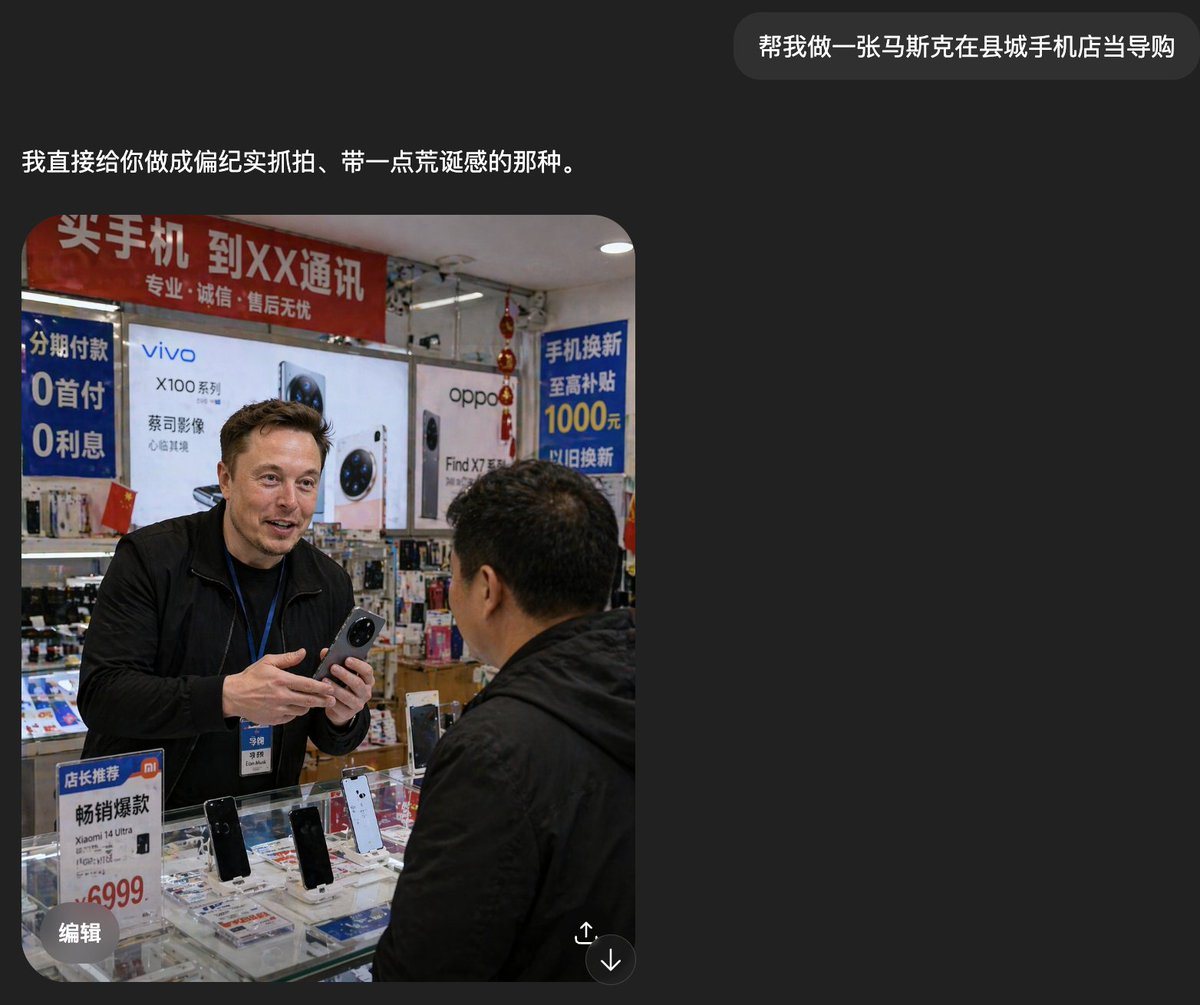
Realistic Documentary-style Smartphone Photo

A realistic documentary-style smartphone photo inside a small county-town mobile phone shop in China, showing a candid sales interaction at the counter. A tall foreign man, about Russian,...

A realistic documentary-style smartphone photo inside a small county-town mobile phone shop in China, showing a candid sales interaction at the counter. A tall foreign man, about Russian,...
Prompt

A realistic documentary-style smartphone photo inside a small county-town mobile phone shop in China, showing a candid sales interaction at the counter. A tall foreign man, about {argument name="shop clerk nationality" default="Russian"}, stands behind a glass display case wearing a black jacket and a blue employee lanyard with badge, holding a smartphone in both hands as if introducing it to a customer. His face is deliberately blurred into a soft rectangular mosaic for privacy. In the foreground, a middle-aged Chinese male customer in a black jacket is seen from behind and slightly to the side, facing the clerk. The store is cramped, brightly lit, and visually cluttered with authentic retail details. Behind them are large smartphone brand posters and lightbox ads, including 2 major phone brand ads: vivo and oppo. There are 4 prominent Chinese promotional signs visible: a red overhead banner about buying phones and carrier service, a blue vertical installment-payment sign mentioning 0 down payment and 0 interest, a blue trade-in subsidy sign mentioning 1000 yuan, and a small counter sign promoting a Xiaomi model with a 6999 price. The glass counter contains multiple display phones, with 4 clearly visible upright demo phones on stands, plus scattered brochures and accessories beneath the glass. Add dense shelves of boxed accessories and hanging decorations in the background, with slightly messy composition, harsh indoor shop lighting, mild lens distortion, and the rough, unpolished realism of a casually taken phone snapshot. The mood should feel mundane, local, and faintly surreal because the foreign clerk appears completely integrated into an ordinary Chinese mobile phone store.

Prompt structure
  • Modelgpt-image-2
  • Use casesocial-media-post
  • Stylephotorealistic
  • Aspect ratioFlexible
Best used for
  • Use casesocial-media-post
  • Stylephotorealistic
  • Recommended specs1:1, 4:5, 16:9, or 9:16
  • ModelGPT Image 2
How to customize

Use this Realistic Documentary-style Smartphone Photo prompt as a base. Replace the subject, product details, environment, lighting, brand colors, and output ratio while keeping the social-media-post intent and photorealistic direction stable.

Editable variables
  • SubjectReplace the product, person, scene, interface, or object being generated.
  • Use caseKeep or rewrite the destination as social media post, ad creative, cover image, poster, or ecommerce hero.
  • FrameChoose 1:1, 4:5, 16:9, or 9:16 based on the final placement.
  • Brand cuesAdd colors, materials, props, text-safe space, and the platform where the image will be used.
Recommended specs

Choose the frame for the destination first, then use 1K, 2K, or 4K based on output quality needs. Product images and posters usually benefit from higher resolution.

Pre-generation checklist
  • CheckSubject, lighting, composition, and frame are specific enough to review.
  • CheckText-safe space is included when the image will carry a headline or ad copy.
  • CheckResolution, credit cost, and final destination are checked before generation.
Why this prompt works

Realistic Documentary-style Smartphone Photo works because it starts from the image job, then controls subject, composition, lighting, style, and frame. It is best for social media post while keeping the photorealistic direction stable.

Common questions
  • Can I use it directly?Yes. Replace the subject, brand cues, and frame, then generate in Image2Studio.
  • Which ratio should I use?Choose 1:1, 4:5, 16:9, or 9:16 based on the destination.




