
Image2Studio
Examples

gpt-image-2

Using The Provided Reference Image

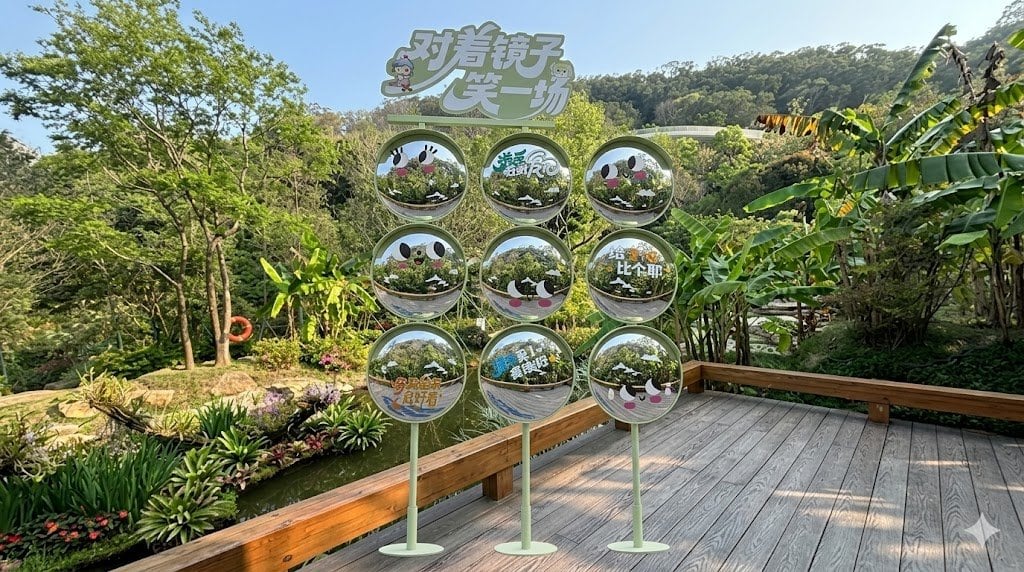
Using the provided reference image, keep the same garden, pond, trees, hillside, and wooden deck viewpoint, but reposition the decorative sign installation so it stands on the wooden deck...

Using the provided reference image, keep the same garden, pond, trees, hillside, and wooden deck viewpoint, but reposition the decorative sign installation so it stands on the wooden deck...
Prompt

Using the provided reference image, keep the same garden, pond, trees, hillside, and wooden deck viewpoint, but reposition the decorative sign installation so it stands on the wooden deck in the foreground instead of in the water. Enlarge it and center it more prominently in front of the camera while preserving a believable outdoor perspective, natural daylight, and consistent shadows. Keep the installation structure as a 3-column by 3-row set of 9 circular sign panels on slim green stands with the top header sign reading “对着镜子笑一场”. Make the panels look more reflective and mirror-like, showing realistic reflections of the surrounding greenery, while retaining the cute face graphics and Chinese text on the circles. The result should look like a realistic ad mockup/composite photo of the same display placed correctly in the scene.

Prompt structure
  • Modelgpt-image-2
  • Use casesocial-media-post
  • Stylephotorealistic
  • Aspect ratioFlexible
Best used for
  • Use casesocial-media-post
  • Stylephotorealistic
  • Recommended specs1:1, 4:5, 16:9, or 9:16
  • ModelGPT Image 2
How to customize

Use this Using The Provided Reference Image prompt as a base. Replace the subject, product details, environment, lighting, brand colors, and output ratio while keeping the social-media-post intent and photorealistic direction stable.

Editable variables
  • SubjectReplace the product, person, scene, interface, or object being generated.
  • Use caseKeep or rewrite the destination as social media post, ad creative, cover image, poster, or ecommerce hero.
  • FrameChoose 1:1, 4:5, 16:9, or 9:16 based on the final placement.
  • Brand cuesAdd colors, materials, props, text-safe space, and the platform where the image will be used.
Recommended specs

Choose the frame for the destination first, then use 1K, 2K, or 4K based on output quality needs. Product images and posters usually benefit from higher resolution.

Pre-generation checklist
  • CheckSubject, lighting, composition, and frame are specific enough to review.
  • CheckText-safe space is included when the image will carry a headline or ad copy.
  • CheckResolution, credit cost, and final destination are checked before generation.
Why this prompt works

Using The Provided Reference Image works because it starts from the image job, then controls subject, composition, lighting, style, and frame. It is best for social media post while keeping the photorealistic direction stable.

Common questions
  • Can I use it directly?Yes. Replace the subject, brand cues, and frame, then generate in Image2Studio.
  • Which ratio should I use?Choose 1:1, 4:5, 16:9, or 9:16 based on the destination.




