
Image2Studio
Examples

gpt-image-2

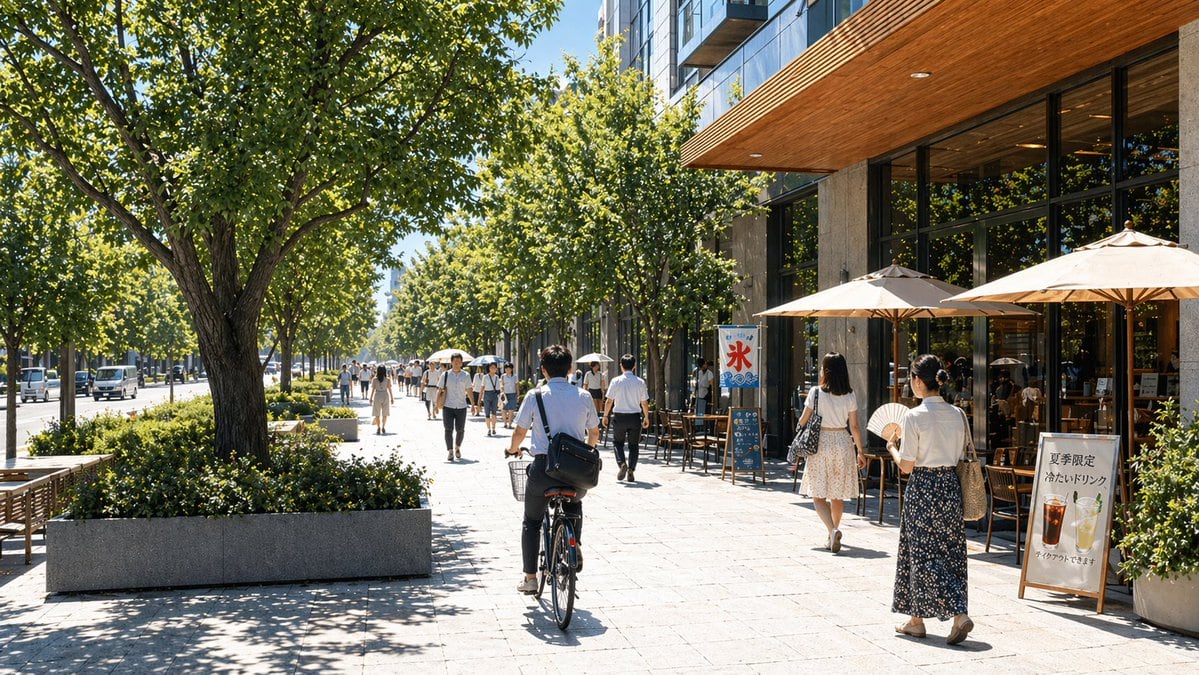
Bright Ultra-realistic Summer Streetscape In Japan

A bright, ultra-realistic summer streetscape in Japan, photographed at pedestrian eye level on a wide, clean urban sidewalk lined with mature green trees casting dappled shadows. The scen...

A bright, ultra-realistic summer streetscape in Japan, photographed at pedestrian eye level on a wide, clean urban sidewalk lined with mature green trees casting dappled shadows. The scen...
Prompt

A bright, ultra-realistic summer streetscape in Japan, photographed at pedestrian eye level on a wide, clean urban sidewalk lined with mature green trees casting dappled shadows. The scene shows a modern mixed-use city block on a clear sunny day, with a contemporary cafe or restaurant on the right featuring tall glass windows, dark frames, a stone facade, and a warm wood soffit extending over the terrace. Place 3 large beige patio umbrellas outside the cafe, with wooden tables and chairs beneath them. Show a lively but orderly sidewalk with around 14 pedestrians spread into the distance, most dressed in light summer office-casual clothing in white, beige, navy, and gray. In the center foreground, include 1 person riding a bicycle away from the camera, wearing a short-sleeve white shirt and dark pants with a shoulder bag. On the right foreground, include 2 women walking away, one in a white blouse and long dark floral skirt holding a round hand fan, and one in a white top and light patterned skirt carrying a bag. Add 2 visible standing signs outside the cafe: one vertical banner with large Japanese text "氷" and icy blue graphics, and one sandwich board with Japanese text reading "夏季限定 冷たいドリンク" plus images of 2 cold drinks, one dark iced beverage and one pale lemonade-like drink. On the left side, show a quiet street with a few vehicles in the distance, benches, low concrete planters, and neatly trimmed shrubs. Composition should emphasize depth with a long vanishing point down the tree-lined boulevard, crisp midday sunlight, realistic reflections in the windows, and an upscale, calm urban atmosphere. Photorealistic architectural photography, natural colors, high detail, wide-angle lens, deep focus.

Prompt structure
  • Modelgpt-image-2
  • Use casesocial-media-post
  • Stylephotorealistic, minimal
  • Aspect ratioFlexible
Best used for
  • Use casesocial-media-post
  • Stylephotorealistic, minimal
  • Recommended specs1:1, 4:5, 16:9, or 9:16
  • ModelGPT Image 2
How to customize

Use this Bright Ultra-realistic Summer Streetscape In Japan prompt as a base. Replace the subject, product details, environment, lighting, brand colors, and output ratio while keeping the social-media-post intent and photorealistic, minimal direction stable.

Editable variables
  • SubjectReplace the product, person, scene, interface, or object being generated.
  • Use caseKeep or rewrite the destination as social media post, ad creative, cover image, poster, or ecommerce hero.
  • FrameChoose 1:1, 4:5, 16:9, or 9:16 based on the final placement.
  • Brand cuesAdd colors, materials, props, text-safe space, and the platform where the image will be used.
Recommended specs

Choose the frame for the destination first, then use 1K, 2K, or 4K based on output quality needs. Product images and posters usually benefit from higher resolution.

Pre-generation checklist
  • CheckSubject, lighting, composition, and frame are specific enough to review.
  • CheckText-safe space is included when the image will carry a headline or ad copy.
  • CheckResolution, credit cost, and final destination are checked before generation.
Why this prompt works

Bright Ultra-realistic Summer Streetscape In Japan works because it starts from the image job, then controls subject, composition, lighting, style, and frame. It is best for social media post while keeping the photorealistic, minimal direction stable.

Common questions
  • Can I use it directly?Yes. Replace the subject, brand cues, and frame, then generate in Image2Studio.
  • Which ratio should I use?Choose 1:1, 4:5, 16:9, or 9:16 based on the destination.




