
Image2Studio
Examples

gpt-image-2

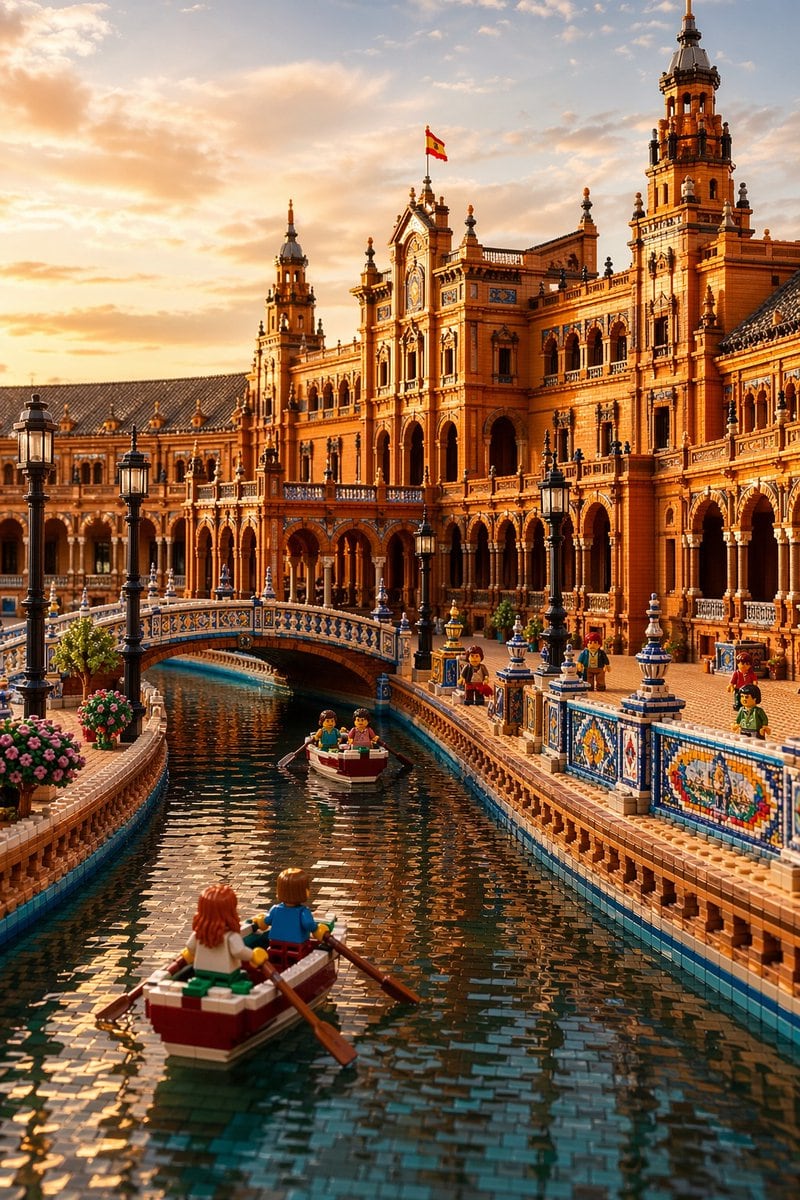
Highly Detailed Photorealistic LEGO Interpretation Of Plaza De España

A highly detailed photorealistic LEGO interpretation of Plaza de España, Seville, shown as a grand golden-hour architectural scene from canal level. The image is vertical and cinematic, w...

A highly detailed photorealistic LEGO interpretation of Plaza de España, Seville, shown as a grand golden-hour architectural scene from canal level. The image is vertical and cinematic, w...
Prompt

A highly detailed photorealistic LEGO interpretation of {argument name="landmark" default="Plaza de España, Seville"}, shown as a grand golden-hour architectural scene from canal level. The image is vertical and cinematic, with the viewer looking straight down a narrow curved canal toward an ornate Spanish Renaissance Revival palace facade built entirely from LEGO bricks. The warm terracotta building fills the upper half of the frame, with multiple towers, arched colonnades, balconies, decorative cornices, and intricate brick-built ornamentation. A small Spanish flag flies from the central tower. In the foreground, a LEGO rowboat with 2 minifigures is seen from behind, drifting along the canal; one has reddish-brown hair and the other light brown hair, both rowing with long brown oars. In the mid-distance, there is a second small rowboat with 2 minifigures under or near an elegant arched bridge. Count 2 boats total and 4 rowing passengers total. Along the right-side promenade, count 4 visible standing minifigures placed at intervals beside the tiled railing. The canal is lined with detailed blue, white, and yellow ceramic-style LEGO mosaic balustrades and brick parapets, with black vintage street lamps; count 7 visible lamp posts total. On the left edge, include 2 rounded pink flowering shrubs in planters. The bridge crossing the canal has ornate blue-and-white LEGO tile patterns and a graceful single arch. The water should look realistic yet made from small glossy LEGO-like tiles, with dark teal reflections of the building and sky. Lighting is soft sunset light with a glowing amber sky, scattered clouds, long highlights, and rich warm shadows. Emphasize realism, fine texture, playful scale illusion, and the convincing blend of real architectural grandeur with unmistakable LEGO construction.

Prompt structure
  • Modelgpt-image-2
  • Use casesocial-media-post
  • Stylephotorealistic, cinematic, luxury
  • Aspect ratioFlexible
Best used for
  • Use casesocial-media-post
  • Stylephotorealistic, cinematic, luxury
  • Recommended specs1:1, 4:5, 16:9, or 9:16
  • ModelGPT Image 2
How to customize

Use this Highly Detailed Photorealistic LEGO Interpretation Of Plaza De España prompt as a base. Replace the subject, product details, environment, lighting, brand colors, and output ratio while keeping the social-media-post intent and photorealistic, cinematic, luxury direction stable.

Editable variables
  • SubjectReplace the product, person, scene, interface, or object being generated.
  • Use caseKeep or rewrite the destination as social media post, ad creative, cover image, poster, or ecommerce hero.
  • FrameChoose 1:1, 4:5, 16:9, or 9:16 based on the final placement.
  • Brand cuesAdd colors, materials, props, text-safe space, and the platform where the image will be used.
Recommended specs

Choose the frame for the destination first, then use 1K, 2K, or 4K based on output quality needs. Product images and posters usually benefit from higher resolution.

Pre-generation checklist
  • CheckSubject, lighting, composition, and frame are specific enough to review.
  • CheckText-safe space is included when the image will carry a headline or ad copy.
  • CheckResolution, credit cost, and final destination are checked before generation.
Why this prompt works

Highly Detailed Photorealistic LEGO Interpretation Of Plaza De España works because it starts from the image job, then controls subject, composition, lighting, style, and frame. It is best for social media post while keeping the photorealistic, cinematic, luxury direction stable.

Common questions
  • Can I use it directly?Yes. Replace the subject, brand cues, and frame, then generate in Image2Studio.
  • Which ratio should I use?Choose 1:1, 4:5, 16:9, or 9:16 based on the destination.




