
Image2Studio
Examples

gpt-image-2

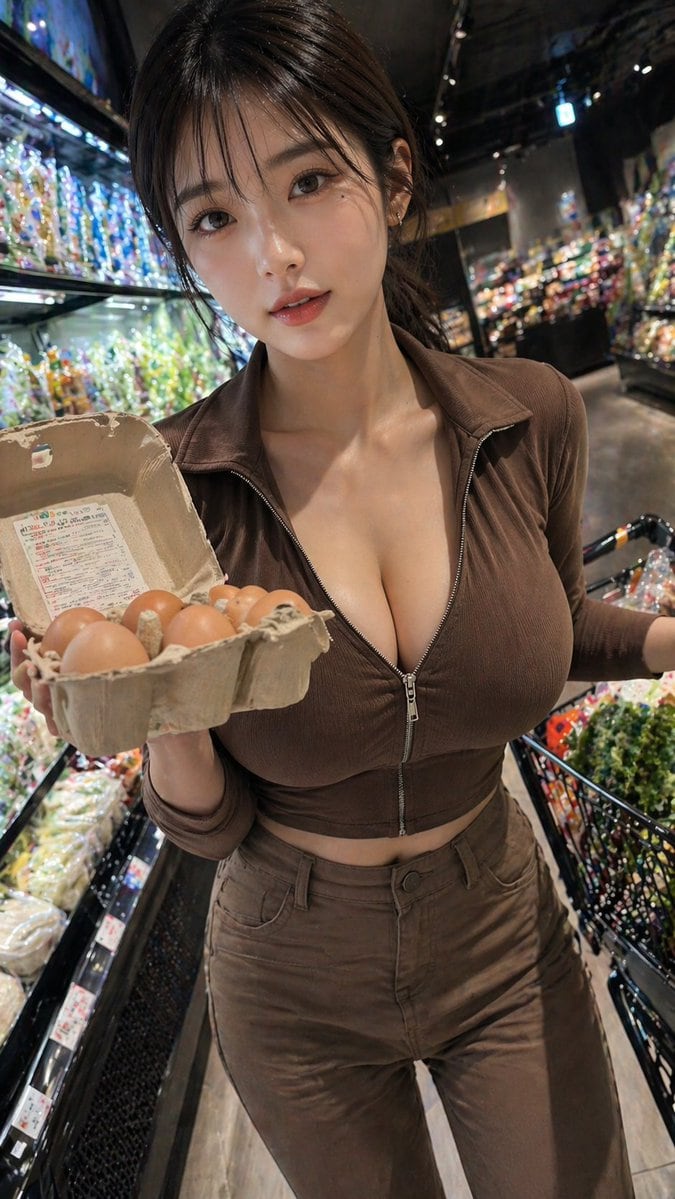
Realistic Handheld Smartphone Photo Of A Young Adult Woman Shopping In A

A realistic handheld smartphone photo of a young adult woman shopping in a modern grocery store produce section at night, framed vertically from upper thighs to head in a close, slightly...

A realistic handheld smartphone photo of a young adult woman shopping in a modern grocery store produce section at night, framed vertically from upper thighs to head in a close, slightly...
Prompt

A realistic handheld smartphone photo of a {argument name="subject age" default="young adult woman"} shopping in a modern grocery store produce section at night, framed vertically from upper thighs to head in a close, slightly wide-angle perspective. She stands in the aisle beside brightly lit refrigerated shelves filled with packaged vegetables and colorful produce, with a black shopping basket cart visible on the right and glossy dark store interiors fading into soft bokeh in the background. She is holding an open cardboard egg carton toward the camera with exactly 6 visible brown eggs inside, creating a casual candid shopping moment. She has dark brown shoulder-length hair, a light warm skin tone, and is wearing a fitted monochrome brown outfit: a ribbed long-sleeve zip-front crop top with the zipper partially open at the chest, and matching high-waisted brown pants. The pose is confident and natural, torso angled slightly toward the camera, one arm presenting the egg carton and the other near the cart handle. Use dramatic supermarket lighting with bright highlights from the refrigerated cases, shallow depth of field, realistic skin texture, realistic fabric folds, subtle lens distortion from a phone camera, and high-detail commercial lifestyle photography. Keep the mood candid, fashionable, and urban, with the outfit color customizable as {argument name="outfit color" default="brown"}, the item in hand customizable as {argument name="held item" default="open carton of eggs"}, the store type customizable as {argument name="store setting" default="upscale grocery store produce aisle"}, and the camera style customizable as {argument name="camera style" default="handheld smartphone photo"}.

Prompt structure
  • Modelgpt-image-2
  • Use casesocial-media-post
  • Stylephotorealistic, cinematic
  • Aspect ratioFlexible
Best used for
  • Use casesocial-media-post
  • Stylephotorealistic, cinematic
  • Recommended specs1:1, 4:5, 16:9, or 9:16
  • ModelGPT Image 2
How to customize

Use this Realistic Handheld Smartphone Photo Of A Young Adult Woman Shopping In A prompt as a base. Replace the subject, product details, environment, lighting, brand colors, and output ratio while keeping the social-media-post intent and photorealistic, cinematic direction stable.

Editable variables
  • SubjectReplace the product, person, scene, interface, or object being generated.
  • Use caseKeep or rewrite the destination as social media post, ad creative, cover image, poster, or ecommerce hero.
  • FrameChoose 1:1, 4:5, 16:9, or 9:16 based on the final placement.
  • Brand cuesAdd colors, materials, props, text-safe space, and the platform where the image will be used.
Recommended specs

Choose the frame for the destination first, then use 1K, 2K, or 4K based on output quality needs. Product images and posters usually benefit from higher resolution.

Pre-generation checklist
  • CheckSubject, lighting, composition, and frame are specific enough to review.
  • CheckText-safe space is included when the image will carry a headline or ad copy.
  • CheckResolution, credit cost, and final destination are checked before generation.
Why this prompt works

Realistic Handheld Smartphone Photo Of A Young Adult Woman Shopping In A works because it starts from the image job, then controls subject, composition, lighting, style, and frame. It is best for social media post while keeping the photorealistic, cinematic direction stable.

Common questions
  • Can I use it directly?Yes. Replace the subject, brand cues, and frame, then generate in Image2Studio.
  • Which ratio should I use?Choose 1:1, 4:5, 16:9, or 9:16 based on the destination.




