
Image2Studio
Examples

gpt-image-2

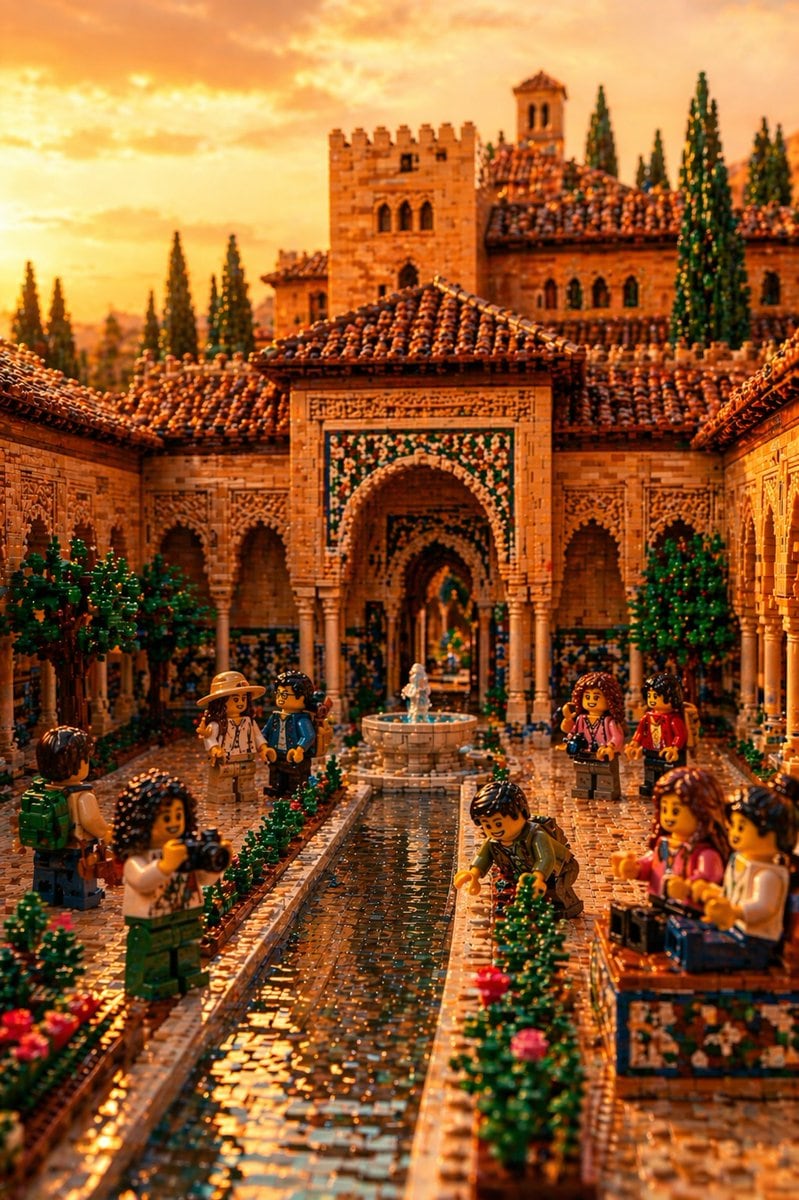
Highly Detailed Photorealistic LEGO Diorama Of The Alhambra In Granada

A highly detailed photorealistic LEGO diorama of the Alhambra in Granada, shown as an ornate Moorish courtyard at golden-hour sunset. The scene is built entirely from LEGO bricks and mini...

A highly detailed photorealistic LEGO diorama of the Alhambra in Granada, shown as an ornate Moorish courtyard at golden-hour sunset. The scene is built entirely from LEGO bricks and mini...
Prompt

A highly detailed photorealistic LEGO diorama of {argument name="landmark" default="the Alhambra in Granada"}, shown as an ornate Moorish courtyard at golden-hour sunset. The scene is built entirely from LEGO bricks and minifigure parts, with warm amber light, cinematic depth, and rich texture. Center the composition on a long narrow reflective water channel leading toward 1 small round fountain in the middle distance and a grand horseshoe arch beyond it. Surround the courtyard with intricate tan stone-like LEGO walls, carved-looking geometric relief patterns, slender columns, tiled archways, and terracotta rooflines made from densely layered reddish-brown pieces. In the background, include 2 main towers and several additional palace structures rising behind the courtyard, plus 6 tall dark green cypress trees silhouetted against a glowing orange sky. Add blue, green, and white mosaic-style tile details around the central arch and lower walls. Populate the courtyard with exactly 9 LEGO tourists and visitors: 1 traveler in a tan hat and light outfit, 1 visitor in a blue jacket beside them, 1 person with a green backpack at the left foreground, 1 photographer holding a camera in the left foreground, 1 kneeling visitor examining the garden at the right edge of the water channel, 2 standing visitors chatting in the right midground, and 2 seated visitors on a tiled bench in the right foreground. Frame the water channel with low manicured hedges and small pink flowers. Use a low eye-level perspective from the start of the reflecting pool, shallow depth of field, crisp focus on the central courtyard, glossy water reflections, realistic LEGO stud texture, and a mood that feels majestic, playful, and museum-quality.

Prompt structure
  • Modelgpt-image-2
  • Use casesocial-media-post
  • Stylephotorealistic, cinematic
  • Aspect ratioFlexible
Best used for
  • Use casesocial-media-post
  • Stylephotorealistic, cinematic
  • Recommended specs1:1, 4:5, 16:9, or 9:16
  • ModelGPT Image 2
How to customize

Use this Highly Detailed Photorealistic LEGO Diorama Of The Alhambra In Granada prompt as a base. Replace the subject, product details, environment, lighting, brand colors, and output ratio while keeping the social-media-post intent and photorealistic, cinematic direction stable.

Editable variables
  • SubjectReplace the product, person, scene, interface, or object being generated.
  • Use caseKeep or rewrite the destination as social media post, ad creative, cover image, poster, or ecommerce hero.
  • FrameChoose 1:1, 4:5, 16:9, or 9:16 based on the final placement.
  • Brand cuesAdd colors, materials, props, text-safe space, and the platform where the image will be used.
Recommended specs

Choose the frame for the destination first, then use 1K, 2K, or 4K based on output quality needs. Product images and posters usually benefit from higher resolution.

Pre-generation checklist
  • CheckSubject, lighting, composition, and frame are specific enough to review.
  • CheckText-safe space is included when the image will carry a headline or ad copy.
  • CheckResolution, credit cost, and final destination are checked before generation.
Why this prompt works

Highly Detailed Photorealistic LEGO Diorama Of The Alhambra In Granada works because it starts from the image job, then controls subject, composition, lighting, style, and frame. It is best for social media post while keeping the photorealistic, cinematic direction stable.

Common questions
  • Can I use it directly?Yes. Replace the subject, brand cues, and frame, then generate in Image2Studio.
  • Which ratio should I use?Choose 1:1, 4:5, 16:9, or 9:16 based on the destination.




