
Image2Studio
Prompts

gpt-image-2

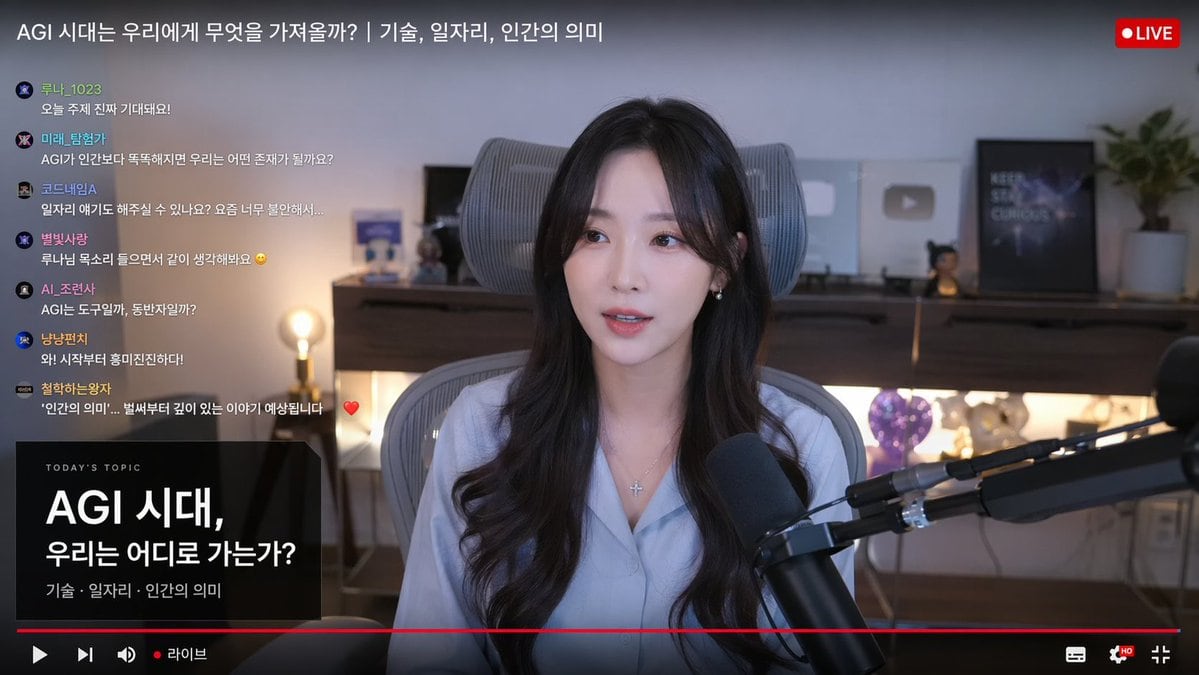
Live Stream Interface Mockup

Structured live stream interface mockup prompt for GPT Image 2.

Structured live stream interface mockup prompt for GPT Image 2.
Prompt

{ "type": "live stream interface mockup", "subject": { "description": "{argument name=\"subject appearance\" default=\"young Korean woman, long dark wavy hair, light blue button-up shirt\"}", "accessories": "silver cross necklace, black broadcast microphone on boom arm", "pose": "speaking to camera, sitting in grey ergonomic chair" }, "background": "{argument name=\"background vibe\" default=\"cozy room with warm lighting, shelf with YouTube play buttons\"}", "layout": { "top_bar": { "title": "{argument name=\"stream title\" default=\"AGI 시대는 우리에게 무엇을 가져올까? | 기술, 일자리, 인간의 의미\"}", "badge": "LIVE" }, "left_chat": { "count": 7, "messages": [ {"user": "루나_1023", "text": "오늘 주제 진짜 기대돼요!"}, {"user": "미래_탐험가", "text": "AGI가 인간보다 똑똑해지면 우리는 어떤 존재가 될까요?"}, {"user": "코드네임A", "text": "일자리 얘기도 해주실 수 있나요? 요즘 너무 불안해서..."}, {"user": "별빛사랑", "text": "루나님 목소리 들으면서 같이 생각해봐요"}, {"user": "AI_조련사", "text": "AGI는 도구일까, 동반자일까?"}, {"user": "냥냥펀치", "text": "와! 시작부터 흥미진진하다!"}, {"user": "철학하는왕자", "text": "'인간의 의미'... 벌써부터 깊이 있는 이야기 예상됩니다"} ] }, "bottom_left_card": { "header": "TODAY'S TOPIC", "main_text": "{argument name=\"topic title\" default=\"AGI 시대, 우리는 어디로 가는가?\"}", "sub_text": "기술 · 일자리 · 인간의 의미" }, "bottom_controls": { "elements": ["red progress bar", "play icon", "volume icon", "라이브", "settings icon", "fullscreen icon"] } } }

Prompt structure
  • Modelgpt-image-2
  • Use casesocial-media-post
  • Stylephotorealistic, editorial
  • Aspect ratioFlexible
Best used for
  • Use casesocial-media-post
  • Stylephotorealistic, editorial
  • Recommended specs1:1, 4:5, 16:9, or 9:16
  • ModelGPT Image 2
How to customize

Use this Live Stream Interface Mockup prompt as a base. Replace the subject, product details, environment, lighting, brand colors, and output ratio while keeping the social-media-post intent and photorealistic, editorial direction stable.

Editable variables
  • SubjectReplace the product, person, scene, interface, or object being generated.
  • Use caseKeep or rewrite the destination as social media post, ad creative, cover image, poster, or ecommerce hero.
  • FrameChoose 1:1, 4:5, 16:9, or 9:16 based on the final placement.
  • Brand cuesAdd colors, materials, props, text-safe space, and the platform where the image will be used.
Recommended specs

Choose the frame for the destination first, then use 1K, 2K, or 4K based on output quality needs. Product images and posters usually benefit from higher resolution.

Pre-generation checklist
  • CheckSubject, lighting, composition, and frame are specific enough to review.
  • CheckText-safe space is included when the image will carry a headline or ad copy.
  • CheckResolution, credit cost, and final destination are checked before generation.
Why this prompt works

Live Stream Interface Mockup works because it starts from the image job, then controls subject, composition, lighting, style, and frame. It is best for social media post while keeping the photorealistic, editorial direction stable.

Common questions
  • Can I use it directly?Yes. Replace the subject, brand cues, and frame, then generate in Image2Studio.
  • Which ratio should I use?Choose 1:1, 4:5, 16:9, or 9:16 based on the destination.




