
Image2Studio
Examples

gpt-image-2

Wide-angle Photorealistic Corporate Boardroom Scene During A High-level

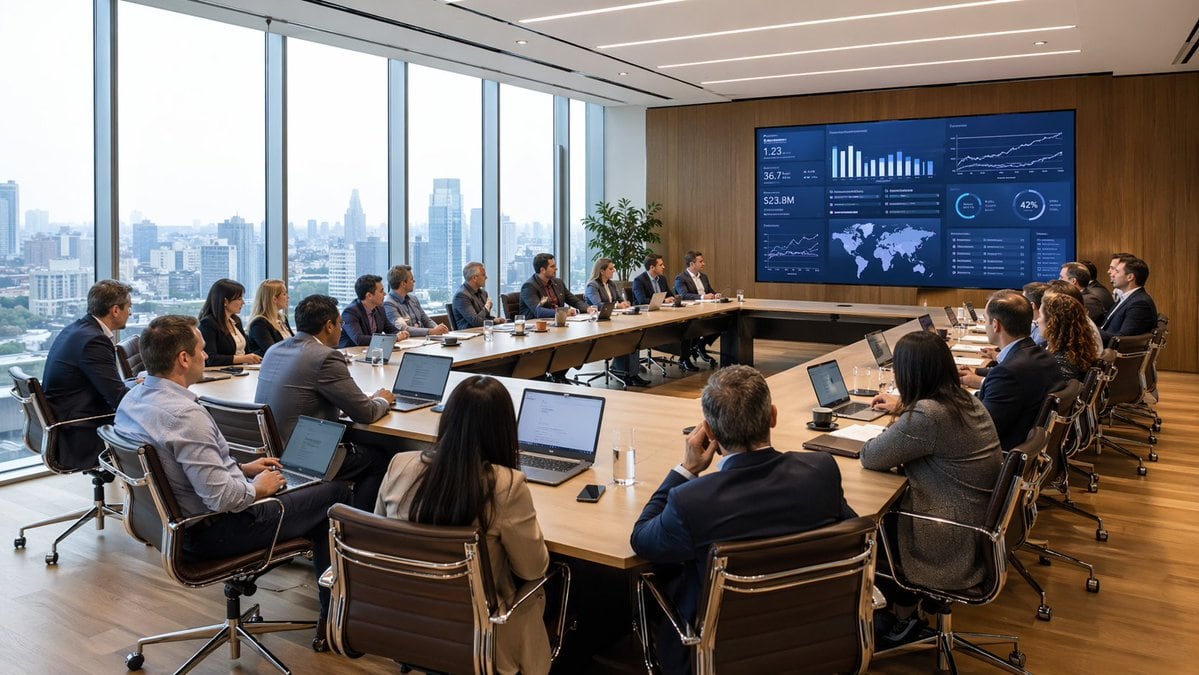
A wide-angle photorealistic corporate boardroom scene during a high-level business meeting, viewed from the back corner of the room. Around 18 professionals in business attire sit around...

A wide-angle photorealistic corporate boardroom scene during a high-level business meeting, viewed from the back corner of the room. Around 18 professionals in business attire sit around...
Prompt

A wide-angle photorealistic corporate boardroom scene during a high-level business meeting, viewed from the back corner of the room. Around {argument name="number of attendees" default="18"} professionals in business attire sit around a large U-shaped light wood conference table, most with open laptops, notebooks, coffee cups, glasses of water, and smartphones in front of them. The group includes men and women of varied ethnicities, all focused toward a huge wall-mounted digital presentation screen on a warm wood-paneled wall. The screen shows a dark blue analytics dashboard with multiple charts and data panels, including bar charts, line graphs, KPI tiles, a world map, percentage circles, and trend visuals, suggesting finance, operations, or executive reporting. A presenter sits near the center-right side facing the screen, while the rest of the team watches attentively in a formal strategy session. The office is a modern executive meeting room with floor-to-ceiling windows along the entire left side, revealing a hazy urban skyline of high-rise buildings in daylight. Include sleek black leather office chairs with chrome frames, a polished wood floor, recessed linear ceiling lights, and a tall green potted plant near the display wall. Natural daylight fills the room, balanced with clean architectural interior lighting. Emphasize realism, professional atmosphere, sharp detail, subtle reflections, believable skin tones, and premium corporate interior design. Shot in a cinematic architectural photography style, ultra-detailed, high resolution, wide composition.

Prompt structure
  • Modelgpt-image-2
  • Use casesocial-media-post
  • Stylephotorealistic, cinematic, minimal, luxury
  • Aspect ratioFlexible
Best used for
  • Use casesocial-media-post
  • Stylephotorealistic, cinematic, minimal, luxury
  • Recommended specs1:1, 4:5, 16:9, or 9:16
  • ModelGPT Image 2
How to customize

Use this Wide-angle Photorealistic Corporate Boardroom Scene During A High-level prompt as a base. Replace the subject, product details, environment, lighting, brand colors, and output ratio while keeping the social-media-post intent and photorealistic, cinematic, minimal, luxury direction stable.

Editable variables
  • SubjectReplace the product, person, scene, interface, or object being generated.
  • Use caseKeep or rewrite the destination as social media post, ad creative, cover image, poster, or ecommerce hero.
  • FrameChoose 1:1, 4:5, 16:9, or 9:16 based on the final placement.
  • Brand cuesAdd colors, materials, props, text-safe space, and the platform where the image will be used.
Recommended specs

Choose the frame for the destination first, then use 1K, 2K, or 4K based on output quality needs. Product images and posters usually benefit from higher resolution.

Pre-generation checklist
  • CheckSubject, lighting, composition, and frame are specific enough to review.
  • CheckText-safe space is included when the image will carry a headline or ad copy.
  • CheckResolution, credit cost, and final destination are checked before generation.
Why this prompt works

Wide-angle Photorealistic Corporate Boardroom Scene During A High-level works because it starts from the image job, then controls subject, composition, lighting, style, and frame. It is best for social media post while keeping the photorealistic, cinematic, minimal, luxury direction stable.

Common questions
  • Can I use it directly?Yes. Replace the subject, brand cues, and frame, then generate in Image2Studio.
  • Which ratio should I use?Choose 1:1, 4:5, 16:9, or 9:16 based on the destination.




