
Image2Studio
Examples

gpt-image-2

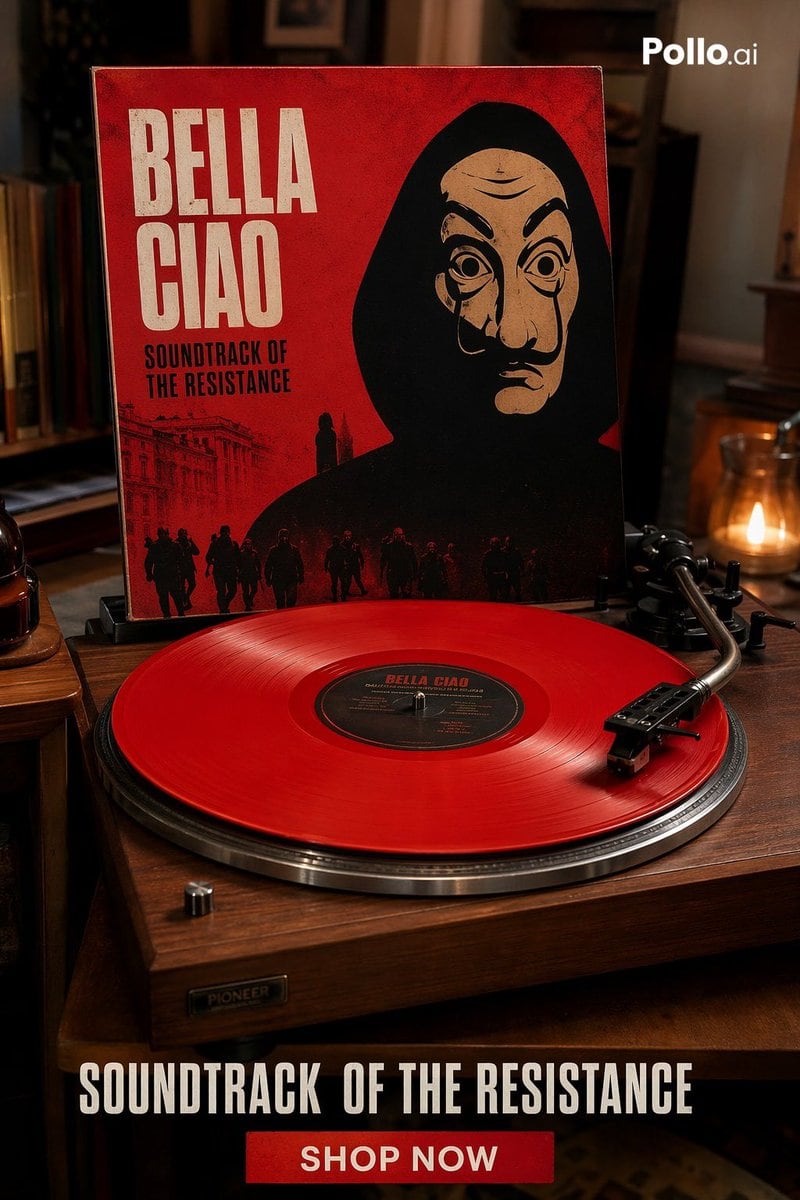
Cinematic Luxury Product Advertisement Shot Of A Vintage Wooden Turntabl

A cinematic luxury product advertisement shot of a vintage wooden turntable playing a translucent bright red vinyl record in a warm, dimly lit living room. Behind the turntable, an uprigh...

A cinematic luxury product advertisement shot of a vintage wooden turntable playing a translucent bright red vinyl record in a warm, dimly lit living room. Behind the turntable, an uprigh...
Prompt

A cinematic luxury product advertisement shot of a vintage wooden turntable playing a translucent bright red vinyl record in a warm, dimly lit living room. Behind the turntable, an upright album cover dominates the frame with a bold distressed red background and large condensed cream-white block lettering reading {argument name="album title" default="BELLA CIAO"} at the upper left, with smaller black text beneath reading {argument name="subtitle text" default="SOUNDTRACK OF THE RESISTANCE"}. The cover art shows a dark black silhouette of a hooded figure centered against the red field, with a row of small marching figures along the bottom edge and faint architectural line art on the lower left, evoking political resistance and dramatic soundtrack imagery. The turntable is shown in three-quarter view on a wooden table, with a brushed metal platter rim, black tonearm resting on the record at the right, and a small metallic control knob visible at front left. Use a shallow depth of field, premium editorial lighting, rich amber highlights, soft candle glow in the background on the right, shelves and home interior details blurred in the background, and a high-end fashion-campaign-meets-music-product aesthetic. At the bottom of the image, add a bold promotional banner overlay with large white condensed all-caps text reading {argument name="bottom headline" default="SOUNDTRACK OF THE RESISTANCE"} and a centered red rectangular button underneath with white all-caps text reading {argument name="button text" default="SHOP NOW"}. Include a small white {argument name="brand watermark" default="Pollo.ai"} watermark in the top-right corner. Ultra-realistic photography, sharp focus on the vinyl and cover, moody luxurious atmosphere, social-media ad composition, vertical 2:3 format.

Prompt structure
  • Modelgpt-image-2
  • Use casesocial-media-post
  • Stylephotorealistic, luxury, cinematic, editorial
  • Aspect ratioFlexible
Best used for
  • Use casesocial-media-post
  • Stylephotorealistic, luxury, cinematic, editorial
  • Recommended specs1:1, 4:5, 16:9, or 9:16
  • ModelGPT Image 2
How to customize

Use this Cinematic Luxury Product Advertisement Shot Of A Vintage Wooden Turntabl prompt as a base. Replace the subject, product details, environment, lighting, brand colors, and output ratio while keeping the social-media-post intent and photorealistic, luxury, cinematic, editorial direction stable.

Editable variables
  • SubjectReplace the product, person, scene, interface, or object being generated.
  • Use caseKeep or rewrite the destination as social media post, ad creative, cover image, poster, or ecommerce hero.
  • FrameChoose 1:1, 4:5, 16:9, or 9:16 based on the final placement.
  • Brand cuesAdd colors, materials, props, text-safe space, and the platform where the image will be used.
Recommended specs

Choose the frame for the destination first, then use 1K, 2K, or 4K based on output quality needs. Product images and posters usually benefit from higher resolution.

Pre-generation checklist
  • CheckSubject, lighting, composition, and frame are specific enough to review.
  • CheckText-safe space is included when the image will carry a headline or ad copy.
  • CheckResolution, credit cost, and final destination are checked before generation.
Why this prompt works

Cinematic Luxury Product Advertisement Shot Of A Vintage Wooden Turntabl works because it starts from the image job, then controls subject, composition, lighting, style, and frame. It is best for social media post while keeping the photorealistic, luxury, cinematic, editorial direction stable.

Common questions
  • Can I use it directly?Yes. Replace the subject, brand cues, and frame, then generate in Image2Studio.
  • Which ratio should I use?Choose 1:1, 4:5, 16:9, or 9:16 based on the destination.




