
Image2Studio
Examples

gpt-image-2

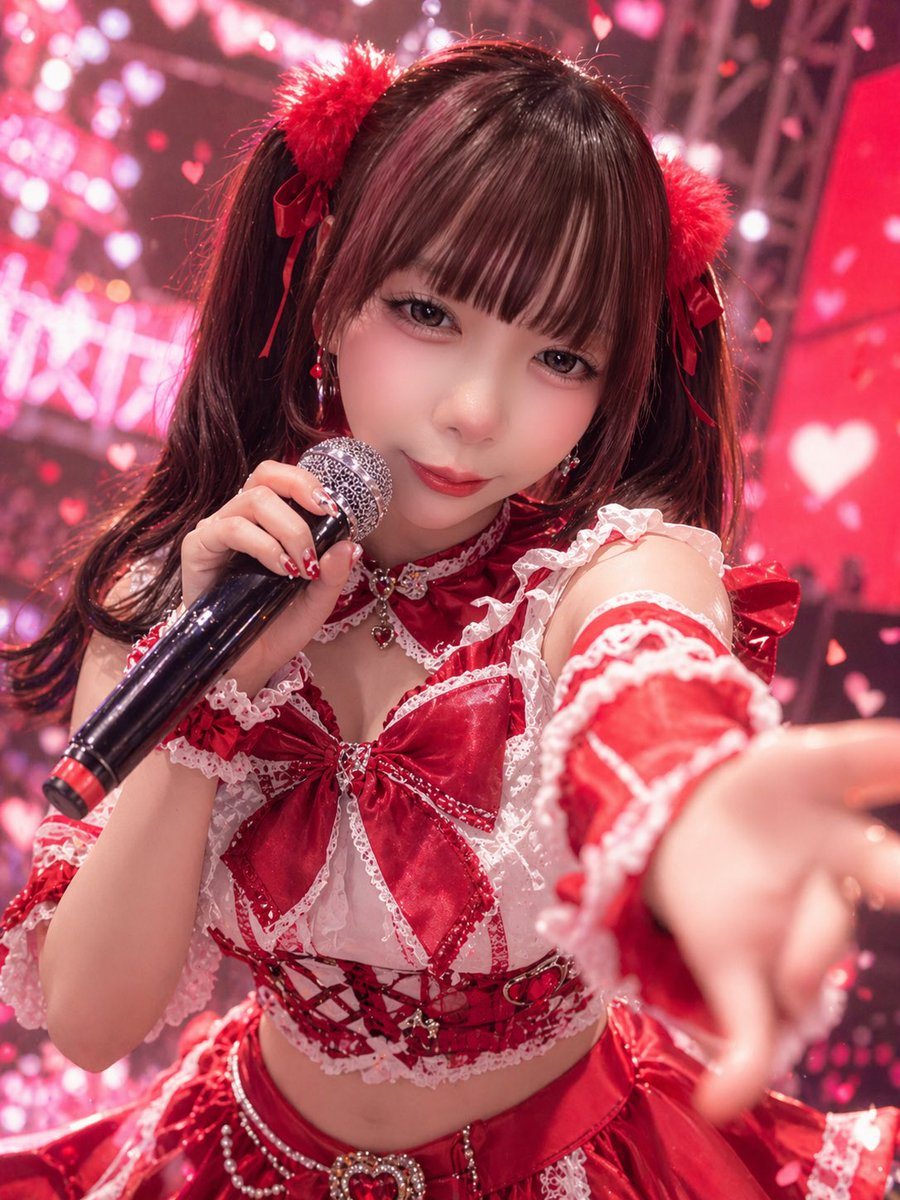
Dynamic Close-up Concert Photo Of A Young Female J-pop Idol On Stage

A dynamic close-up concert photo of a young female J-pop idol on stage, shot from the audience perspective with a shallow depth of field. She is leaning toward the camera and reaching one...

A dynamic close-up concert photo of a young female J-pop idol on stage, shot from the audience perspective with a shallow depth of field. She is leaning toward the camera and reaching one...
Prompt

A dynamic close-up concert photo of a {argument name="idol performer" default="young female J-pop idol"} on stage, shot from the audience perspective with a shallow depth of field. She is leaning toward the camera and reaching one hand forward in the foreground, creating dramatic foreshortening, while holding a black handheld microphone with a red accent ring in her other hand near her mouth. She wears a highly detailed red-and-white frilly idol costume: twin-tail dark brown hair with straight bangs, 2 fluffy red pom-pom hair accessories tied with ribbon bows, dangling red earrings, a red choker with lace and a small heart jewel, a cropped lace-trimmed top with 1 oversized satin bow at the chest, off-shoulder frilled sleeves, a corset-style midriff section with red ribbon lacing and small metallic charms, and a layered satin skirt with sparkling bead chains and 1 heart-shaped jeweled ornament at the waist. Her manicure is glossy red with cute white decorative nail art. The lighting is vivid pink and crimson stage lighting, with a glamorous live-idol atmosphere. The background is filled with soft bokeh, LED screens, rigging, and numerous glowing heart shapes and floating heart confetti, creating a dreamy romantic concert scene. Use a photorealistic style with crisp fabric texture, shiny satin highlights, lace detail, concert ambience, slight motion energy, and an overall {argument name="color theme" default="red and pink"} palette. Include a subtle sense of excitement and fan-service stage charisma, like a promotional live-performance shot for a {argument name="theme" default="cute romantic idol concert"}.

Prompt structure
  • Modelgpt-image-2
  • Use casesocial-media-post
  • Stylephotorealistic, cinematic
  • Aspect ratioFlexible
Best used for
  • Use casesocial-media-post
  • Stylephotorealistic, cinematic
  • Recommended specs1:1, 4:5, 16:9, or 9:16
  • ModelGPT Image 2
How to customize

Use this Dynamic Close-up Concert Photo Of A Young Female J-pop Idol On Stage prompt as a base. Replace the subject, product details, environment, lighting, brand colors, and output ratio while keeping the social-media-post intent and photorealistic, cinematic direction stable.

Editable variables
  • SubjectReplace the product, person, scene, interface, or object being generated.
  • Use caseKeep or rewrite the destination as social media post, ad creative, cover image, poster, or ecommerce hero.
  • FrameChoose 1:1, 4:5, 16:9, or 9:16 based on the final placement.
  • Brand cuesAdd colors, materials, props, text-safe space, and the platform where the image will be used.
Recommended specs

Choose the frame for the destination first, then use 1K, 2K, or 4K based on output quality needs. Product images and posters usually benefit from higher resolution.

Pre-generation checklist
  • CheckSubject, lighting, composition, and frame are specific enough to review.
  • CheckText-safe space is included when the image will carry a headline or ad copy.
  • CheckResolution, credit cost, and final destination are checked before generation.
Why this prompt works

Dynamic Close-up Concert Photo Of A Young Female J-pop Idol On Stage works because it starts from the image job, then controls subject, composition, lighting, style, and frame. It is best for social media post while keeping the photorealistic, cinematic direction stable.

Common questions
  • Can I use it directly?Yes. Replace the subject, brand cues, and frame, then generate in Image2Studio.
  • Which ratio should I use?Choose 1:1, 4:5, 16:9, or 9:16 based on the destination.




