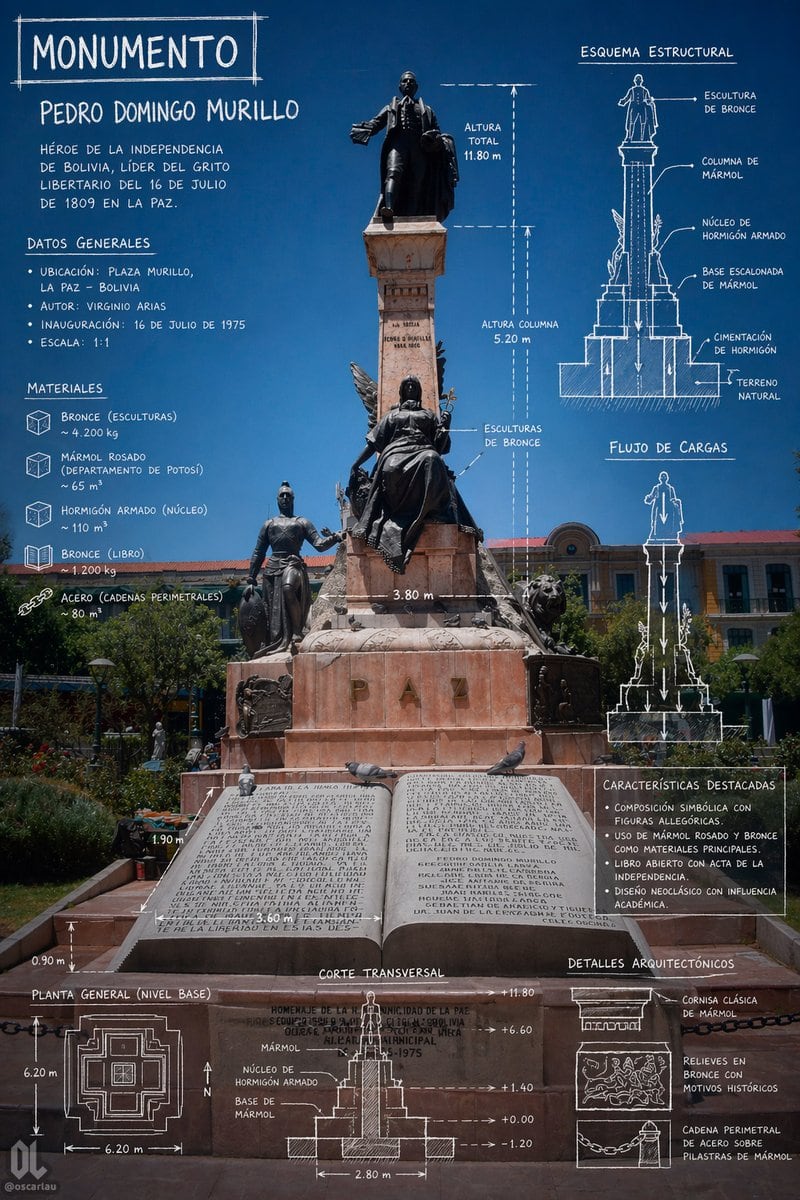
Prompt{"type":"architectural monument infographic poster","subject":{"monument_name":"{argument name=\"monument name\" default=\"Pedro Domingo Murillo\"}","headline":"{argument name=\"headline text\" default=\"MONUMENTO\"}","location":"{argument name=\"location\" default=\"Plaza Murillo, La Paz - Bolivia\"}","historical_text":"{argument name=\"historical summary\" default=\"Héroe de la independencia de Bolivia, líder del grito libertario del 16 de julio de 1809 en La Paz.\"}","main_view":"full-height front photograph of a monumental statue in a public square under a deep clear blue sky, centered composition, realistic lighting, the entire pedestal and lower forecourt visible","monument_description":"tall marble column monument with a bronze standing figure at the top, a seated bronze allegorical female figure in the middle front, an additional standing bronze figure on the lower left, sculptural details on the sides, lions flanking the base, and a large open stone book plaque at the bottom foreground","inscription":"large carved letters on the base spelling PAZ"},"style":{"visual_language":"photo-based infographic with white hand-drawn architectural annotations","mood":"scholarly, civic, historical, precise","colors":{"background":"rich cobalt-to-deep-blue sky","overlay":"white sketch lines and handwritten uppercase text","stone":"pinkish rose marble and light brown stone","metal":"dark bronze"},"typography":"chalk-like handwritten all caps, slightly irregular technical drawing labels","rendering":"high-resolution editorial poster, realistic monument photography combined with blueprint overlays"},"layout":{"sections":[{"title":"DATOS GENERALES","position":"upper left","count":4,"labels":["Ubicación","Autor","Inauguración","Escala"]},{"title":"MATERIALES","position":"left middle","count":5,"labels":["Bronce (esculturas)","Mármol rosado (departamento de Potosí)","Hormigón armado (núcleo)","Bronce (libro)","Acero (cadenas perimetrales)"]},{"title":"ESQUEMA ESTRUCTURAL","position":"upper right","count":5,"labels":["Escultura de bronce","Columna de mármol","Núcleo de hormigón armado","Base escalonada de mármol","Cimentación de hormigón sobre terreno natural"]},{"title":"FLUJO DE CARGAS","position":"right center","count":1,"labels":["vertical load arrows from sculpture to foundation"]},{"title":"CARACTERÍSTICAS DESTACADAS","position":"right lower-middle","count":4,"labels":["Composición simbólica con figuras alegóricas","Uso de mármol rosado y bronce como materiales principales","Libro abierto con acta de la independencia","Diseño neoclásico con influencia académica"]},{"title":"PLANTA GENERAL (NIVEL BASE)","position":"bottom left","count":1,"labels":["square stepped plan with north arrow and dimension lines"]},{"title":"CORTE TRANSVERSAL","position":"bottom center","count":1,"labels":["section drawing with internal core, marble base, elevation marks, and width dimension"]},{"title":"DETALLES ARQUITECTÓNICOS","position":"bottom right","count":3,"labels":["Cornisa clásica de mármol","Relieves en bronce con motivos históricos","Cadena perimetral de acero sobre pilastras de mármol"]}],"dimension_annotations":["Altura total 11.80 m","Altura columna 5.20 m","3.80 m","3.60 m","2.80 m","6.20 m","1.90 m","0.90 m","+11.80","+6.60","+1.40","+0.00","-1.20"],"centerpiece":"the monument occupies the full vertical center, with annotations wrapped around it symmetrically","text_distribution":"large title at top left, descriptive paragraph below, technical notes on left and right, measured drawings and plan aligned along the bottom edge"},"camera":{"perspective":"straight-on eye-level architectural documentation shot","framing":"portrait poster orientation, monument centered, enough foreground to show the open book and lower dimensions, civic buildings and greenery in the background"},"quality":{"finish":"clean infographic composition suitable for a museum panel, heritage poster, or educational social media post","detail_level":"very high, readable labels, crisp line work, realistic textures"}}