
Image2Studio
Examples

gpt-image-2

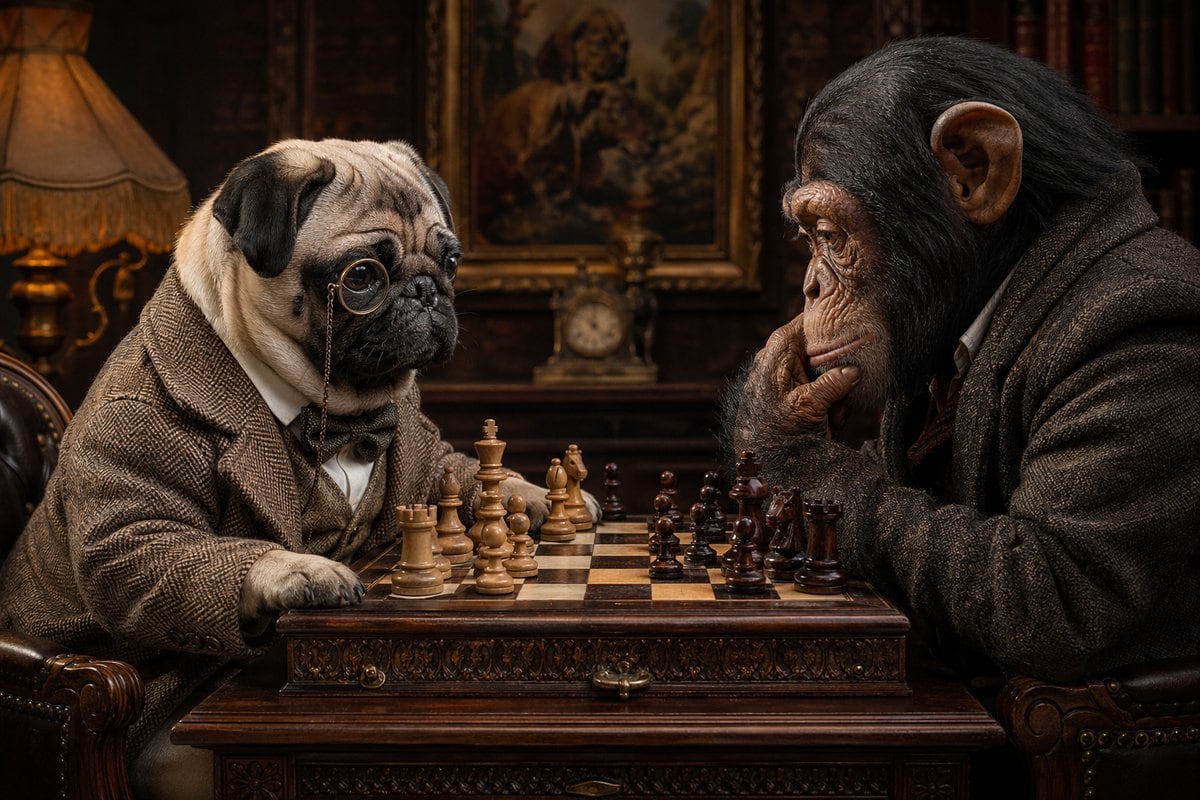
Highly Detailed Cinematic Portrait Of An Anthropomorphic Pug And A Chimp

A highly detailed cinematic portrait of an anthropomorphic pug and a chimpanzee sitting across from each other playing chess in a dim, old-world Victorian study. The dog is on the left, s...

A highly detailed cinematic portrait of an anthropomorphic pug and a chimpanzee sitting across from each other playing chess in a dim, old-world Victorian study. The dog is on the left, s...
Prompt

A highly detailed cinematic portrait of an anthropomorphic {argument name="dog breed" default="pug"} and a chimpanzee sitting across from each other playing chess in a dim, old-world Victorian study. The dog is on the left, shown from the waist up, wearing a brown tweed suit jacket, white shirt, and bow tie, with a single round monocle and chain over one eye, resting one paw near the chessboard and gazing thoughtfully at the pieces. The chimpanzee is on the right, also dressed in a heavy brown tweed jacket over a shirt, leaning forward with one hand against its chin in a classic thinking pose, intensely focused on the board. Between them is an ornate carved wooden chess table with a full chess set mid-game, with exactly 32 pieces visible: 16 light wooden pieces on the left side and 16 dark wooden pieces on the right side, arranged in a believable strategic position rather than a starting layout. The room is rich with dark polished wood, leather armchairs, a warm amber table lamp on the far left, bookshelves in the background, a framed classical portrait painting centered behind them, and a small mantel clock beneath the painting. Use warm tungsten lighting, shallow depth of field, moody shadows, ultra-realistic fur and skin textures, fine wrinkles, reflective glass on the monocle, and a serious intellectual atmosphere with subtle humor. Symmetrical composition, eye-level camera, photorealistic, sharp focus on both faces and the chessboard, luxurious period details, dark brown and sepia color palette.

Prompt structure
  • Modelgpt-image-2
  • Use casesocial-media-post
  • Stylephotorealistic, cinematic, editorial
  • Aspect ratioFlexible
Best used for
  • Use casesocial-media-post
  • Stylephotorealistic, cinematic, editorial
  • Recommended specs1:1, 4:5, 16:9, or 9:16
  • ModelGPT Image 2
How to customize

Use this Highly Detailed Cinematic Portrait Of An Anthropomorphic Pug And A Chimp prompt as a base. Replace the subject, product details, environment, lighting, brand colors, and output ratio while keeping the social-media-post intent and photorealistic, cinematic, editorial direction stable.

Editable variables
  • SubjectReplace the product, person, scene, interface, or object being generated.
  • Use caseKeep or rewrite the destination as social media post, ad creative, cover image, poster, or ecommerce hero.
  • FrameChoose 1:1, 4:5, 16:9, or 9:16 based on the final placement.
  • Brand cuesAdd colors, materials, props, text-safe space, and the platform where the image will be used.
Recommended specs

Choose the frame for the destination first, then use 1K, 2K, or 4K based on output quality needs. Product images and posters usually benefit from higher resolution.

Pre-generation checklist
  • CheckSubject, lighting, composition, and frame are specific enough to review.
  • CheckText-safe space is included when the image will carry a headline or ad copy.
  • CheckResolution, credit cost, and final destination are checked before generation.
Why this prompt works

Highly Detailed Cinematic Portrait Of An Anthropomorphic Pug And A Chimp works because it starts from the image job, then controls subject, composition, lighting, style, and frame. It is best for social media post while keeping the photorealistic, cinematic, editorial direction stable.

Common questions
  • Can I use it directly?Yes. Replace the subject, brand cues, and frame, then generate in Image2Studio.
  • Which ratio should I use?Choose 1:1, 4:5, 16:9, or 9:16 based on the destination.




