
Image2Studio
Examples

gpt-image-2

Using The Provided Reference Image

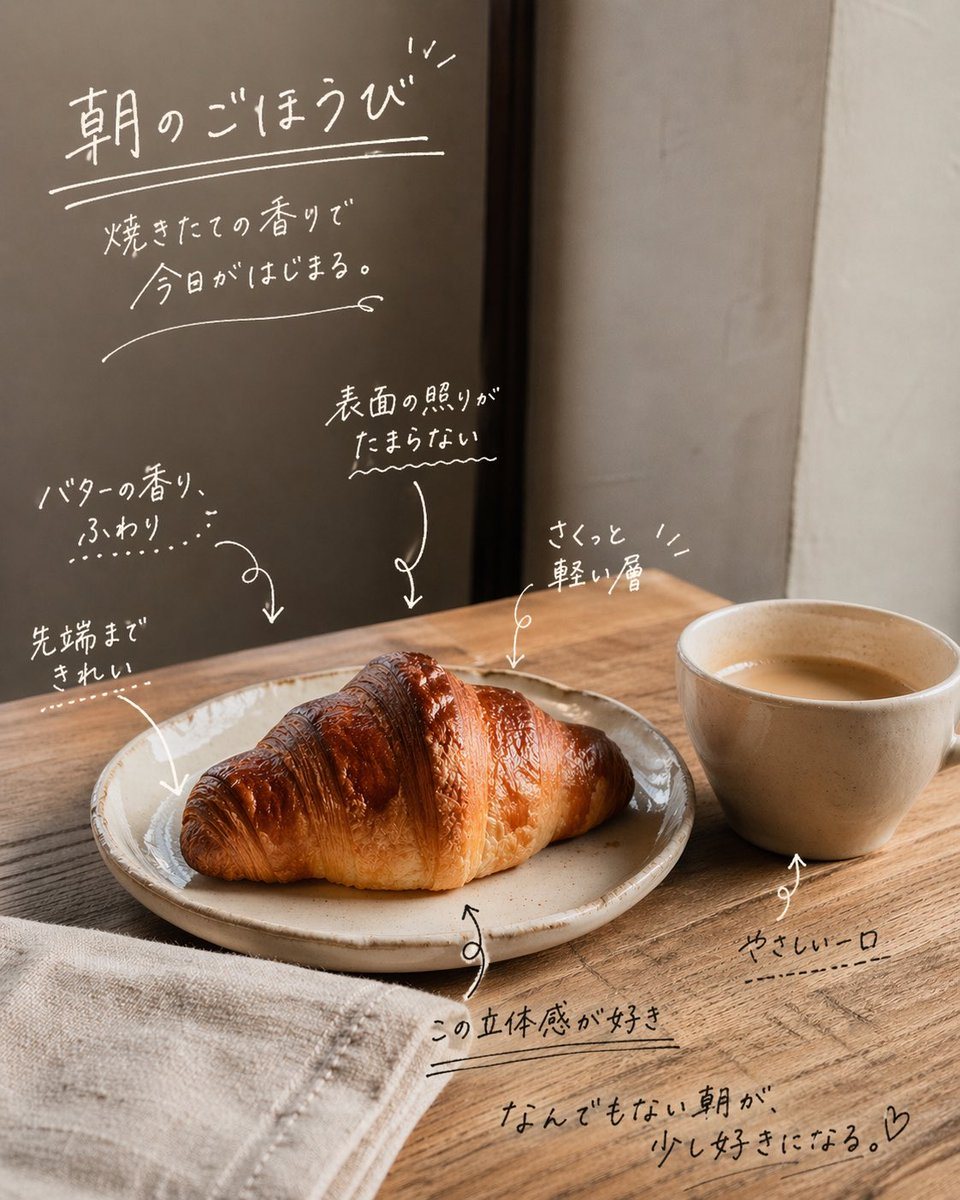
Using the provided reference image, keep the cafe photo composition, lighting, food, cup, plate, table, and background unchanged, and turn it into an emotive social-media style annotated...

Using the provided reference image, keep the cafe photo composition, lighting, food, cup, plate, table, and background unchanged, and turn it into an emotive social-media style annotated...
Prompt

Using the provided reference image, keep the cafe photo composition, lighting, food, cup, plate, table, and background unchanged, and turn it into an emotive social-media style annotated photo by overlaying handwritten white Japanese copy directly on the image. Add 1 main headline in the upper left with an underline and small accent marks: 「朝のごほうび」. Beneath it, add 1 short subcopy block in 2 lines: 「焼きたての香りで / 今日がはじまる。」. Then add 6 handwritten callout notes with sketchy arrows pointing to details in the scene: 1) 「バターの香り、ふわり…」 pointing to the croissant, 2) 「先端まできれい」 pointing to the left tip of the croissant, 3) 「表面の照りがたまらない〜」 pointing to the glossy top surface, 4) 「さくっと軽い層」 pointing to the upper right area of the croissant, 5) 「この立体感が好き」 near the plate edge, 6) 「やさしい一口」 pointing to the cup. Add 1 closing handwritten sentence near the lower right: 「なんでもない朝が、少し好きになる。♡」. Make all typography look like casual marker or chalk-pen handwriting with thin uneven strokes, soft organic spacing, doodled underlines, arrows, and small decorative marks. Keep the text integrated naturally into the empty wall and tabletop spaces, with a warm minimal Japanese lifestyle ad / UGC feel.

Prompt structure
  • Modelgpt-image-2
  • Use casesocial-media-post
  • Stylephotorealistic, minimal
  • Aspect ratioFlexible
Best used for
  • Use casesocial-media-post
  • Stylephotorealistic, minimal
  • Recommended specs1:1, 4:5, 16:9, or 9:16
  • ModelGPT Image 2
How to customize

Use this Using The Provided Reference Image prompt as a base. Replace the subject, product details, environment, lighting, brand colors, and output ratio while keeping the social-media-post intent and photorealistic, minimal direction stable.

Editable variables
  • SubjectReplace the product, person, scene, interface, or object being generated.
  • Use caseKeep or rewrite the destination as social media post, ad creative, cover image, poster, or ecommerce hero.
  • FrameChoose 1:1, 4:5, 16:9, or 9:16 based on the final placement.
  • Brand cuesAdd colors, materials, props, text-safe space, and the platform where the image will be used.
Recommended specs

Choose the frame for the destination first, then use 1K, 2K, or 4K based on output quality needs. Product images and posters usually benefit from higher resolution.

Pre-generation checklist
  • CheckSubject, lighting, composition, and frame are specific enough to review.
  • CheckText-safe space is included when the image will carry a headline or ad copy.
  • CheckResolution, credit cost, and final destination are checked before generation.
Why this prompt works

Using The Provided Reference Image works because it starts from the image job, then controls subject, composition, lighting, style, and frame. It is best for social media post while keeping the photorealistic, minimal direction stable.

Common questions
  • Can I use it directly?Yes. Replace the subject, brand cues, and frame, then generate in Image2Studio.
  • Which ratio should I use?Choose 1:1, 4:5, 16:9, or 9:16 based on the destination.




