
Image2Studio
Prompts

gpt-image-2

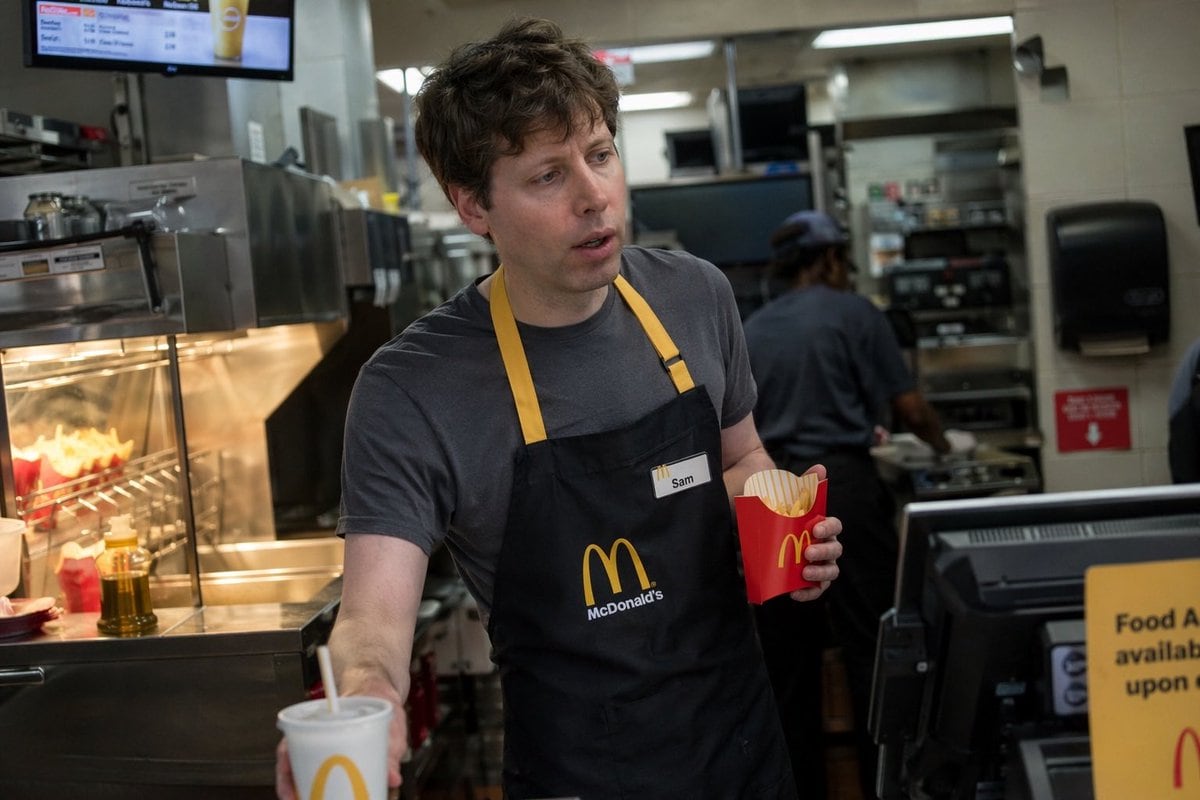
名人快餐店员工抓拍

生成一张名人从事快餐店日常工作的写实风格抓拍照片。

Copy this GPT Image 2 prompt for social media post and food photography with Photorealistic styling. Use it in Image2Studio to generate, edit, and save.
Prompt

A photorealistic candid photograph of {argument name="person" default="Sam Altman"} working behind the counter at a {argument name="restaurant brand" default="McDonald's"} restaurant. He is wearing a dark grey short-sleeve t-shirt under a black apron with yellow neck straps and the restaurant's logo, along with a white nametag reading "{argument name="nametag text" default="Sam"}". He has a slightly tired, focused expression, holding a {argument name="held item" default="red carton of french fries"} in his left hand while extending his right hand forward to serve a {argument name="served item" default="white drink cup with a straw"}. The background features a realistic, slightly blurred fast-food kitchen environment with stainless steel counters, a fry station glowing under warm heat lamps, digital order screens, a point-of-sale register, and another employee working in the distance. The lighting is typical indoor fluorescent, giving the image a documentary, everyday feel.

Prompt structure
  • Modelgpt-image-2
  • Use casesocial-media-post
  • Stylephotorealistic
  • Aspect ratioFlexible
Best used for
  • Use casesocial-media-post
  • Stylephotorealistic
  • Recommended specs1:1, 4:5, 16:9, or 9:16
  • ModelGPT Image 2
How to customize

Use this 名人快餐店员工抓拍 prompt as a base. Replace the subject, product details, environment, lighting, brand colors, and output ratio while keeping the social-media-post intent and photorealistic direction stable.

Editable variables
  • SubjectReplace the product, person, scene, interface, or object being generated.
  • Use caseKeep or rewrite the destination as social media post, ad creative, cover image, poster, or ecommerce hero.
  • FrameChoose 1:1, 4:5, 16:9, or 9:16 based on the final placement.
  • Brand cuesAdd colors, materials, props, text-safe space, and the platform where the image will be used.
Recommended specs

Choose the frame for the destination first, then use 1K, 2K, or 4K based on output quality needs. Product images and posters usually benefit from higher resolution.

Pre-generation checklist
  • CheckSubject, lighting, composition, and frame are specific enough to review.
  • CheckText-safe space is included when the image will carry a headline or ad copy.
  • CheckResolution, credit cost, and final destination are checked before generation.
Why this prompt works

名人快餐店员工抓拍 works because it starts from the image job, then controls subject, composition, lighting, style, and frame. It is best for social media post while keeping the photorealistic direction stable.

Common questions
  • Can I use it directly?Yes. Replace the subject, brand cues, and frame, then generate in Image2Studio.
  • Which ratio should I use?Choose 1:1, 4:5, 16:9, or 9:16 based on the destination.




