
Image2Studio
Examples

gpt-image-2

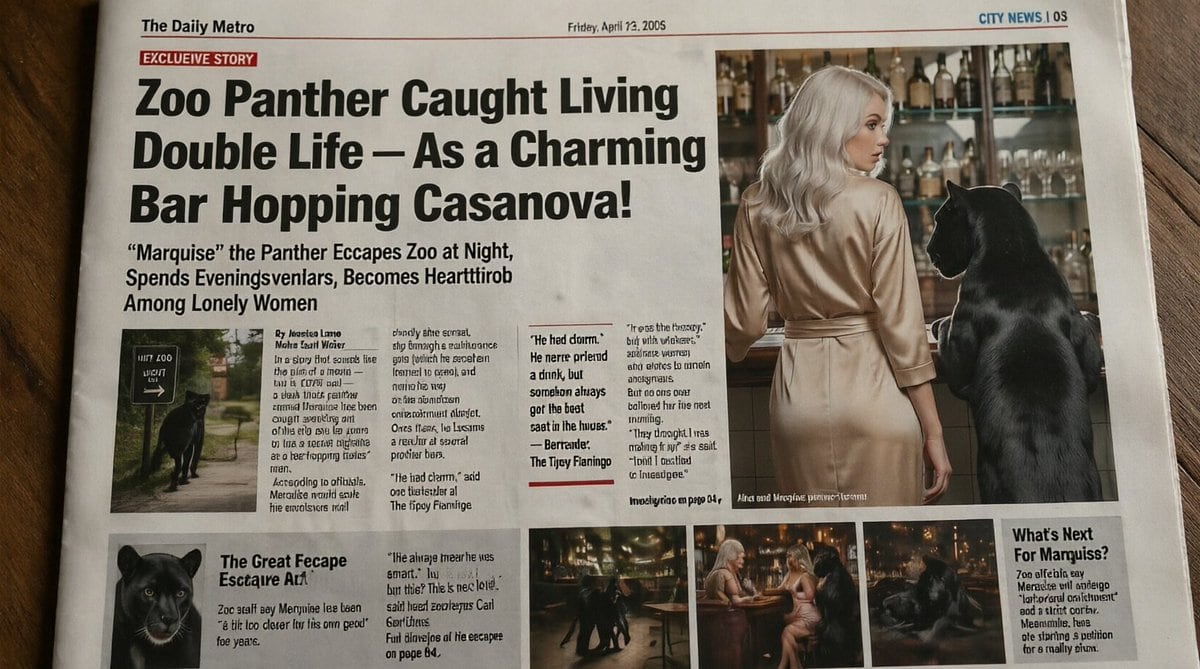
Realistic Slightly Humorous Tabloid Newspaper Front Page Photographed Fr

A realistic, slightly humorous tabloid newspaper front page photographed from above on a wooden table, designed to look like a printed broadsheet with subtle paper texture, fold marks, an...

A realistic, slightly humorous tabloid newspaper front page photographed from above on a wooden table, designed to look like a printed broadsheet with subtle paper texture, fold marks, an...
Prompt

A realistic, slightly humorous tabloid newspaper front page photographed from above on a wooden table, designed to look like a printed broadsheet with subtle paper texture, fold marks, and mild lens distortion. The masthead at top left reads “The Daily Metro”, the date line near the top center reads “Friday, April 22, 2005”, and the top-right section marker reads “CITY NEWS | 05”. A red banner near the upper left says “EXCLUSIVE STORY”. The dominant oversized black headline spans multiple lines: “Zoo Panther Caught Living Double Life – As a Charming Bar Hopping Casanova!” Below it, a large subheadline reads: ““Marquise” the Panther Escapes Zoo at Night, Spends Eveningsvlenlars, Becomes Heartthrob Among Lonely Women”. The page layout should mimic a sensational tabloid with 1 huge headline area, 1 large main photo on the upper right, 1 small inset photo under the main text on the left, 3 narrow text columns with dense newspaper copy in the center-left, 1 pull-quote box in the middle, 1 lower-left secondary story block with a panther portrait, 3 small bottom photo thumbnails in a row, and 1 right-side sidebar box titled “What’s Next For Mamquiss?”. Keep most body text tiny and partly nonsensical or pseudo-legible like AI-generated newspaper filler, but preserve the major visible headlines exactly. The main photo on the upper right shows the back view of a glamorous blonde woman in a silky champagne-colored dress standing at a bar beside a large black panther upright on a stool or standing with forepaws elevated near the counter. The bar background contains many liquor bottles and glassware on shelves, warmly lit. The woman’s face is intentionally obscured by a rectangular blur/block. The panther is sleek, glossy, and realistically rendered. The inset photo under the headline at left shows the black panther near a zoo exit or pathway sign at night. The lower-left portrait shows a close-up of the panther’s face. The 3 bottom thumbnails show nightlife scenes: the panther moving through a bar interior, the panther seated near two women at a small round table, and the panther lounging in dim warm light. Use an early-2000s tabloid aesthetic, high-contrast black headline typography, off-white newsprint, red accent rules, narrow columns, and slightly messy authentic newspaper composition. The overall tone is deadpan absurdist journalism, realistic enough to glance as a real newspaper, with the page filling most of the frame and photographed in natural indoor light.

Prompt structure
  • Modelgpt-image-2
  • Use casesocial-media-post
  • Stylephotorealistic, editorial
  • Aspect ratioFlexible
Best used for
  • Use casesocial-media-post
  • Stylephotorealistic, editorial
  • Recommended specs1:1, 4:5, 16:9, or 9:16
  • ModelGPT Image 2
How to customize

Use this Realistic Slightly Humorous Tabloid Newspaper Front Page Photographed Fr prompt as a base. Replace the subject, product details, environment, lighting, brand colors, and output ratio while keeping the social-media-post intent and photorealistic, editorial direction stable.

Editable variables
  • SubjectReplace the product, person, scene, interface, or object being generated.
  • Use caseKeep or rewrite the destination as social media post, ad creative, cover image, poster, or ecommerce hero.
  • FrameChoose 1:1, 4:5, 16:9, or 9:16 based on the final placement.
  • Brand cuesAdd colors, materials, props, text-safe space, and the platform where the image will be used.
Recommended specs

Choose the frame for the destination first, then use 1K, 2K, or 4K based on output quality needs. Product images and posters usually benefit from higher resolution.

Pre-generation checklist
  • CheckSubject, lighting, composition, and frame are specific enough to review.
  • CheckText-safe space is included when the image will carry a headline or ad copy.
  • CheckResolution, credit cost, and final destination are checked before generation.
Why this prompt works

Realistic Slightly Humorous Tabloid Newspaper Front Page Photographed Fr works because it starts from the image job, then controls subject, composition, lighting, style, and frame. It is best for social media post while keeping the photorealistic, editorial direction stable.

Common questions
  • Can I use it directly?Yes. Replace the subject, brand cues, and frame, then generate in Image2Studio.
  • Which ratio should I use?Choose 1:1, 4:5, 16:9, or 9:16 based on the destination.




