
Image2Studio
Examples

gpt-image-2

Realistic Vertical Smartphone Photo Of A Young Woman Standing At A Kitch

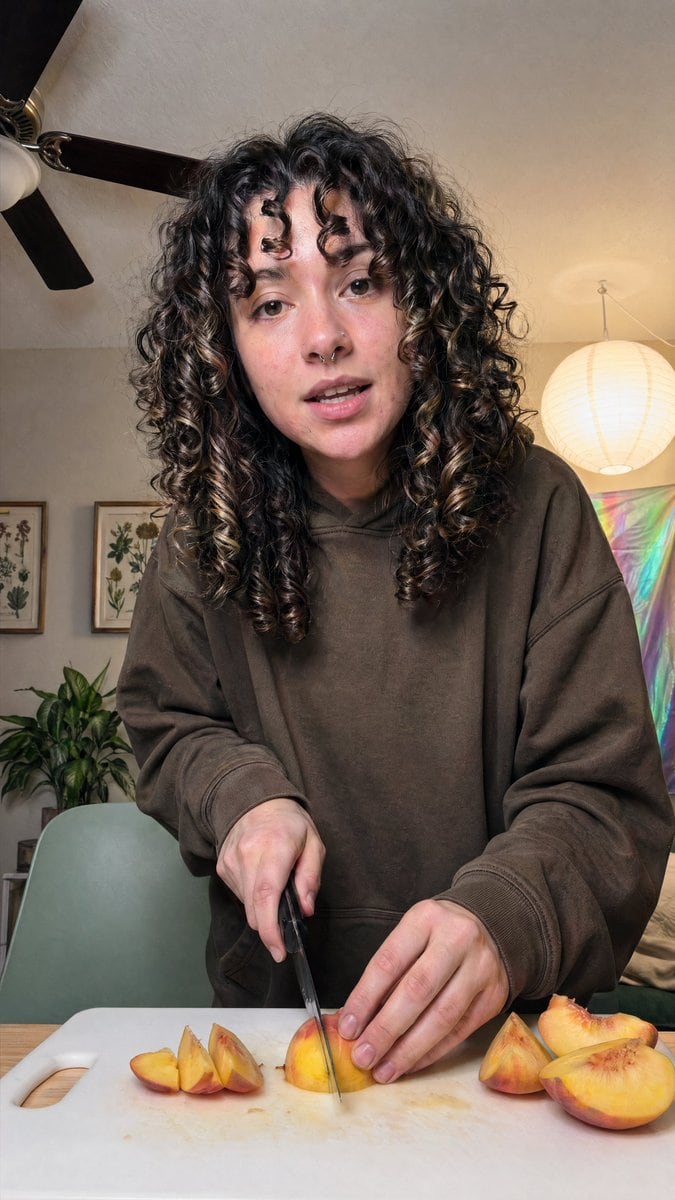
A realistic vertical smartphone photo of a young woman standing at a kitchen or dining table, slicing ripe peaches on a white plastic cutting board. The subject is centered and framed fro...

A realistic vertical smartphone photo of a young woman standing at a kitchen or dining table, slicing ripe peaches on a white plastic cutting board. The subject is centered and framed fro...
Prompt

A realistic vertical smartphone photo of a {argument name="person" default="young woman"} standing at a kitchen or dining table, slicing ripe peaches on a white plastic cutting board. The subject is centered and framed from about mid-thigh or waist up, leaning slightly toward the camera in a casual candid pose. She has very thick, long, dark brown to black naturally curly hair with defined ringlets and a few lighter brown highlights, falling around her shoulders and partially covering the sides of her face. She wears an oversized {argument name="hoodie color" default="dark brown"} hoodie with loose sleeves, giving the image a relaxed at-home lifestyle feel. One hand holds a kitchen knife vertically as it cuts into a peach wedge in the center of the board, while the other hand steadies the fruit. Show exactly 7 peach pieces visible on the cutting board: 3 smaller wedges grouped on the left, 1 central wedge being cut, and 3 larger pieces on the right including a half peach. The table surface is light wood. The room is warmly lit and cozy, with a beige wall and ceiling, a dark ceiling fan with 3 visible blades in the upper left, 2 framed botanical prints on the left wall, 1 leafy green houseplant in the lower left background, 1 pale sage-green chair behind the table, 1 glowing round white paper lantern hanging on the right, and 1 iridescent pastel wall hanging or reflective fabric panel in the right background. Use soft indoor lighting, natural skin tones, subtle shadows, realistic fruit texture and knife detail, documentary-style composition, shallow to medium depth of field, and an authentic everyday home aesthetic.

Prompt structure
  • Modelgpt-image-2
  • Use casesocial-media-post
  • Stylephotorealistic
  • Aspect ratioFlexible
Best used for
  • Use casesocial-media-post
  • Stylephotorealistic
  • Recommended specs1:1, 4:5, 16:9, or 9:16
  • ModelGPT Image 2
How to customize

Use this Realistic Vertical Smartphone Photo Of A Young Woman Standing At A Kitch prompt as a base. Replace the subject, product details, environment, lighting, brand colors, and output ratio while keeping the social-media-post intent and photorealistic direction stable.

Editable variables
  • SubjectReplace the product, person, scene, interface, or object being generated.
  • Use caseKeep or rewrite the destination as social media post, ad creative, cover image, poster, or ecommerce hero.
  • FrameChoose 1:1, 4:5, 16:9, or 9:16 based on the final placement.
  • Brand cuesAdd colors, materials, props, text-safe space, and the platform where the image will be used.
Recommended specs

Choose the frame for the destination first, then use 1K, 2K, or 4K based on output quality needs. Product images and posters usually benefit from higher resolution.

Pre-generation checklist
  • CheckSubject, lighting, composition, and frame are specific enough to review.
  • CheckText-safe space is included when the image will carry a headline or ad copy.
  • CheckResolution, credit cost, and final destination are checked before generation.
Why this prompt works

Realistic Vertical Smartphone Photo Of A Young Woman Standing At A Kitch works because it starts from the image job, then controls subject, composition, lighting, style, and frame. It is best for social media post while keeping the photorealistic direction stable.

Common questions
  • Can I use it directly?Yes. Replace the subject, brand cues, and frame, then generate in Image2Studio.
  • Which ratio should I use?Choose 1:1, 4:5, 16:9, or 9:16 based on the destination.




