
Image2Studio
Prompts

gpt-image-2

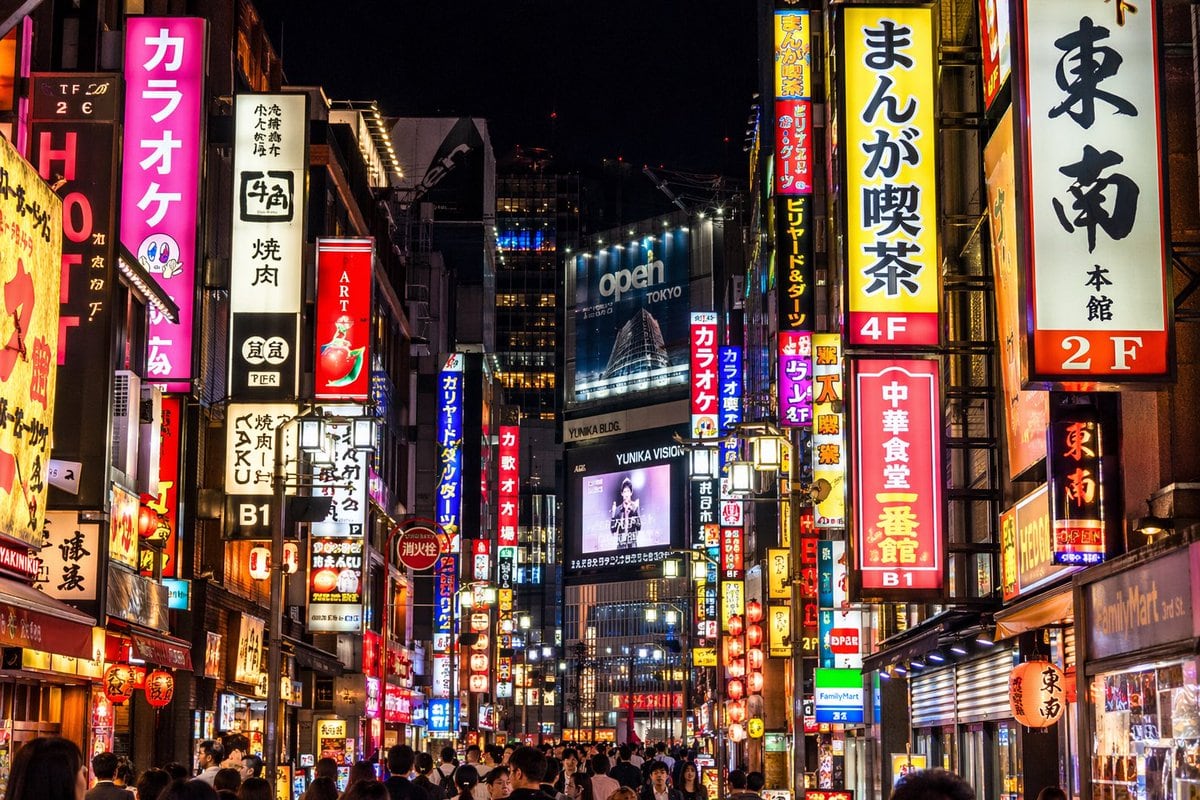
照片级写实风格霓虹东京街景

生成一张高度细节化、照片级写实的日本繁华城市街道夜景,并支持自定义霓虹灯牌和广告牌。

Copy this GPT Image 2 prompt for social media post and social ads with Photorealistic, Cyberpunk styling. Use it in Image2Studio to generate, edit, and.
Prompt

A photorealistic night street photography shot of a bustling {argument name="city location" default="Tokyo"} street, heavily illuminated by densely packed vertical neon signs and billboards. On the left, a bright pink sign prominently reads "{argument name="pink sign text" default="カラオケ"}" next to a white sign reading "牛角 焼肉". On the right, prominent signs include a yellow one reading "{argument name="yellow sign text" default="まんが喫茶 4F"}", a white one reading "東南 本館 2F", and a red one reading "{argument name="red sign text" default="中華食堂 一番館 B1"}". In the center distance, a large blue billboard displays "{argument name="billboard text" default="open TOKYO"}" above a digital screen showing a person with the text "YUNIKA VISION". The street level is crowded with the backs of pedestrians' heads walking through the vibrant, glowing urban canyon. The lighting is high contrast with rich neon colors reflecting off the surroundings.

Prompt structure
  • Modelgpt-image-2
  • Use casesocial-media-post
  • Stylephotorealistic, cyberpunk
  • Aspect ratioFlexible
Best used for
  • Use casesocial-media-post
  • Stylephotorealistic, cyberpunk
  • Recommended specs1:1, 4:5, 16:9, or 9:16
  • ModelGPT Image 2
How to customize

Use this 照片级写实风格霓虹东京街景 prompt as a base. Replace the subject, product details, environment, lighting, brand colors, and output ratio while keeping the social-media-post intent and photorealistic, cyberpunk direction stable.

Editable variables
  • SubjectReplace the product, person, scene, interface, or object being generated.
  • Use caseKeep or rewrite the destination as social media post, ad creative, cover image, poster, or ecommerce hero.
  • FrameChoose 1:1, 4:5, 16:9, or 9:16 based on the final placement.
  • Brand cuesAdd colors, materials, props, text-safe space, and the platform where the image will be used.
Recommended specs

Choose the frame for the destination first, then use 1K, 2K, or 4K based on output quality needs. Product images and posters usually benefit from higher resolution.

Pre-generation checklist
  • CheckSubject, lighting, composition, and frame are specific enough to review.
  • CheckText-safe space is included when the image will carry a headline or ad copy.
  • CheckResolution, credit cost, and final destination are checked before generation.
Why this prompt works

照片级写实风格霓虹东京街景 works because it starts from the image job, then controls subject, composition, lighting, style, and frame. It is best for social media post while keeping the photorealistic, cyberpunk direction stable.

Common questions
  • Can I use it directly?Yes. Replace the subject, brand cues, and frame, then generate in Image2Studio.
  • Which ratio should I use?Choose 1:1, 4:5, 16:9, or 9:16 based on the destination.




