
Image2Studio
Prompts

gpt-image-2

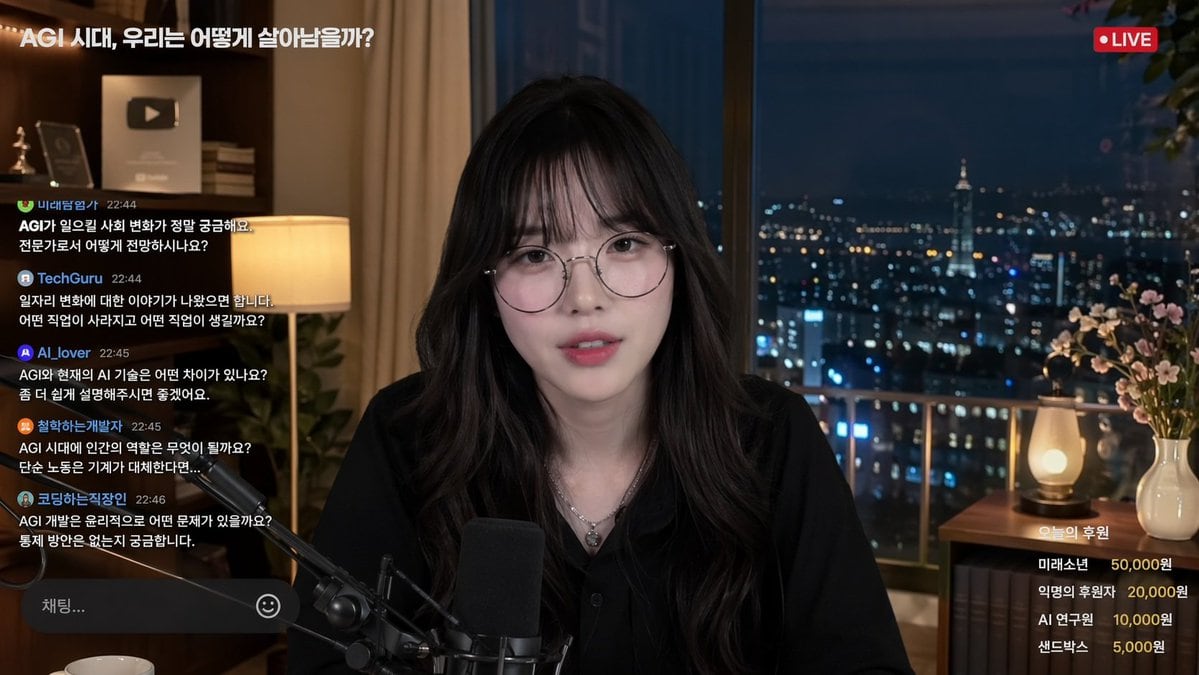
Livestream Interface Mockup

Structured livestream interface mockup prompt for GPT Image 2.

Structured livestream interface mockup prompt for GPT Image 2.
Prompt

{ "type": "livestream interface mockup", "subject": { "description": "{argument name=\"streamer description\" default=\"young Asian woman, long dark wavy hair with bangs, round wire-rimmed glasses, black button-up shirt, silver necklace\"}", "action": "looking directly at camera, speaking into a professional broadcast microphone" }, "setting": { "location": "high-rise apartment interior at night", "background": "large window with blurred illuminated city skyline", "props": "YouTube play button plaque on shelf, warm desk lamp" }, "layout": { "top_left": { "element": "stream title", "text": "{argument name=\"stream title\" default=\"AGI 시대, 우리는 어떻게 살아남을까?\"}" }, "top_right": { "element": "status badge", "text": "LIVE", "style": "red circle indicator" }, "left_panel": { "element": "live chat feed", "message_count": 5, "messages": [ "FutureExplorer 22:44: Curious about social changes caused by AGI.", "TechGuru 22:44: What jobs will disappear or emerge?", "AI_lover 22:45: Difference between AGI and current AI?", "PhilosophizingDev 22:45: What is the human role in the AGI era?", "CodingOfficeWorker 22:46: Ethical issues and control methods for AGI?" ], "input_box": "Chat... with smiley icon" }, "bottom_right": { "element": "donation leaderboard", "title": "{argument name=\"donation title\" default=\"오늘의 후원\"}", "item_count": 4, "items": [ "FutureBoy 50,000 won", "Anonymous 20,000 won", "AI Researcher 10,000 won", "Sandbox 5,000 won" ] } } }

Prompt structure
  • Modelgpt-image-2
  • Use casesocial-media-post
  • Stylephotorealistic, editorial
  • Aspect ratioFlexible
Best used for
  • Use casesocial-media-post
  • Stylephotorealistic, editorial
  • Recommended specs1:1, 4:5, 16:9, or 9:16
  • ModelGPT Image 2
How to customize

Use this Livestream Interface Mockup prompt as a base. Replace the subject, product details, environment, lighting, brand colors, and output ratio while keeping the social-media-post intent and photorealistic, editorial direction stable.

Editable variables
  • SubjectReplace the product, person, scene, interface, or object being generated.
  • Use caseKeep or rewrite the destination as social media post, ad creative, cover image, poster, or ecommerce hero.
  • FrameChoose 1:1, 4:5, 16:9, or 9:16 based on the final placement.
  • Brand cuesAdd colors, materials, props, text-safe space, and the platform where the image will be used.
Recommended specs

Choose the frame for the destination first, then use 1K, 2K, or 4K based on output quality needs. Product images and posters usually benefit from higher resolution.

Pre-generation checklist
  • CheckSubject, lighting, composition, and frame are specific enough to review.
  • CheckText-safe space is included when the image will carry a headline or ad copy.
  • CheckResolution, credit cost, and final destination are checked before generation.
Why this prompt works

Livestream Interface Mockup works because it starts from the image job, then controls subject, composition, lighting, style, and frame. It is best for social media post while keeping the photorealistic, editorial direction stable.

Common questions
  • Can I use it directly?Yes. Replace the subject, brand cues, and frame, then generate in Image2Studio.
  • Which ratio should I use?Choose 1:1, 4:5, 16:9, or 9:16 based on the destination.




