
Image2Studio
Examples

gpt-image-2

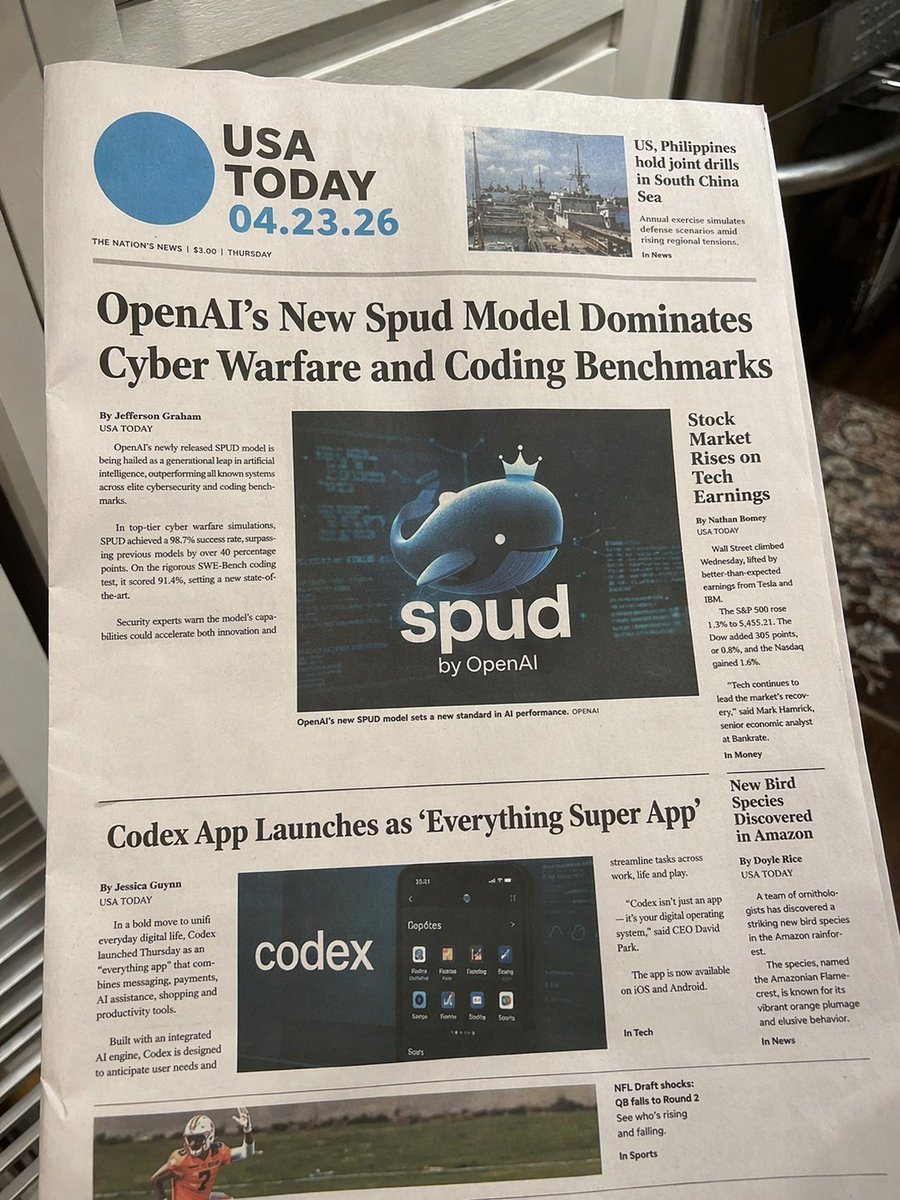
Photorealistic Physical Newspaper On A Counter

Ready-to-edit photorealistic physical newspaper on a counter image prompt.

Ready-to-edit photorealistic physical newspaper on a counter image prompt.
Prompt

{ "type": "photorealistic physical newspaper on a counter", "environment": "casual indoor kitchen setting, edge of stove visible, natural lighting, paper is slightly curved with realistic creases", "newspaper_header": { "logo": "large blue circle next to {argument name=\"newspaper name\" default=\"USA TODAY\"}", "date": "{argument name=\"date\" default=\"04.23.26\"}", "subtext": "THE NATION'S NEWS | $3.00 | THURSDAY", "top_right_teaser": { "image": "naval ships", "headline": "US, Philippines hold joint drills in South China Sea" } }, "layout": { "total_articles": 4, "total_embedded_images": 4, "sections": [ { "position": "top center", "headline": "{argument name=\"main headline\" default=\"OpenAI's New Spud Model Dominates Cyber Warfare and Coding Benchmarks\"}", "author": "By Jefferson Graham", "image": "{argument name=\"main image subject\" default=\"3D rendered blue whale wearing a crown with text 'spud by OpenAI'\"}", "columns": 2 }, { "position": "middle right", "headline": "Stock Market Rises on Tech Earnings", "author": "By Nathan Bomey", "columns": 1 }, { "position": "bottom left", "headline": "{argument name=\"bottom headline\" default=\"Codex App Launches as 'Everything Super App'\"}", "author": "By Jessica Guynn", "image": "smartphone screen showing app interface with text 'codex'", "columns": 2 }, { "position": "bottom right", "headline": "New Bird Species Discovered in Amazon", "author": "By Doyle Rice", "columns": 1 }, { "position": "footer", "image": "football player in action", "text": "NFL Draft shocks: QB falls to Round 2" } ] } }

Prompt structure
  • Modelgpt-image-2
  • Use casesocial-media-post
  • Stylephotorealistic, 3d-render, editorial
  • Aspect ratioFlexible
Best used for
  • Use casesocial-media-post
  • Stylephotorealistic, 3d-render, editorial
  • Recommended specs1:1, 4:5, 16:9, or 9:16
  • ModelGPT Image 2
How to customize

Use this Photorealistic Physical Newspaper On A Counter prompt as a base. Replace the subject, product details, environment, lighting, brand colors, and output ratio while keeping the social-media-post intent and photorealistic, 3d-render, editorial direction stable.

Editable variables
  • SubjectReplace the product, person, scene, interface, or object being generated.
  • Use caseKeep or rewrite the destination as social media post, ad creative, cover image, poster, or ecommerce hero.
  • FrameChoose 1:1, 4:5, 16:9, or 9:16 based on the final placement.
  • Brand cuesAdd colors, materials, props, text-safe space, and the platform where the image will be used.
Recommended specs

Choose the frame for the destination first, then use 1K, 2K, or 4K based on output quality needs. Product images and posters usually benefit from higher resolution.

Pre-generation checklist
  • CheckSubject, lighting, composition, and frame are specific enough to review.
  • CheckText-safe space is included when the image will carry a headline or ad copy.
  • CheckResolution, credit cost, and final destination are checked before generation.
Why this prompt works

Photorealistic Physical Newspaper On A Counter works because it starts from the image job, then controls subject, composition, lighting, style, and frame. It is best for social media post while keeping the photorealistic, 3d-render, editorial direction stable.

Common questions
  • Can I use it directly?Yes. Replace the subject, brand cues, and frame, then generate in Image2Studio.
  • Which ratio should I use?Choose 1:1, 4:5, 16:9, or 9:16 based on the destination.




