
Image2Studio
Examples

gpt-image-2

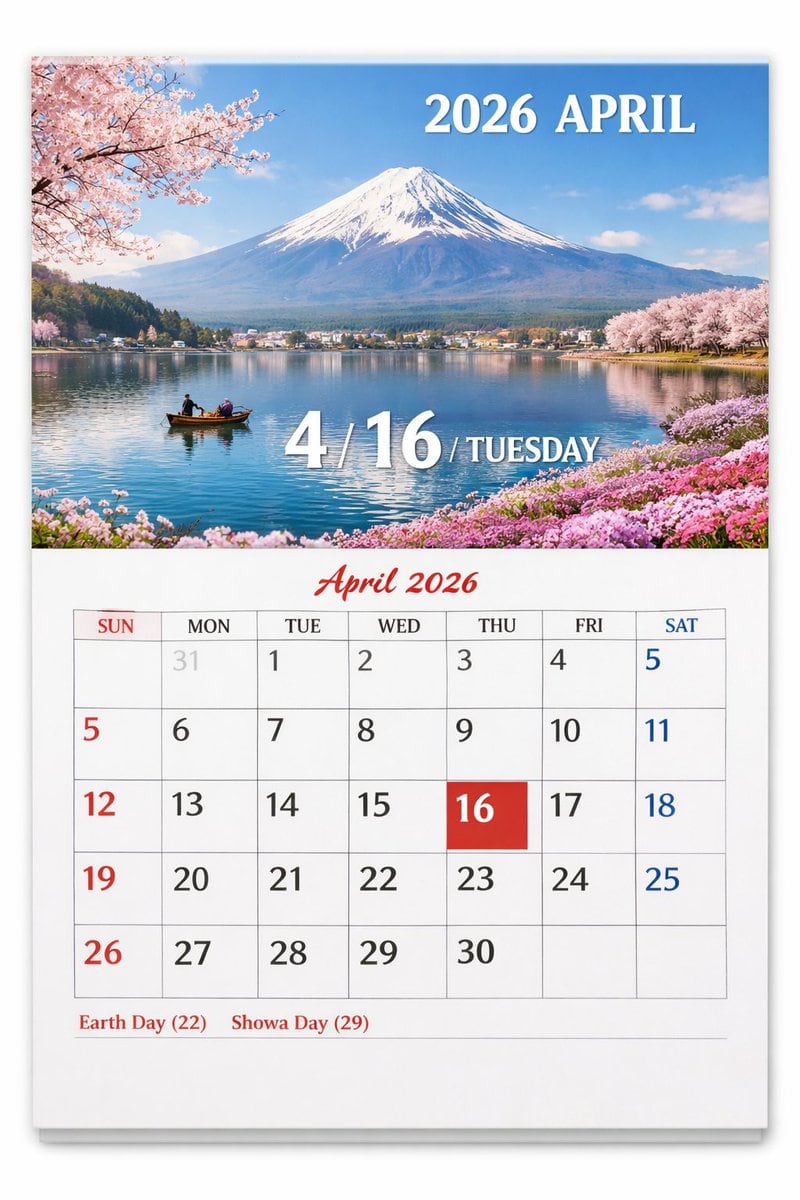
Wall Calendar Page

Ready-to-edit wall calendar page image prompt.

Ready-to-edit wall calendar page image prompt.
Prompt

{ "type": "wall calendar page", "presentation": "physical paper calendar hanging on a white wall with a subtle drop shadow", "layout": { "top_half": { "type": "scenic photograph", "subject": "{argument name=\"scenic location\" default=\"Mount Fuji with cherry blossoms and a lake\"}", "details": "snow-capped mountain, calm blue lake reflection, small wooden boat with two people, pink cherry blossoms framing the top left and right shores, pink flowers on the bottom right shore", "text_overlays": [ { "position": "top right", "text": "{argument name=\"year and month\" default=\"2026 APRIL\"}", "style": "white serif font" }, { "position": "bottom center", "text": "4 / {argument name=\"highlighted date\" default=\"16\"} / {argument name=\"day of week\" default=\"TUESDAY\"}", "style": "large white serif font with drop shadow" } ] }, "bottom_half": { "type": "calendar grid", "header": { "text": "April 2026", "style": "red cursive script font, centered" }, "grid_structure": { "columns": 7, "rows": 5, "column_headers": ["SUN", "MON", "TUE", "WED", "THU", "FRI", "SAT"] }, "grid_content": { "highlighted_cell": { "date": "{argument name=\"highlighted date\" default=\"16\"}", "style": "solid red square background, white text" }, "number_colors": "Sundays in red, Saturdays in blue, weekdays in black, previous month dates in light gray", "notable_features": "AI generation artifact where the number 5 appears twice (end of row 1, start of row 2)" }, "footer": { "text": "{argument name=\"holidays\" default=\"Earth Day (22) Showa Day (29)\"}", "position": "bottom left", "style": "red serif font" } } } }

Prompt structure
  • Modelgpt-image-2
  • Use casesocial-media-post
  • Stylephotorealistic, editorial
  • Aspect ratioFlexible
Best used for
  • Use casesocial-media-post
  • Stylephotorealistic, editorial
  • Recommended specs1:1, 4:5, 16:9, or 9:16
  • ModelGPT Image 2
How to customize

Use this Wall Calendar Page prompt as a base. Replace the subject, product details, environment, lighting, brand colors, and output ratio while keeping the social-media-post intent and photorealistic, editorial direction stable.

Editable variables
  • SubjectReplace the product, person, scene, interface, or object being generated.
  • Use caseKeep or rewrite the destination as social media post, ad creative, cover image, poster, or ecommerce hero.
  • FrameChoose 1:1, 4:5, 16:9, or 9:16 based on the final placement.
  • Brand cuesAdd colors, materials, props, text-safe space, and the platform where the image will be used.
Recommended specs

Choose the frame for the destination first, then use 1K, 2K, or 4K based on output quality needs. Product images and posters usually benefit from higher resolution.

Pre-generation checklist
  • CheckSubject, lighting, composition, and frame are specific enough to review.
  • CheckText-safe space is included when the image will carry a headline or ad copy.
  • CheckResolution, credit cost, and final destination are checked before generation.
Why this prompt works

Wall Calendar Page works because it starts from the image job, then controls subject, composition, lighting, style, and frame. It is best for social media post while keeping the photorealistic, editorial direction stable.

Common questions
  • Can I use it directly?Yes. Replace the subject, brand cues, and frame, then generate in Image2Studio.
  • Which ratio should I use?Choose 1:1, 4:5, 16:9, or 9:16 based on the destination.




