
Image2Studio
Structured photograph prompt for GPT Image 2.
Prompt

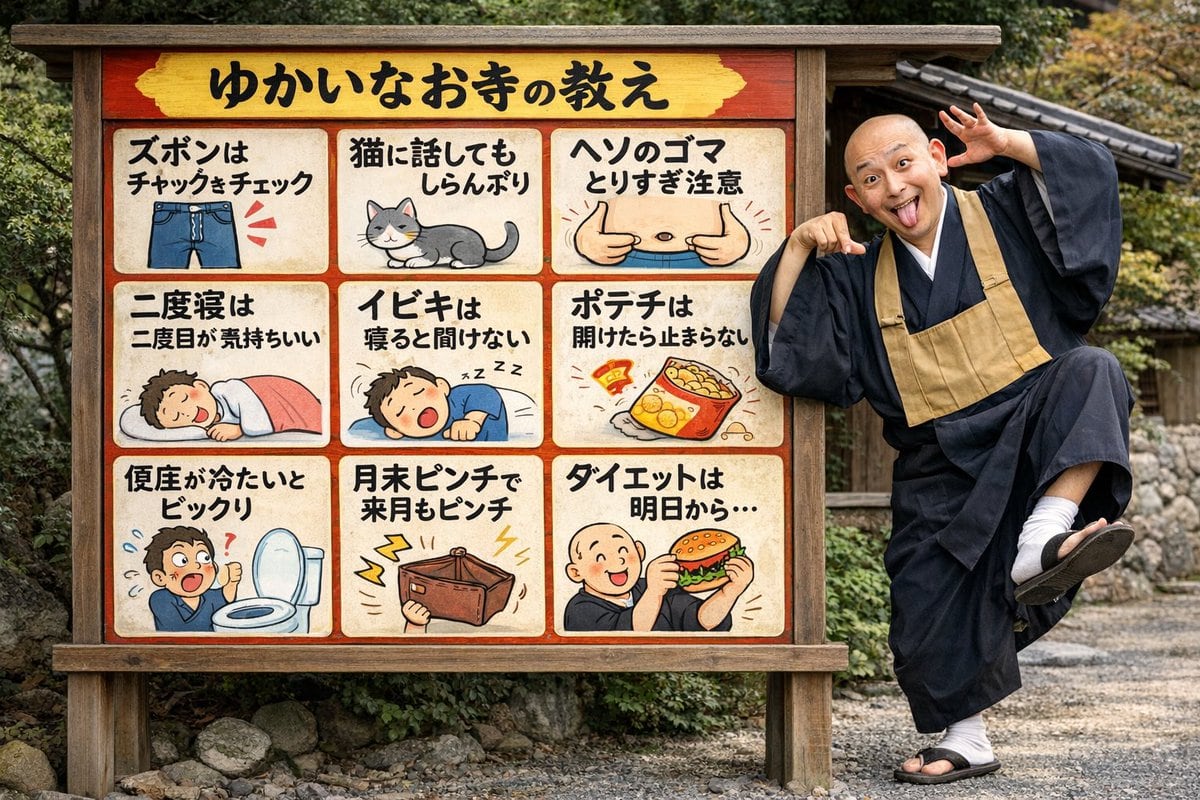
{ "type": "photograph", "setting": "outdoor temple grounds with gravel and foliage", "subjects": [ { "type": "signboard", "material": "wood with red border and yellow header", "header_text": "{argument name=\"header text\" default=\"ゆかいなお寺の教え\"}", "layout": "3x3 grid", "panel_count": 9, "panels": [ { "position": "top-left", "text": "ズボンはチャックをチェック", "illustration": "blue jeans with zipper" }, { "position": "top-center", "text": "猫に話してもしらんぷり", "illustration": "grey and white cat" }, { "position": "top-right", "text": "ヘソのゴマとりすぎ注意", "illustration": "belly with thumbs pointing at navel" }, { "position": "mid-left", "text": "二度寝は二度目が気持ちいい", "illustration": "person sleeping under pink blanket" }, { "position": "mid-center", "text": "イビキは寝ると聞けない", "illustration": "person snoring" }, { "position": "mid-right", "text": "ポテチは開けたら止まらない", "illustration": "open bag of potato chips" }, { "position": "bottom-left", "text": "便座が冷たいとビックリ", "illustration": "shocked person next to toilet" }, { "position": "bottom-center", "text": "月末ピンチで来月もピンチ", "illustration": "empty wallet with lightning bolts" }, { "position": "bottom-right", "text": "{argument name=\"bottom right text\" default=\"ダイエットは明日から...\"}", "illustration": "{argument name=\"bottom right illustration\" default=\"monk eating a hamburger\"}" } ] }, { "type": "monk", "description": "bald Japanese Buddhist monk in black robes, white tabi socks, and sandals", "pose": "standing on one leg, leaning on sign", "expression": "{argument name=\"monk expression\" default=\"goofy, tongue out, wide eyes, hands framing face\"}" } ] }

Prompt structure
  • Modelgpt-image-2
  • Use casesocial-media-post
  • Stylewatercolor, photorealistic, editorial
  • Aspect ratioFlexible
Best used for
  • Use casesocial-media-post
  • Stylewatercolor, photorealistic, editorial
  • Recommended specs1:1, 4:5, 16:9, or 9:16
  • ModelGPT Image 2
How to customize

Use this Photograph prompt as a base. Replace the subject, product details, environment, lighting, brand colors, and output ratio while keeping the social-media-post intent and watercolor, photorealistic, editorial direction stable.

Editable variables
  • SubjectReplace the product, person, scene, interface, or object being generated.
  • Use caseKeep or rewrite the destination as social media post, ad creative, cover image, poster, or ecommerce hero.
  • FrameChoose 1:1, 4:5, 16:9, or 9:16 based on the final placement.
  • Brand cuesAdd colors, materials, props, text-safe space, and the platform where the image will be used.
Recommended specs

Choose the frame for the destination first, then use 1K, 2K, or 4K based on output quality needs. Product images and posters usually benefit from higher resolution.

Pre-generation checklist
  • CheckSubject, lighting, composition, and frame are specific enough to review.
  • CheckText-safe space is included when the image will carry a headline or ad copy.
  • CheckResolution, credit cost, and final destination are checked before generation.
Why this prompt works

Photograph works because it starts from the image job, then controls subject, composition, lighting, style, and frame. It is best for social media post while keeping the watercolor, photorealistic, editorial direction stable.

Common questions
  • Can I use it directly?Yes. Replace the subject, brand cues, and frame, then generate in Image2Studio.
  • Which ratio should I use?Choose 1:1, 4:5, 16:9, or 9:16 based on the destination.




