
Image2Studio
Prompts

gpt-image-2

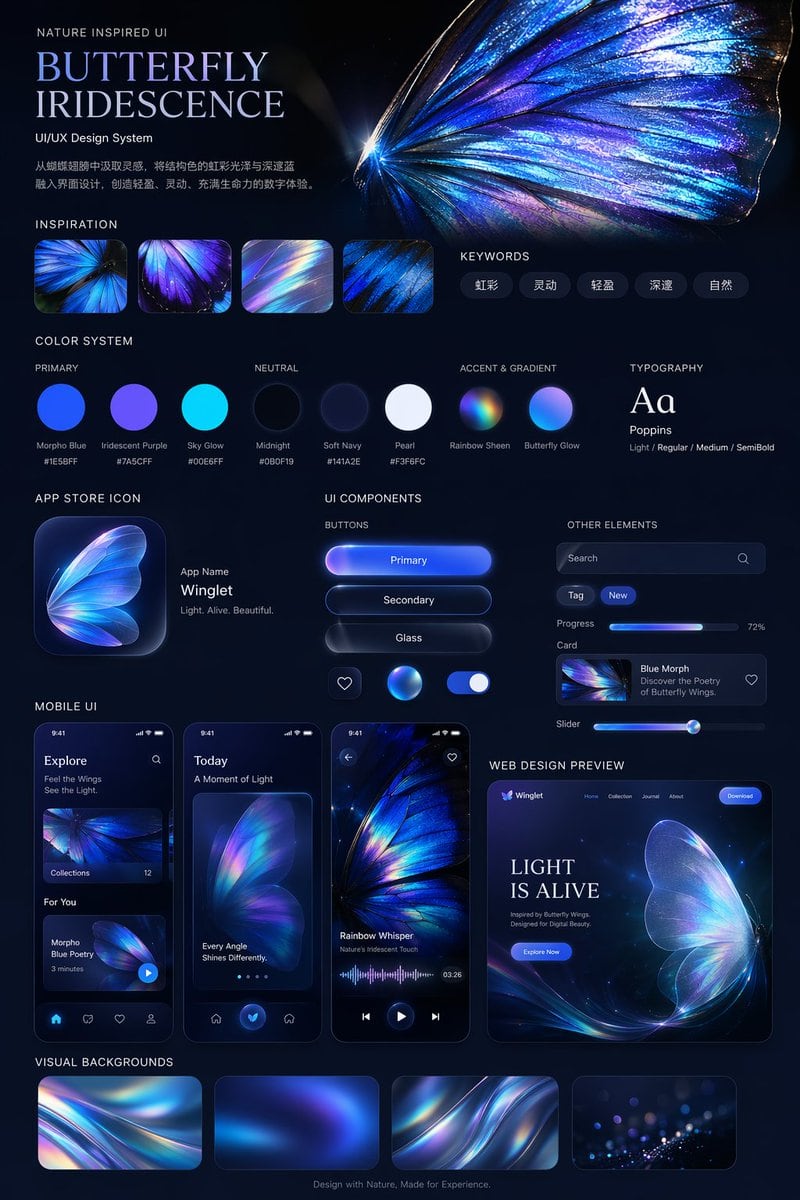
UI/UX Design System Presentation Board

Structured UI/UX Design System presentation board prompt for GPT Image 2.

Structured UI/UX Design System presentation board prompt for GPT Image 2.
Prompt

{ "type": "UI/UX Design System presentation board", "theme": "Dark mode, nature-inspired, glowing iridescent aesthetics", "header": { "title": "NATURE INSPIRED UI\n{argument name=\"system title\" default=\"BUTTERFLY IRIDESCENCE\"}\nUI/UX Design System", "description": "{argument name=\"chinese description\" default=\"从蝴蝶翅膀中汲取灵感,将结构色的虹彩光泽与深邃蓝融入界面设计,创造轻盈、灵动、充满生命力的数字体验。\"}", "hero_image": "Large, highly detailed, glowing blue and purple iridescent butterfly wing" }, "layout": { "sections": [ { "title": "INSPIRATION", "count": 4, "description": "Square thumbnails showing close-ups of iridescent butterfly wings and light refractions" }, { "title": "KEYWORDS", "count": 5, "labels": ["虹彩", "灵动", "轻盈", "深邃", "自然"] }, { "title": "COLOR SYSTEM", "subsections": [ { "title": "PRIMARY", "count": 3, "labels": ["Morpho Blue #1E5BFF", "Iridescent Purple #7A5CFF", "Sky Glow #00E6FF"] }, { "title": "NEUTRAL", "count": 3, "labels": ["Midnight #0B0F19", "Soft Navy #141A2E", "Pearl #F3F6FC"] }, { "title": "ACCENT & GRADIENT", "count": 2, "labels": ["Rainbow Sheen", "Butterfly Glow"] } ] }, { "title": "TYPOGRAPHY", "content": "Aa Poppins Light / Regular / Medium / SemiBold" }, { "title": "APP STORE ICON", "count": 1, "text": "App Name {argument name=\"app name\" default=\"Winglet\"} Light. Alive. Beautiful." }, { "title": "UI COMPONENTS", "subsections": [ { "title": "BUTTONS", "count": 6, "labels": ["Primary", "Secondary", "Glass", "heart icon", "glowing sphere icon", "toggle switch"] }, { "title": "OTHER ELEMENTS", "count": 5, "labels": ["Search bar", "Tag (New)", "Progress bar (72%)", "Card (Blue Morph)", "Slider"] } ] }, { "title": "MOBILE UI", "count": 3, "screens": ["Explore screen", "Today screen with large butterfly wing", "Audio player screen with waveform"] }, { "title": "WEB DESIGN PREVIEW", "count": 1, "details": "Desktop browser mockup, hero section with '{argument name=\"web hero headline\" default=\"LIGHT IS ALIVE\"}' and 'Explore Now' button" }, { "title": "VISUAL BACKGROUNDS", "count": 4, "description": "Rectangular thumbnails showing abstract iridescent waves" } ], "footer": "Design with Nature, Made for Experience." } }

Prompt structure
  • Modelgpt-image-2
  • Use caseapp-ui-mockup
  • Styleeditorial
  • Aspect ratioFlexible
Best used for
  • Use caseapp-ui-mockup
  • Styleeditorial
  • Recommended specs1:1, 4:5, 16:9, or 9:16
  • ModelGPT Image 2
How to customize

Use this UI/UX Design System Presentation Board prompt as a base. Replace the subject, product details, environment, lighting, brand colors, and output ratio while keeping the app-ui-mockup intent and editorial direction stable.

Editable variables
  • SubjectReplace the product, person, scene, interface, or object being generated.
  • Use caseKeep or rewrite the destination as app ui mockup, ad creative, cover image, poster, or ecommerce hero.
  • FrameChoose 1:1, 4:5, 16:9, or 9:16 based on the final placement.
  • Brand cuesAdd colors, materials, props, text-safe space, and the platform where the image will be used.
Recommended specs

Choose the frame for the destination first, then use 1K, 2K, or 4K based on output quality needs. Product images and posters usually benefit from higher resolution.

Pre-generation checklist
  • CheckSubject, lighting, composition, and frame are specific enough to review.
  • CheckText-safe space is included when the image will carry a headline or ad copy.
  • CheckResolution, credit cost, and final destination are checked before generation.
Why this prompt works

UI/UX Design System Presentation Board works because it starts from the image job, then controls subject, composition, lighting, style, and frame. It is best for app ui mockup while keeping the editorial direction stable.

Common questions
  • Can I use it directly?Yes. Replace the subject, brand cues, and frame, then generate in Image2Studio.
  • Which ratio should I use?Choose 1:1, 4:5, 16:9, or 9:16 based on the destination.




