
Image2Studio
Examples

gpt-image-2

Using The Provided Reference Image As The Character And Color-palette Gu

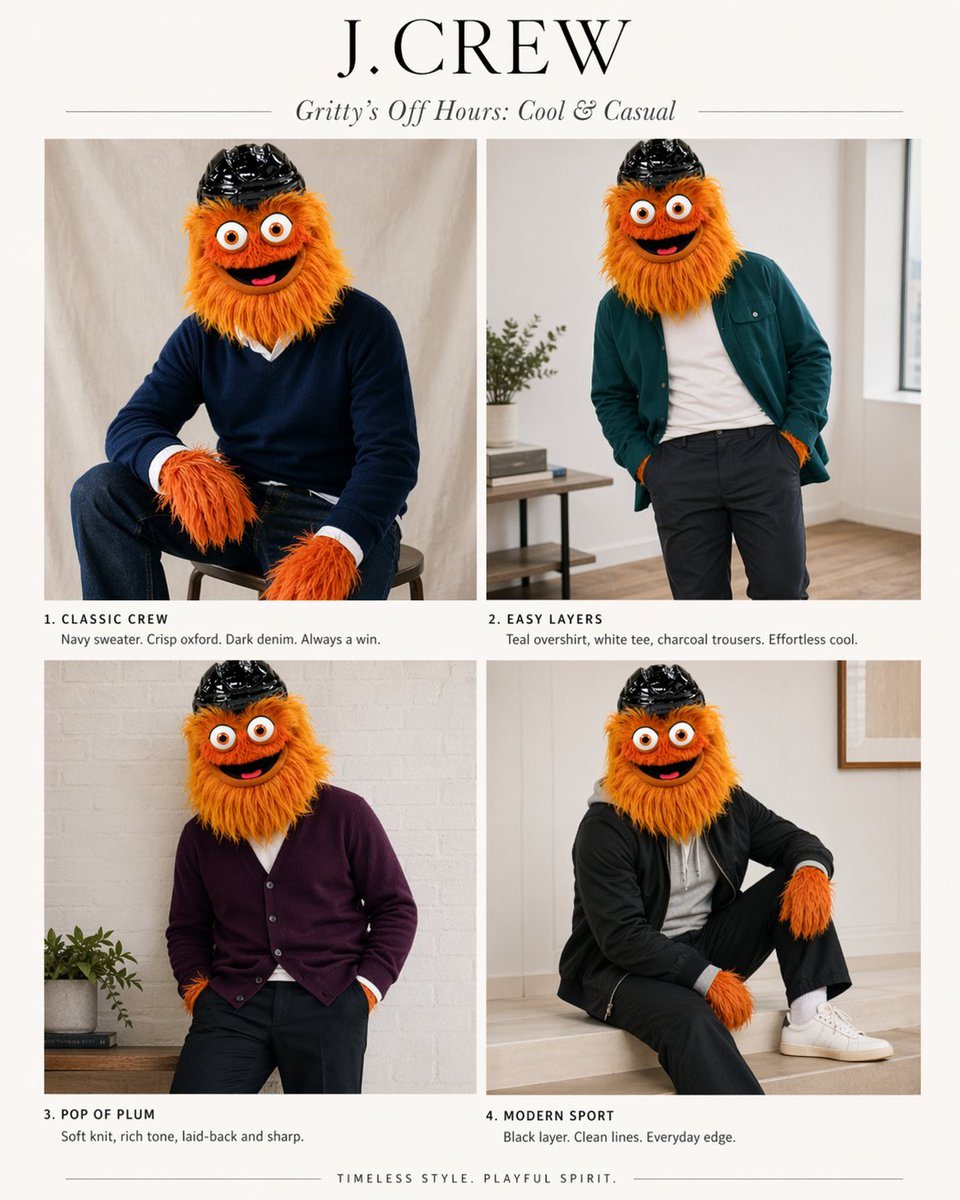
Using the provided reference image as the character and color-palette guide, transform it into a polished J.Crew-style editorial fashion lookbook starring the same mascot. Replace the inf...

Using the provided reference image as the character and color-palette guide, transform it into a polished J.Crew-style editorial fashion lookbook starring the same mascot. Replace the inf...
Prompt

Using the provided reference image as the character and color-palette guide, transform it into a polished J.Crew-style editorial fashion lookbook starring the same mascot. Replace the infographic/chart layout with a clean 2x2 magazine spread on an off-white background. Add a large serif brand header reading {argument name="headline text" default="J.CREW"} and an italic subhead reading {argument name="subhead text" default="Gritty’s Off Hours: Cool & Casual"}. Show exactly 4 styled outfit photos of the same character, keeping the fuzzy orange fur, big eyes, and black helmet, but placing the mascot in modern menswear inspired by the “best” colors from the reference: 1) “CLASSIC CREW” — seated on a stool in a navy sweater over a crisp white oxford with dark denim; 2) “EASY LAYERS” — standing casually in a teal overshirt, white tee, and charcoal trousers; 3) “POP OF PLUM” — relaxed pose in a plum cardigan with dark pants; 4) “MODERN SPORT” — seated in a black sporty layer with black pants, white socks, and white sneakers. Give each panel a short catalog-style caption under it matching those 4 titles and concise fashion copy. Use soft natural indoor lighting, minimal home-interior editorial settings, premium catalog photography, and a tasteful upscale preppy aesthetic. Add a small closing line centered at the bottom: {argument name="footer text" default="TIMELESS STYLE. PLAYFUL SPIRIT."}

Prompt structure
  • Modelgpt-image-2
  • Use casesocial-media-post
  • Styleminimal, editorial, photorealistic, luxury
  • Aspect ratioFlexible
Best used for
  • Use casesocial-media-post
  • Styleminimal, editorial, photorealistic, luxury
  • Recommended specs1:1, 4:5, 16:9, or 9:16
  • ModelGPT Image 2
How to customize

Use this Using The Provided Reference Image As The Character And Color-palette Gu prompt as a base. Replace the subject, product details, environment, lighting, brand colors, and output ratio while keeping the social-media-post intent and minimal, editorial, photorealistic, luxury direction stable.

Editable variables
  • SubjectReplace the product, person, scene, interface, or object being generated.
  • Use caseKeep or rewrite the destination as social media post, ad creative, cover image, poster, or ecommerce hero.
  • FrameChoose 1:1, 4:5, 16:9, or 9:16 based on the final placement.
  • Brand cuesAdd colors, materials, props, text-safe space, and the platform where the image will be used.
Recommended specs

Choose the frame for the destination first, then use 1K, 2K, or 4K based on output quality needs. Product images and posters usually benefit from higher resolution.

Pre-generation checklist
  • CheckSubject, lighting, composition, and frame are specific enough to review.
  • CheckText-safe space is included when the image will carry a headline or ad copy.
  • CheckResolution, credit cost, and final destination are checked before generation.
Why this prompt works

Using The Provided Reference Image As The Character And Color-palette Gu works because it starts from the image job, then controls subject, composition, lighting, style, and frame. It is best for social media post while keeping the minimal, editorial, photorealistic, luxury direction stable.

Common questions
  • Can I use it directly?Yes. Replace the subject, brand cues, and frame, then generate in Image2Studio.
  • Which ratio should I use?Choose 1:1, 4:5, 16:9, or 9:16 based on the destination.




