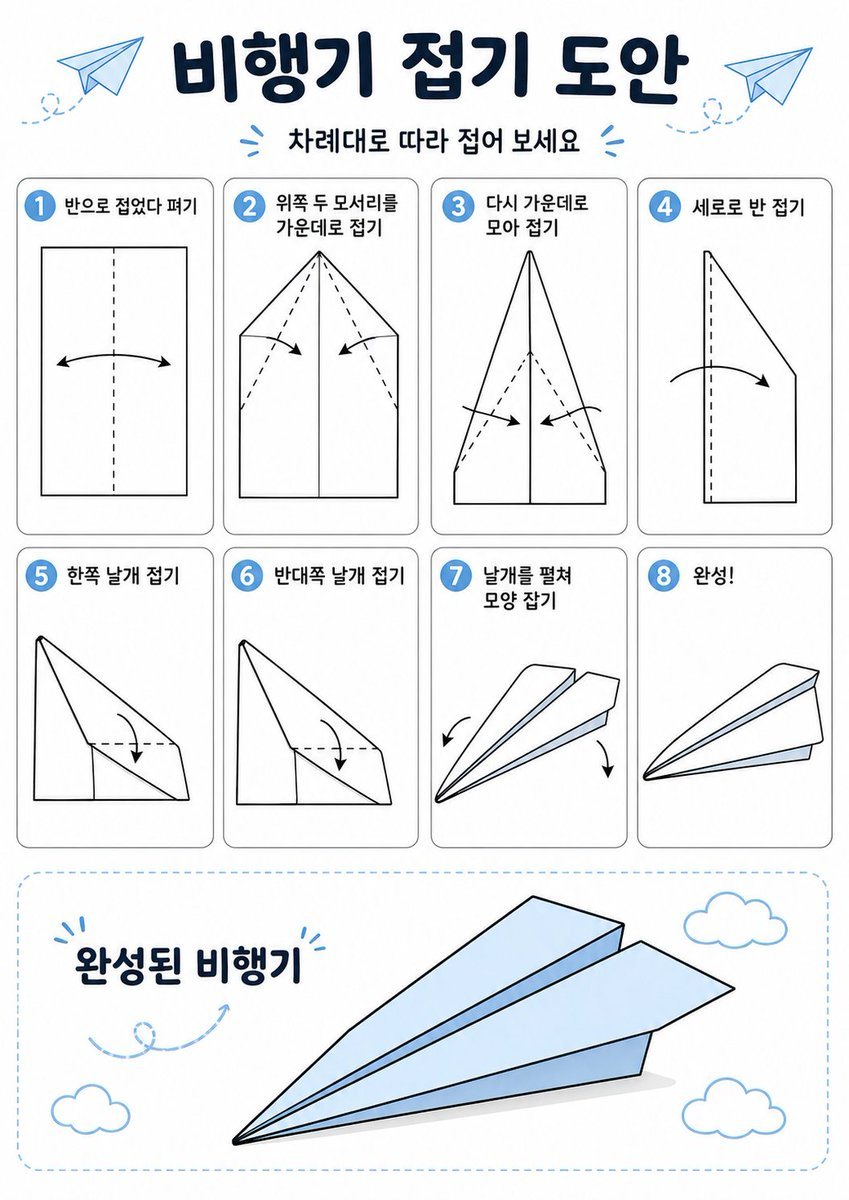
Prompt{"type":"origami instruction poster","topic":"paper airplane folding guide","language":"Korean","style":{"overall":"clean educational infographic, simple vector line art, friendly classroom worksheet aesthetic","palette":{"background":"white","primary":"dark navy","accent":"light sky blue","line":"black","shadow":"soft light gray"},"rendering":"flat 2D layout with crisp outlines and minimal shading"},"canvas":{"orientation":"portrait","margin":"generous white margins"},"header":{"title":"{argument name=\"headline text\" default=\"비행기 접기 도안\"}","subtitle":"{argument name=\"subtitle text\" default=\"차례대로 따라 접어 보세요\"}","decorations":{"paper_airplanes":2,"dashed_flight_paths":2,"blue_accent_marks":2}},"layout":{"grid":{"columns":4,"rows":2,"step_cards":8},"sections":[{"title":"steps row 1","position":"upper middle","count":4,"labels":["1 반으로 접었다 펴기","2 위쪽 두 모서리를 가운데로 접기","3 다시 가운데로 모아 접기","4 세로로 반 접기"]},{"title":"steps row 2","position":"middle","count":4,"labels":["5 한쪽 날개 접기","6 반대쪽 날개 접기","7 날개를 펼쳐 모양 잡기","8 완성!"]},{"title":"finished airplane display","position":"bottom","count":1,"labels":["완성된 비행기"]}]},"step_cards":[{"step":1,"badge":"1","text":"반으로 접었다 펴기","diagram":"vertical rectangle sheet with a centered vertical dashed fold line and a curved double-headed arrow indicating folding inward and reopening"},{"step":2,"badge":"2","text":"위쪽 두 모서리를 가운데로 접기","diagram":"paper with pointed top, both upper corners folded to the center line, dashed diagonal guide lines, two inward arrows"},{"step":3,"badge":"3","text":"다시 가운데로 모아 접기","diagram":"narrower pointed shape, side edges folded again toward the center line, dashed diagonal guides, two inward arrows near the lower middle"},{"step":4,"badge":"4","text":"세로로 반 접기","diagram":"side-view folded shape with a vertical dashed center line and one large curved arrow showing the model folded in half lengthwise"},{"step":5,"badge":"5","text":"한쪽 날개 접기","diagram":"triangular side-view airplane body with one wing folded downward, dashed horizontal guide near the top edge and a curved arrow"},{"step":6,"badge":"6","text":"반대쪽 날개 접기","diagram":"same side-view as step 5, folding the opposite wing downward with matching dashed guide and curved arrow"},{"step":7,"badge":"7","text":"날개를 펼쳐 모양 잡기","diagram":"3D paper airplane opening into shape, two curved arrows pointing downward and outward on each side"},{"step":8,"badge":"8","text":"완성!","diagram":"completed paper airplane in simple perspective, light blue top faces, black outline, no arrows"}],"bottom_panel":{"container":"large rounded rectangle with light blue dashed border","label":"완성된 비행기","main_object":"large completed paper airplane angled from lower left to upper right, pale blue surfaces with black outline and subtle gray shadow beneath","decorations":{"clouds":3,"swirl_arrow":1}},"text_style":{"title":"bold rounded Korean display font in dark navy","subtitle":"smaller bold Korean text","step_labels":"bold black Korean text","number_badges":"white numbers inside blue circles"}}