
Image2Studio
Examples

gpt-image-2

Using The Provided Reference Image As The Same Person And Body Base

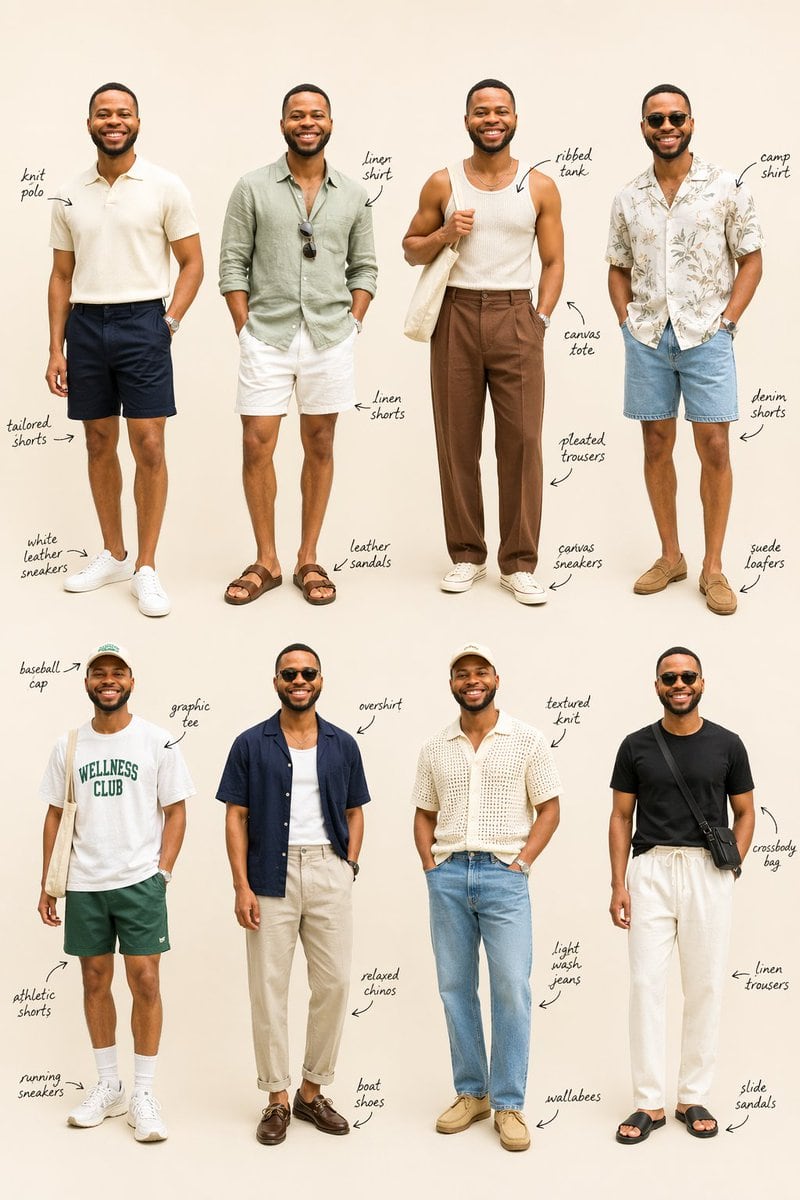
Using the provided reference image as the same person and body base, transform it into a clean men's summer fashion lookbook on a plain warm beige studio background. Keep the subject reco...

Using the provided reference image as the same person and body base, transform it into a clean men's summer fashion lookbook on a plain warm beige studio background. Keep the subject reco...
Prompt

Using the provided reference image as the same person and body base, transform it into a clean men's summer fashion lookbook on a plain warm beige studio background. Keep the subject recognizable, with the face intentionally blurred in every look, and generate 8 full-body outfit variations arranged in a 4-by-2 editorial grid. Add handwritten stylist notes with arrows labeling the key clothing items for each outfit. Top row look 1: cream knit polo, navy tailored shorts, white leather sneakers. Top row look 2: sage green linen shirt, white linen shorts, brown leather sandals, sunglasses hanging from the shirt. Top row look 3: off-white ribbed tank, brown pleated trousers, white canvas sneakers, cream canvas tote bag over one shoulder. Top row look 4: light camp-collar floral shirt, light blue denim shorts, tan suede loafers. Bottom row look 5: white graphic tee with green "WELLNESS CLUB" text, dark green athletic shorts, white running sneakers, white crew socks, light baseball cap, canvas tote bag. Bottom row look 6: navy short-sleeve overshirt worn open over a white tank, beige relaxed chinos, dark brown boat shoes. Bottom row look 7: cream textured knit short-sleeve shirt, light wash jeans, tan wallabees, light cap. Bottom row look 8: black fitted tee, white linen drawstring trousers, black slide sandals, black crossbody bag. Make it look like a polished fashion styling guide with realistic proportions, soft even lighting, minimal shadows, and elegant handwritten annotations beside each person.

Prompt structure
  • Modelgpt-image-2
  • Use casesocial-media-post
  • Stylephotorealistic, minimal, editorial, luxury
  • Aspect ratioFlexible
Best used for
  • Use casesocial-media-post
  • Stylephotorealistic, minimal, editorial, luxury
  • Recommended specs1:1, 4:5, 16:9, or 9:16
  • ModelGPT Image 2
How to customize

Use this Using The Provided Reference Image As The Same Person And Body Base prompt as a base. Replace the subject, product details, environment, lighting, brand colors, and output ratio while keeping the social-media-post intent and photorealistic, minimal, editorial, luxury direction stable.

Editable variables
  • SubjectReplace the product, person, scene, interface, or object being generated.
  • Use caseKeep or rewrite the destination as social media post, ad creative, cover image, poster, or ecommerce hero.
  • FrameChoose 1:1, 4:5, 16:9, or 9:16 based on the final placement.
  • Brand cuesAdd colors, materials, props, text-safe space, and the platform where the image will be used.
Recommended specs

Choose the frame for the destination first, then use 1K, 2K, or 4K based on output quality needs. Product images and posters usually benefit from higher resolution.

Pre-generation checklist
  • CheckSubject, lighting, composition, and frame are specific enough to review.
  • CheckText-safe space is included when the image will carry a headline or ad copy.
  • CheckResolution, credit cost, and final destination are checked before generation.
Why this prompt works

Using The Provided Reference Image As The Same Person And Body Base works because it starts from the image job, then controls subject, composition, lighting, style, and frame. It is best for social media post while keeping the photorealistic, minimal, editorial, luxury direction stable.

Common questions
  • Can I use it directly?Yes. Replace the subject, brand cues, and frame, then generate in Image2Studio.
  • Which ratio should I use?Choose 1:1, 4:5, 16:9, or 9:16 based on the destination.




