
Image2Studio
Examples

gpt-image-2

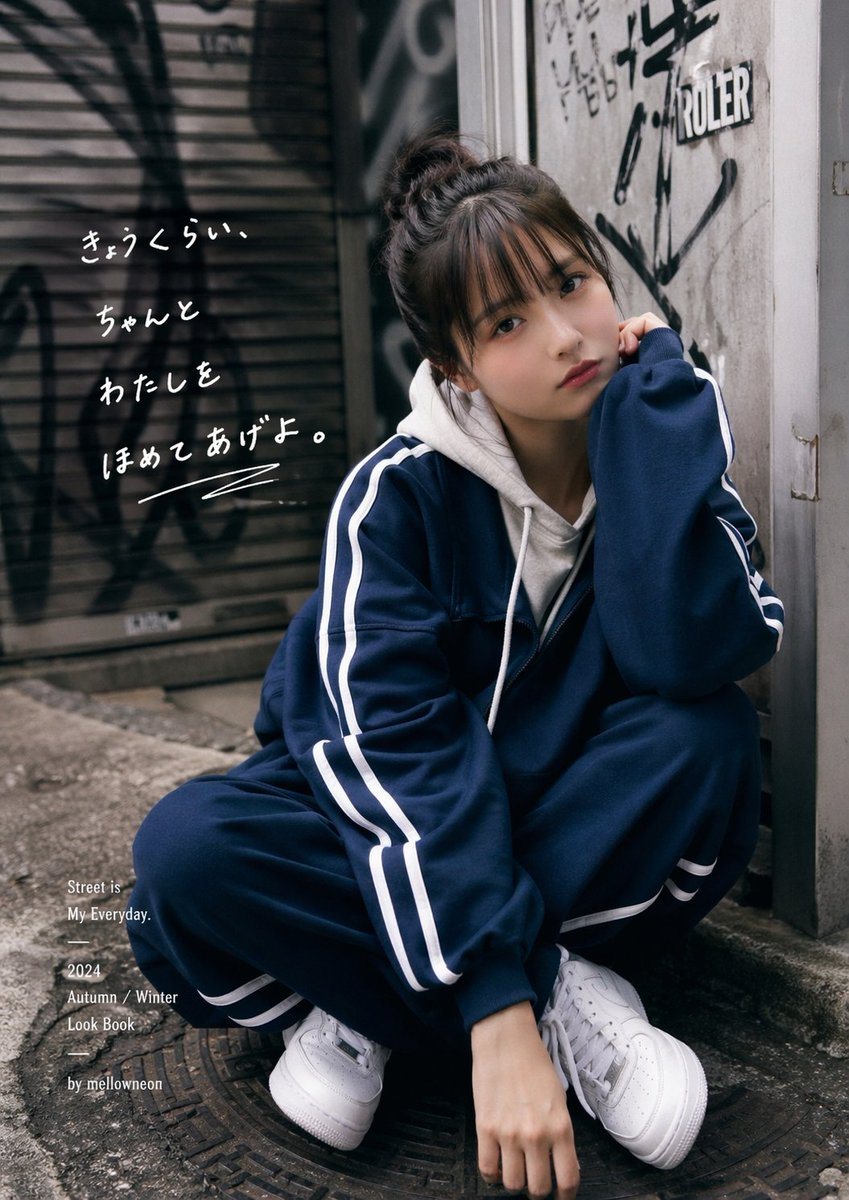
Moody Urban Fashion Editorial Photo Of A Young Woman Crouching In A Narr

A moody urban fashion editorial photo of a young woman crouching in a narrow alley beside a worn concrete wall covered with black graffiti and stickers, with a metal shutter in the backgr...

A moody urban fashion editorial photo of a young woman crouching in a narrow alley beside a worn concrete wall covered with black graffiti and stickers, with a metal shutter in the backgr...
Prompt

A moody urban fashion editorial photo of a young woman crouching in a narrow alley beside a worn concrete wall covered with black graffiti and stickers, with a metal shutter in the background also marked with graffiti. She wears a loose navy blue tracksuit with white side stripes, consisting of 2 visible outfit pieces: a zip-front track jacket and matching track pants, layered over a light gray or off-white hooded sweatshirt, and white chunky sneakers. Her hair is tied up in a messy bun, and she poses with one elbow on her knee and one hand near her face, giving a casual, introspective street-style look. The face area is obscured by a rectangular blur block. The composition is vertical, full-body to three-quarter body, slightly low angle, with soft natural overcast lighting, muted cinematic colors, shallow depth of field, realistic photography, high detail in fabric folds, pavement texture, and wall grime. Add 2 distinct text overlays integrated into the image: on the left upper side, handwritten white Japanese brush-style text reading {argument name="handwritten Japanese text" default="きゅっくらい、ちゃんと わたしを ほめてあげよ。"}; on the lower left, small elegant serif editorial text in white arranged in stacked lines reading exactly 5 lines: {argument name="editorial caption" default="Street is\nMy Everyday.\n2024\nAutumn / Winter\nLook Book"}, plus a small sixth credit line below reading {argument name="credit text" default="by mellovneon"}. Emphasize a Japanese streetwear lookbook aesthetic, candid yet styled, slightly gritty, premium fashion campaign feel.

Prompt structure
  • Modelgpt-image-2
  • Use casesocial-media-post
  • Stylephotorealistic, editorial, luxury, cinematic
  • Aspect ratioFlexible
Best used for
  • Use casesocial-media-post
  • Stylephotorealistic, editorial, luxury, cinematic
  • Recommended specs1:1, 4:5, 16:9, or 9:16
  • ModelGPT Image 2
How to customize

Use this Moody Urban Fashion Editorial Photo Of A Young Woman Crouching In A Narr prompt as a base. Replace the subject, product details, environment, lighting, brand colors, and output ratio while keeping the social-media-post intent and photorealistic, editorial, luxury, cinematic direction stable.

Editable variables
  • SubjectReplace the product, person, scene, interface, or object being generated.
  • Use caseKeep or rewrite the destination as social media post, ad creative, cover image, poster, or ecommerce hero.
  • FrameChoose 1:1, 4:5, 16:9, or 9:16 based on the final placement.
  • Brand cuesAdd colors, materials, props, text-safe space, and the platform where the image will be used.
Recommended specs

Choose the frame for the destination first, then use 1K, 2K, or 4K based on output quality needs. Product images and posters usually benefit from higher resolution.

Pre-generation checklist
  • CheckSubject, lighting, composition, and frame are specific enough to review.
  • CheckText-safe space is included when the image will carry a headline or ad copy.
  • CheckResolution, credit cost, and final destination are checked before generation.
Why this prompt works

Moody Urban Fashion Editorial Photo Of A Young Woman Crouching In A Narr works because it starts from the image job, then controls subject, composition, lighting, style, and frame. It is best for social media post while keeping the photorealistic, editorial, luxury, cinematic direction stable.

Common questions
  • Can I use it directly?Yes. Replace the subject, brand cues, and frame, then generate in Image2Studio.
  • Which ratio should I use?Choose 1:1, 4:5, 16:9, or 9:16 based on the destination.




