
Image2Studio
Examples

gpt-image-2

Create A Dramatic Vertical Dark-fantasy Poster In A Minecraft-inspired V

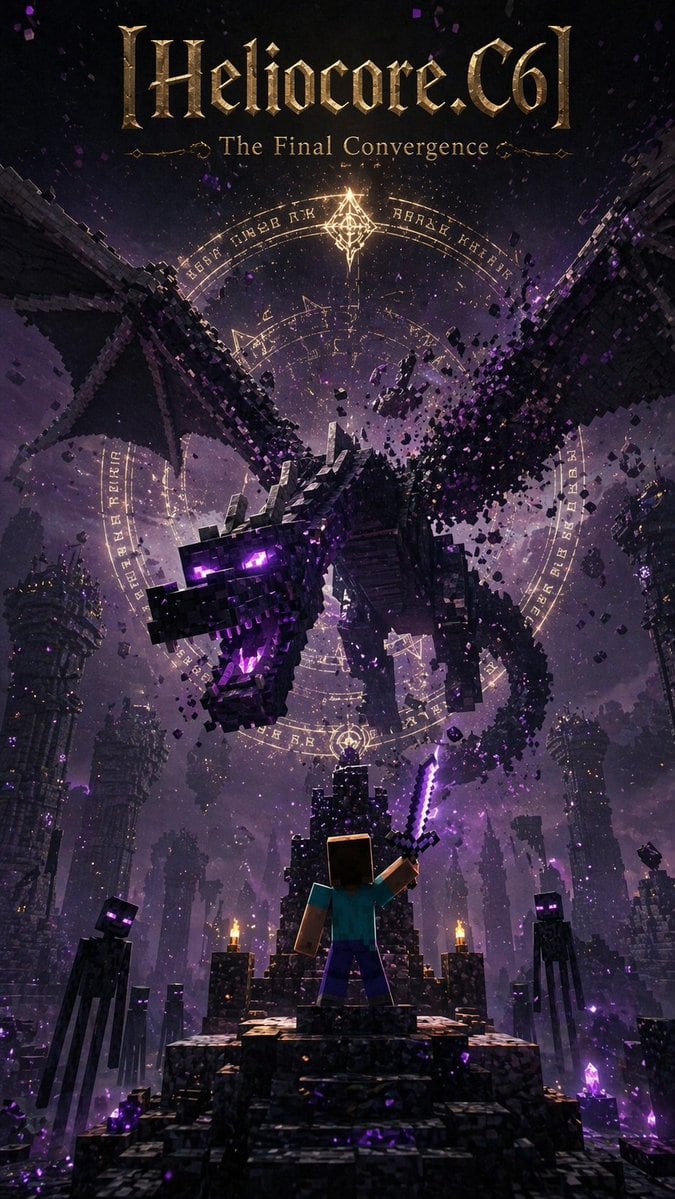
Create a dramatic vertical dark-fantasy poster in a Minecraft-inspired voxel style, like an epic movie or game cover. At the very top, place a large ornate metallic-gold blackletter title...

Create a dramatic vertical dark-fantasy poster in a Minecraft-inspired voxel style, like an epic movie or game cover. At the very top, place a large ornate metallic-gold blackletter title...
Prompt

Create a dramatic vertical dark-fantasy poster in a Minecraft-inspired voxel style, like an epic movie or game cover. At the very top, place a large ornate metallic-gold blackletter title reading {argument name="headline text" default="[Heliocore.C6]"}, with a smaller elegant serif subtitle beneath it reading {argument name="subtitle" default="The Final Convergence"}. The main scene shows 1 massive Ender Dragon made of black cubic blocks, flying forward and downward out of the sky with its wings spread wide, mouth open, glowing purple eyes, and violet energy in its throat, while chunks of voxel debris break apart around its body. Behind the dragon, place 3 large concentric glowing magic circles with arcane runes and geometric symbols in pale gold light, centered in the sky like a summoning seal. In the foreground, show 1 blocky hero seen from behind, resembling Steve, standing on a ruined stone staircase-throne and raising 1 glowing purple enchanted sword toward the dragon. Surround the platform with 4 visible Endermen total, tall and slender with black blocky bodies and glowing purple eyes, acting as ominous witnesses. The environment is an enormous ruined End-city style abyss with towering broken pillars, floating block fragments, crystal clusters, and distant structures fading into purple fog. Use a palette of black, charcoal, deep violet, magenta glow, and antique gold highlights, with cinematic volumetric lighting, heavy atmosphere, sparks, dust, magical particles, extreme scale, high contrast, and a polished ultra-detailed poster composition.

Prompt structure
  • Modelgpt-image-2
  • Use casesocial-media-post
  • Styleluxury, cinematic
  • Aspect ratioFlexible
Best used for
  • Use casesocial-media-post
  • Styleluxury, cinematic
  • Recommended specs1:1, 4:5, 16:9, or 9:16
  • ModelGPT Image 2
How to customize

Use this Create A Dramatic Vertical Dark-fantasy Poster In A Minecraft-inspired V prompt as a base. Replace the subject, product details, environment, lighting, brand colors, and output ratio while keeping the social-media-post intent and luxury, cinematic direction stable.

Editable variables
  • SubjectReplace the product, person, scene, interface, or object being generated.
  • Use caseKeep or rewrite the destination as social media post, ad creative, cover image, poster, or ecommerce hero.
  • FrameChoose 1:1, 4:5, 16:9, or 9:16 based on the final placement.
  • Brand cuesAdd colors, materials, props, text-safe space, and the platform where the image will be used.
Recommended specs

Choose the frame for the destination first, then use 1K, 2K, or 4K based on output quality needs. Product images and posters usually benefit from higher resolution.

Pre-generation checklist
  • CheckSubject, lighting, composition, and frame are specific enough to review.
  • CheckText-safe space is included when the image will carry a headline or ad copy.
  • CheckResolution, credit cost, and final destination are checked before generation.
Why this prompt works

Create A Dramatic Vertical Dark-fantasy Poster In A Minecraft-inspired V works because it starts from the image job, then controls subject, composition, lighting, style, and frame. It is best for social media post while keeping the luxury, cinematic direction stable.

Common questions
  • Can I use it directly?Yes. Replace the subject, brand cues, and frame, then generate in Image2Studio.
  • Which ratio should I use?Choose 1:1, 4:5, 16:9, or 9:16 based on the destination.




