
Image2Studio
Examples

gpt-image-2

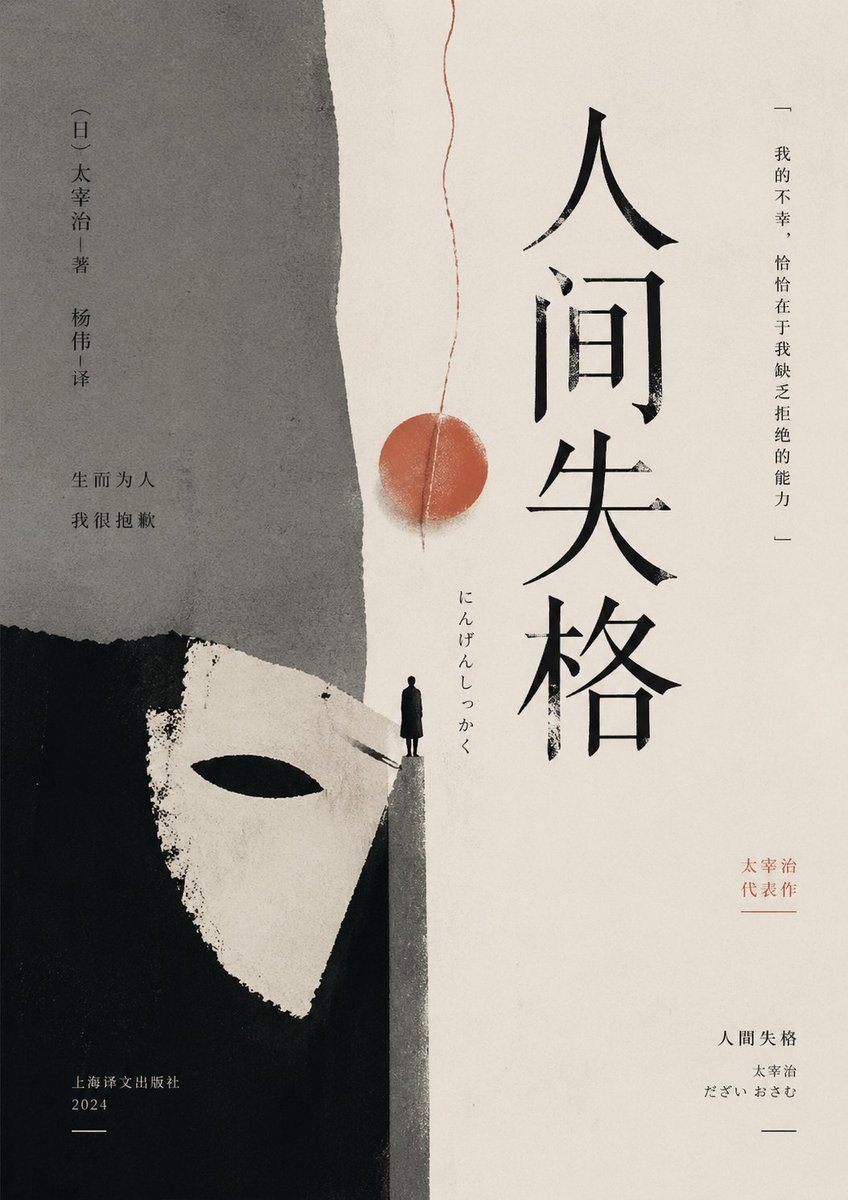
Minimalist No Longer Human Cover

A moody minimalist literary book cover prompt for generating an elegant East Asian edition of a classic novel with collage textures and symbolic imagery.

A moody minimalist literary book cover prompt for generating an elegant East Asian edition of a classic novel with collage textures and symbolic imagery.
Prompt

A minimalist literary book cover in a refined East Asian editorial style, portrait orientation, with a warm off-white paper background and subtle grainy print texture. The composition is vertically split into 2 large abstract fields: a rough torn gray paper shape occupying the upper left half, and a deep black painted block occupying the lower left corner. Emerging from the black area is 1 stark white theatrical mask shape with a single black eye slit, cropped large and angled upward, suggesting alienation and hidden identity. At the center-bottom where the gray and white fields meet, place 1 tiny solitary human figure in a long dark coat standing on a narrow triangular ledge, facing forward, emphasizing isolation and vulnerability. From near the top center, let 1 thin red thread descend vertically with a slight waviness, ending around the middle in 1 muted red circular seal-like disc, aligned above the figure. Set 1 large vertical title in bold expressive black Chinese calligraphy on the right-center: {argument name="title text" default="人间失格"}. Add 1 small vertical Japanese reading beside it: "にんげんしっかく". On the far right margin, add 1 vertical quote in fine black text: "—— 我的不幸,恰恰在于我缺乏拒绝的能力 ——". On the upper left, add 1 vertical author and translator credit in small black type: "【日】太宰治|著 杨伟|译". Below that, add 1 short two-line Chinese phrase in black: "生而为人\n我很抱歉". On the lower right, add 1 small red vertical note: "太宰治\n代表作". Beneath it add 1 small publication block in black with 3 lines: "人间失格", "太宰治", "だざい おさむ". On the lower left, add 1 publisher block in small black text: "上海译文出版社\n2024" with a short horizontal line beneath. Use restrained negative space, asymmetrical balance, raw paper collage edges, sumi-ink and gouache textures, muted charcoal black gray and faded vermilion palette, elegant literary melancholy, premium contemporary Chinese novel cover design.

Prompt structure
  • Modelgpt-image-2
  • Use casesocial-media-post
  • Styleminimal, luxury, editorial, watercolor
  • Aspect ratioFlexible
Best used for
  • Use casesocial-media-post
  • Styleminimal, luxury, editorial, watercolor
  • Recommended specs1:1, 4:5, 16:9, or 9:16
  • ModelGPT Image 2
How to customize

Use this Minimalist No Longer Human Cover prompt as a base. Replace the subject, product details, environment, lighting, brand colors, and output ratio while keeping the social-media-post intent and minimal, luxury, editorial, watercolor direction stable.

Editable variables
  • SubjectReplace the product, person, scene, interface, or object being generated.
  • Use caseKeep or rewrite the destination as social media post, ad creative, cover image, poster, or ecommerce hero.
  • FrameChoose 1:1, 4:5, 16:9, or 9:16 based on the final placement.
  • Brand cuesAdd colors, materials, props, text-safe space, and the platform where the image will be used.
Recommended specs

Choose the frame for the destination first, then use 1K, 2K, or 4K based on output quality needs. Product images and posters usually benefit from higher resolution.

Pre-generation checklist
  • CheckSubject, lighting, composition, and frame are specific enough to review.
  • CheckText-safe space is included when the image will carry a headline or ad copy.
  • CheckResolution, credit cost, and final destination are checked before generation.
Why this prompt works

Minimalist No Longer Human Cover works because it starts from the image job, then controls subject, composition, lighting, style, and frame. It is best for social media post while keeping the minimal, luxury, editorial, watercolor direction stable.

Common questions
  • Can I use it directly?Yes. Replace the subject, brand cues, and frame, then generate in Image2Studio.
  • Which ratio should I use?Choose 1:1, 4:5, 16:9, or 9:16 based on the destination.




