
Image2Studio
Examples

gpt-image-2

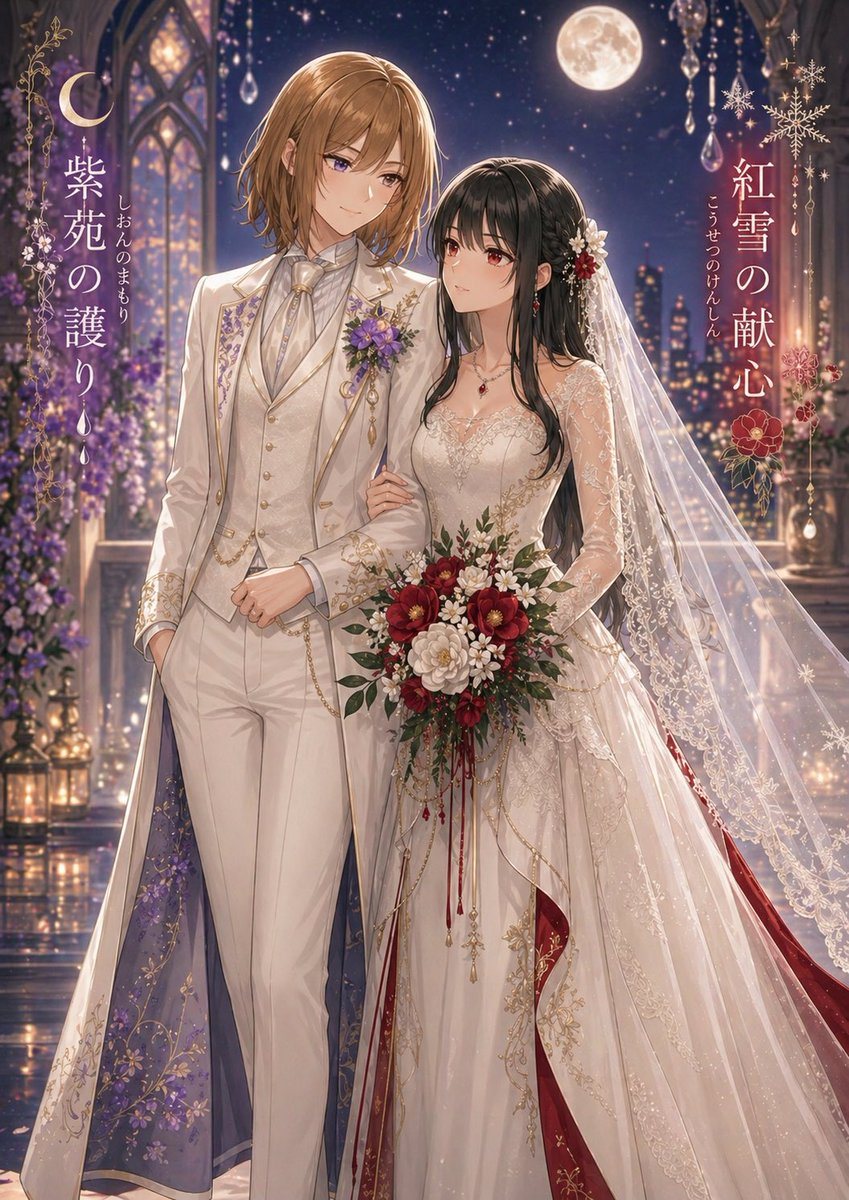
Moonlit Yuri Wedding Poster

This prompt generates a luxurious anime-style wedding poster of two brides in coordinated fantasy attire, ideal for original character pairings, romance key visuals, or decorative cover art.

This prompt generates a luxurious anime-style wedding poster of two brides in coordinated fantasy attire, ideal for original character pairings, romance key visuals, or decorative cover art.
Prompt

A romantic fantasy wedding illustration of two women standing arm in arm in a moonlit palace balcony at night, highly detailed anime style with luminous painterly rendering, elegant and dreamy. The taller woman on the left has {argument name="left character hair color" default="light brown"} shoulder-length softly layered hair and wears a regal ivory-white tailored wedding suit with gold embroidery, a high-collared ruffled shirt, cream vest, cravat, chain accessories, and a long ceremonial coat whose inner lining is deep violet with floral patterns; a purple flower corsage is pinned to her chest. The woman on the right has {argument name="right character hair color" default="black"} long wavy hair and wears an ornate bridal gown in ivory with gold lace embroidery, sheer lace sleeves, a fitted bodice, a very long translucent veil, and rich crimson inner panels and accents peeking from the skirt; she wears red gemstone jewelry and floral hair ornaments in white and red. She holds a large bouquet of red, burgundy, and white flowers with greenery and trailing red ribbons while gently linking arms with her partner. Set them before gothic arched windows, hanging crystal ornaments, glowing lanterns, purple flowers, a distant city skyline, a star-filled sky, and a bright full moon. Add decorative vertical Japanese title text integrated into the composition: on the left, {argument name="left title text" default="紫苑の護り"} with smaller vertical ruby text beside it; on the right, {argument name="right title text" default="紅雪の献心"} with smaller vertical ruby text beside it. Include crescent moon and snowflake-like decorative motifs framing the titles. Use a tall poster composition, full-body view, luxurious fabrics, sparkling highlights, soft bokeh, and an overall palette of ivory, gold, violet, crimson, and midnight blue.

Prompt structure
  • Modelgpt-image-2
  • Use casesocial-media-post
  • Styleluxury, anime, watercolor
  • Aspect ratioFlexible
Best used for
  • Use casesocial-media-post
  • Styleluxury, anime, watercolor
  • Recommended specs1:1, 4:5, 16:9, or 9:16
  • ModelGPT Image 2
How to customize

Use this Moonlit Yuri Wedding Poster prompt as a base. Replace the subject, product details, environment, lighting, brand colors, and output ratio while keeping the social-media-post intent and luxury, anime, watercolor direction stable.

Editable variables
  • SubjectReplace the product, person, scene, interface, or object being generated.
  • Use caseKeep or rewrite the destination as social media post, ad creative, cover image, poster, or ecommerce hero.
  • FrameChoose 1:1, 4:5, 16:9, or 9:16 based on the final placement.
  • Brand cuesAdd colors, materials, props, text-safe space, and the platform where the image will be used.
Recommended specs

Choose the frame for the destination first, then use 1K, 2K, or 4K based on output quality needs. Product images and posters usually benefit from higher resolution.

Pre-generation checklist
  • CheckSubject, lighting, composition, and frame are specific enough to review.
  • CheckText-safe space is included when the image will carry a headline or ad copy.
  • CheckResolution, credit cost, and final destination are checked before generation.
Why this prompt works

Moonlit Yuri Wedding Poster works because it starts from the image job, then controls subject, composition, lighting, style, and frame. It is best for social media post while keeping the luxury, anime, watercolor direction stable.

Common questions
  • Can I use it directly?Yes. Replace the subject, brand cues, and frame, then generate in Image2Studio.
  • Which ratio should I use?Choose 1:1, 4:5, 16:9, or 9:16 based on the destination.




