
Image2Studio
Prompts

gpt-image-2

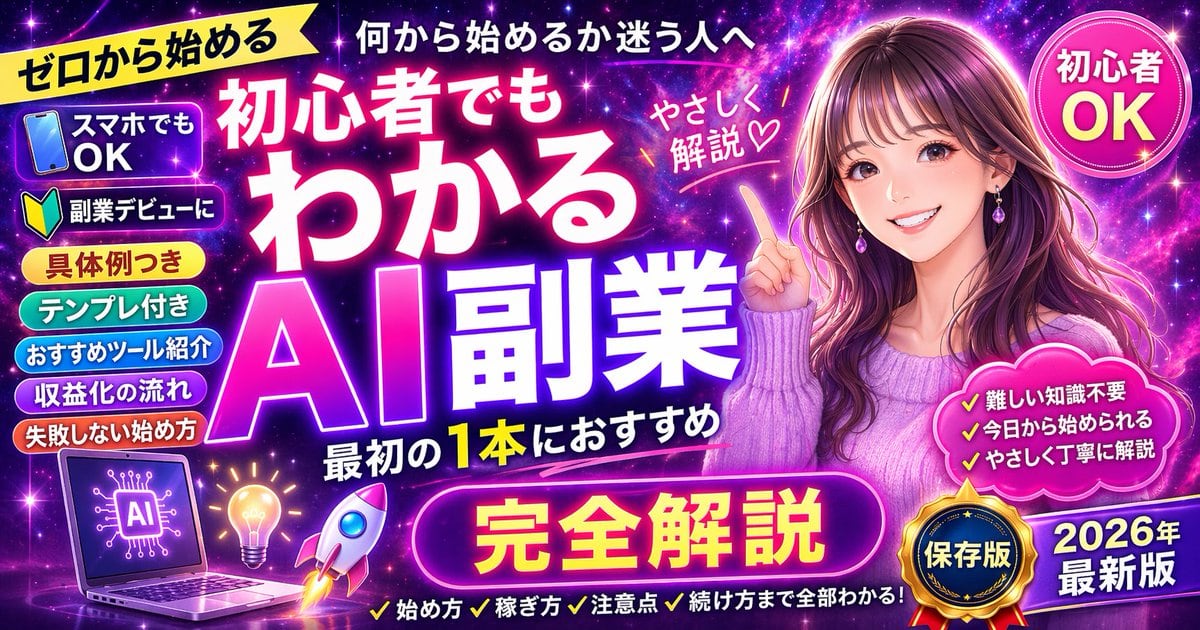
Promotional Banner Thumbnail

Structured promotional banner thumbnail prompt for GPT Image 2.

Structured promotional banner thumbnail prompt for GPT Image 2.
Prompt

{ "type": "promotional banner thumbnail", "style": "vibrant neon, cosmic galaxy background, anime illustration style, high-density Japanese typography, glowing text effects", "character": { "description": "smiling young woman pointing upwards with right index finger", "appearance": "long {argument name=\"character hair color\" default=\"brown\"} hair, purple drop earrings, textured purple sweater", "position": "right side" }, "layout": { "background": "purple, pink, and blue starry space nebula", "center_typography": { "top_small_text": "何から始めるか迷う人へ", "main_title": "{argument name=\"main title\" default=\"初心者でもわかる AI副業\"}", "subtitle": "最初の1本におすすめ", "floating_text_near_character": "やさしく解説♡" }, "top_left": { "yellow_ribbon": "{argument name=\"top left ribbon text\" default=\"ゼロから始める\"}" }, "top_right": { "pink_circle_badge": "初心者 OK" }, "left_column": { "count": 7, "description": "stack of pill-shaped badges", "labels": [ "スマホでもOK (with phone icon)", "副業デビューに (with beginner mark icon)", "具体例つき", "テンプレ付き", "おすすめツール紹介", "収益化の流れ", "失敗しない始め方" ] }, "bottom_left_graphics": { "count": 3, "items": [ "laptop displaying an AI circuit brain graphic", "glowing lightbulb", "rocket ship taking off" ] }, "bottom_center": { "large_purple_button": "{argument name=\"bottom center button text\" default=\"完全解説\"}", "checklist_text_below": "✓始め方 ✓稼ぎ方 ✓注意点 ✓続け方まで全部わかる!" }, "bottom_right": { "pink_cloud_shape": { "count": 3, "bullet_points": [ "✓難しい知識不要", "✓今日から始められる", "✓やさしく丁寧に解説" ] }, "gold_medal_seal": "保存版", "purple_badge": "{argument name=\"year badge text\" default=\"2026年 最新版\"}" } } }

Prompt structure
  • Modelgpt-image-2
  • Use caseyoutube-thumbnail
  • Stylecyberpunk, anime, editorial, watercolor
  • Aspect ratioFlexible
Best used for
  • Use caseyoutube-thumbnail
  • Stylecyberpunk, anime, editorial, watercolor
  • Recommended specs1:1, 4:5, 16:9, or 9:16
  • ModelGPT Image 2
How to customize

Use this Promotional Banner Thumbnail prompt as a base. Replace the subject, product details, environment, lighting, brand colors, and output ratio while keeping the youtube-thumbnail intent and cyberpunk, anime, editorial, watercolor direction stable.

Editable variables
  • SubjectReplace the product, person, scene, interface, or object being generated.
  • Use caseKeep or rewrite the destination as youtube thumbnail, ad creative, cover image, poster, or ecommerce hero.
  • FrameChoose 1:1, 4:5, 16:9, or 9:16 based on the final placement.
  • Brand cuesAdd colors, materials, props, text-safe space, and the platform where the image will be used.
Recommended specs

Choose the frame for the destination first, then use 1K, 2K, or 4K based on output quality needs. Product images and posters usually benefit from higher resolution.

Pre-generation checklist
  • CheckSubject, lighting, composition, and frame are specific enough to review.
  • CheckText-safe space is included when the image will carry a headline or ad copy.
  • CheckResolution, credit cost, and final destination are checked before generation.
Why this prompt works

Promotional Banner Thumbnail works because it starts from the image job, then controls subject, composition, lighting, style, and frame. It is best for youtube thumbnail while keeping the cyberpunk, anime, editorial, watercolor direction stable.

Common questions
  • Can I use it directly?Yes. Replace the subject, brand cues, and frame, then generate in Image2Studio.
  • Which ratio should I use?Choose 1:1, 4:5, 16:9, or 9:16 based on the destination.




