
Image2Studio
Examples

gpt-image-2

Create A Glossy

Create a glossy, hyper-saturated social media ad poster for a futuristic beauty product launch, designed like a Canva marketing graphic. The composition is a single widescreen promotional...

Create a glossy, hyper-saturated social media ad poster for a futuristic beauty product launch, designed like a Canva marketing graphic. The composition is a single widescreen promotional...
Prompt

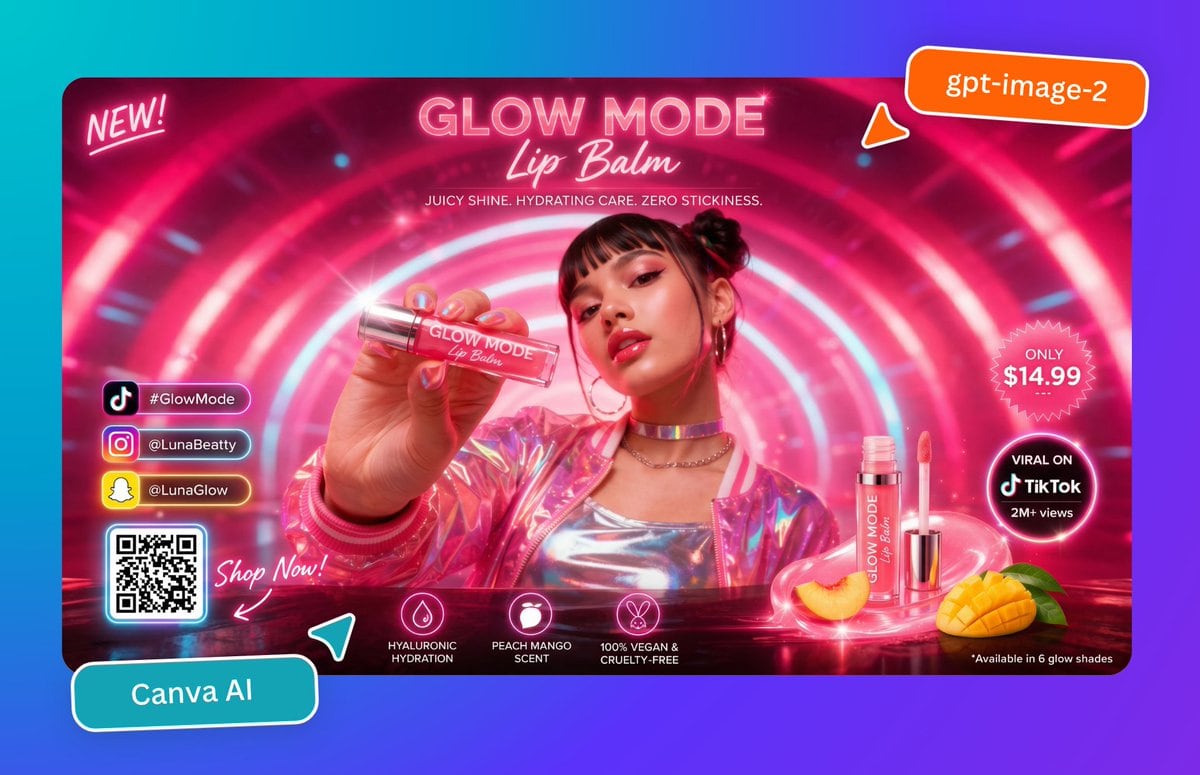
Create a glossy, hyper-saturated social media ad poster for a futuristic beauty product launch, designed like a Canva marketing graphic. The composition is a single widescreen promotional banner centered on a cyan-to-purple gradient background, with rounded corners and a vivid neon pink color palette. Inside the banner, show a young woman from the chest up in a glowing sci-fi tunnel made of concentric pink and white light rings. Her face is obscured by a soft square blur block, but her hair is styled in two small buns, and she wears hoop earrings, layered chain necklaces, a metallic silver top, and an iridescent pink holographic jacket. She extends one hand toward the camera holding a clear lip balm tube close to the lens, creating strong foreground perspective. The tube label reads “GLOW MODE Lip Balm.” At the top center, large neon headline text reads “GLOW MODE” with a script subtitle “Lip Balm,” and below it a smaller line reads “JUICY SHINE. HYDRATING CARE. ZERO STICKINESS.” In the upper left corner, add a handwritten neon note reading “NEW!” In the upper right corner, place an orange rounded sticker with white text reading “gpt-image-2,” plus a small orange pointer tab beneath it. On the right side of the banner, include 2 circular callout badges: a pink starburst badge that says “ONLY $14.99” and a black glowing circular badge that says “VIRAL ON TikTok 2M+ views.” At the lower right, show 2 product display elements: one upright open lip balm tube with wand applicator beside it, and one whole sliced peach plus one cut mango half with green leaves, all sitting on a glossy reflective surface with pink light swirls. Along the lower center, add 3 feature icons with labels: a droplet icon labeled “HYALURONIC HYDRATION,” a fruit icon labeled “PEACH MANGO SCENT,” and a bunny icon labeled “100% VEGAN & CRUELTY-FREE.” In the lower left inside the banner, add a vertical stack of 3 social buttons with platform icons and handles: TikTok with “#GlowMode,” Instagram with “@LunaBeatty,” and Snapchat with “@LunaGlow.” Beneath them place 1 glowing QR code card, and next to it handwritten script text reading “Shop Now!” with an arrow pointing toward the QR code. Outside the banner at the bottom left, place a tilted teal rounded label reading “Canva AI,” with a small teal paper-plane style accent nearby. Add glossy reflections, lens flares, bloom, neon rim lighting, sparkles, and polished ad-design styling throughout, with crisp commercial product photography mixed with futuristic graphic design.

Prompt structure
  • Modelgpt-image-2
  • Use casesocial-media-post
  • Stylecyberpunk, photorealistic
  • Aspect ratioFlexible
Best used for
  • Use casesocial-media-post
  • Stylecyberpunk, photorealistic
  • Recommended specs1:1, 4:5, 16:9, or 9:16
  • ModelGPT Image 2
How to customize

Use this Create A Glossy prompt as a base. Replace the subject, product details, environment, lighting, brand colors, and output ratio while keeping the social-media-post intent and cyberpunk, photorealistic direction stable.

Editable variables
  • SubjectReplace the product, person, scene, interface, or object being generated.
  • Use caseKeep or rewrite the destination as social media post, ad creative, cover image, poster, or ecommerce hero.
  • FrameChoose 1:1, 4:5, 16:9, or 9:16 based on the final placement.
  • Brand cuesAdd colors, materials, props, text-safe space, and the platform where the image will be used.
Recommended specs

Choose the frame for the destination first, then use 1K, 2K, or 4K based on output quality needs. Product images and posters usually benefit from higher resolution.

Pre-generation checklist
  • CheckSubject, lighting, composition, and frame are specific enough to review.
  • CheckText-safe space is included when the image will carry a headline or ad copy.
  • CheckResolution, credit cost, and final destination are checked before generation.
Why this prompt works

Create A Glossy works because it starts from the image job, then controls subject, composition, lighting, style, and frame. It is best for social media post while keeping the cyberpunk, photorealistic direction stable.

Common questions
  • Can I use it directly?Yes. Replace the subject, brand cues, and frame, then generate in Image2Studio.
  • Which ratio should I use?Choose 1:1, 4:5, 16:9, or 9:16 based on the destination.




