
Image2Studio
Examples

gpt-image-2

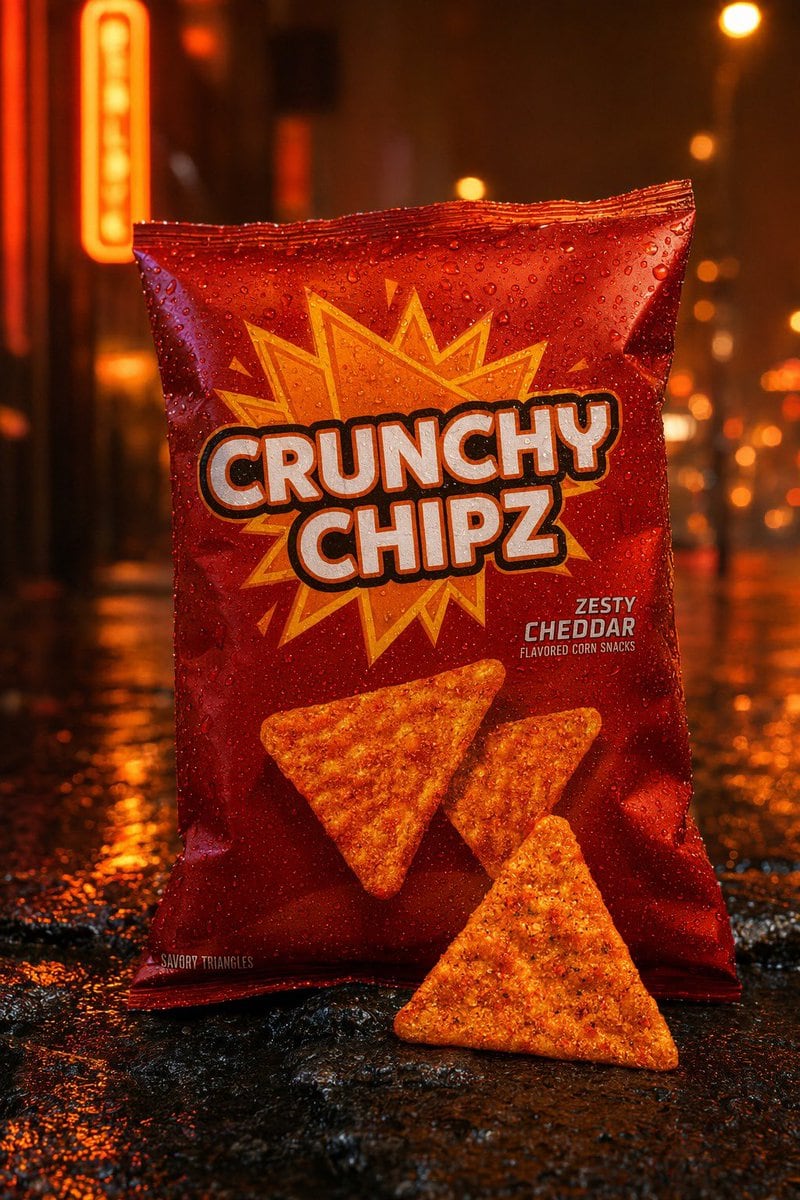
Cinematic Commercial Product Photo Of A Glossy Red Snack Bag Standing Up

A cinematic commercial product photo of a glossy red snack bag standing upright on a wet city street at night, centered in frame, shot straight-on at eye level with shallow depth of field...

A cinematic commercial product photo of a glossy red snack bag standing upright on a wet city street at night, centered in frame, shot straight-on at eye level with shallow depth of field...
Prompt

A cinematic commercial product photo of a glossy red snack bag standing upright on a wet city street at night, centered in frame, shot straight-on at eye level with shallow depth of field and dramatic orange neon lighting. The package is covered in realistic water droplets and reflects warm streetlights. The brand name on the bag reads {argument name="brand name" default="CRUNCHY CHIPZ"} in very large bold white bubble letters with a thick dark outline, stacked across two lines in the center. Behind the logo is a jagged yellow-orange comic-style starburst graphic. In the lower right area of the bag, smaller printed flavor text reads {argument name="flavor text" default="ZESTY CHEDDAR"}, with tiny subtext below reading "FLAVORED CORN SNACKS." Near the bottom left edge of the bag, tiny text reads "SAVORY TRIANGLES." Show exactly 3 triangular corn chips total: 2 printed on the front of the bag and 1 real chip placed on the wet pavement in front of the package, leaning slightly back. The chips are orange, heavily seasoned, and textured. The background is a moody urban alley with blurred neon signs and round bokeh lights, all in deep amber, orange, and red tones, with glossy reflections on the rain-soaked ground. Ultra-detailed advertising photography, high contrast, sharp focus on the bag and front chip, premium snack packaging mockup, realistic condensation, rich saturated colors, studio-quality product retouching blended with a rainy street lifestyle setting.

Prompt structure
  • Modelgpt-image-2
  • Use casesocial-media-post
  • Stylephotorealistic, cyberpunk, cinematic, luxury
  • Aspect ratioFlexible
Best used for
  • Use casesocial-media-post
  • Stylephotorealistic, cyberpunk, cinematic, luxury
  • Recommended specs1:1, 4:5, 16:9, or 9:16
  • ModelGPT Image 2
How to customize

Use this Cinematic Commercial Product Photo Of A Glossy Red Snack Bag Standing Up prompt as a base. Replace the subject, product details, environment, lighting, brand colors, and output ratio while keeping the social-media-post intent and photorealistic, cyberpunk, cinematic, luxury direction stable.

Editable variables
  • SubjectReplace the product, person, scene, interface, or object being generated.
  • Use caseKeep or rewrite the destination as social media post, ad creative, cover image, poster, or ecommerce hero.
  • FrameChoose 1:1, 4:5, 16:9, or 9:16 based on the final placement.
  • Brand cuesAdd colors, materials, props, text-safe space, and the platform where the image will be used.
Recommended specs

Choose the frame for the destination first, then use 1K, 2K, or 4K based on output quality needs. Product images and posters usually benefit from higher resolution.

Pre-generation checklist
  • CheckSubject, lighting, composition, and frame are specific enough to review.
  • CheckText-safe space is included when the image will carry a headline or ad copy.
  • CheckResolution, credit cost, and final destination are checked before generation.
Why this prompt works

Cinematic Commercial Product Photo Of A Glossy Red Snack Bag Standing Up works because it starts from the image job, then controls subject, composition, lighting, style, and frame. It is best for social media post while keeping the photorealistic, cyberpunk, cinematic, luxury direction stable.

Common questions
  • Can I use it directly?Yes. Replace the subject, brand cues, and frame, then generate in Image2Studio.
  • Which ratio should I use?Choose 1:1, 4:5, 16:9, or 9:16 based on the destination.




