
Image2Studio
Examples

gpt-image-2

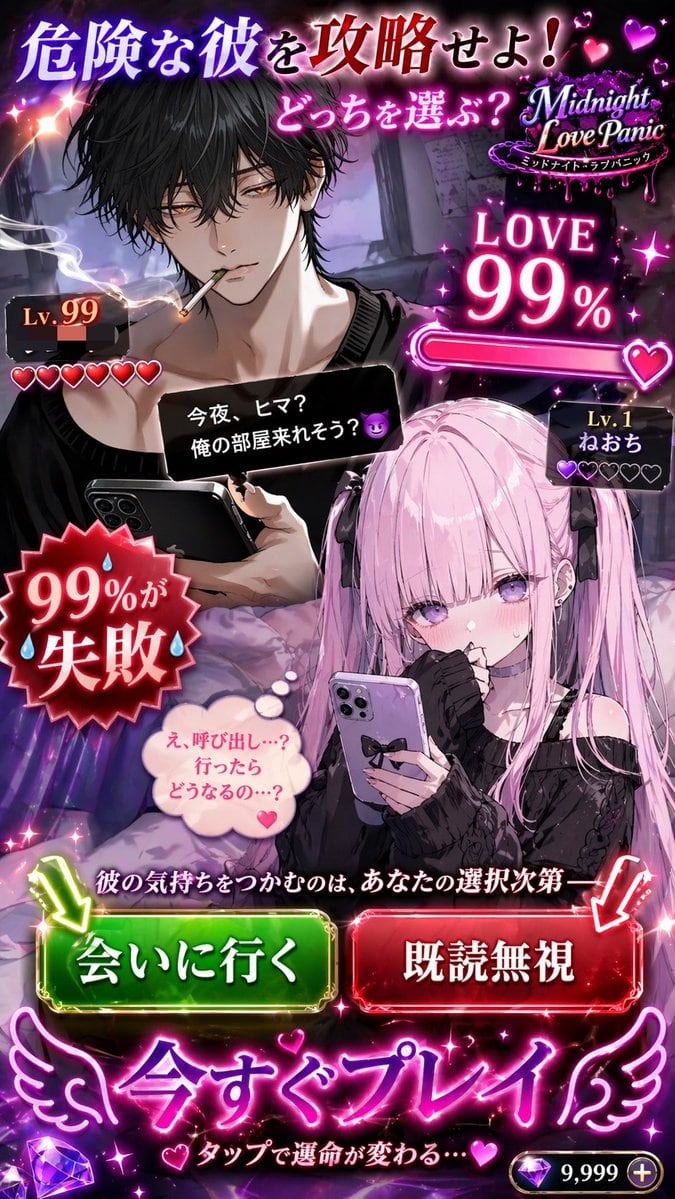
Otome Game Choice Ad Mockup

Generates a mobile visual novel advertisement featuring two characters, status UI, and interactive choice buttons.

Generates a mobile visual novel advertisement featuring two characters, status UI, and interactive choice buttons.
Prompt

{ "type": "mobile otome game advertisement mockup", "characters": { "male_target": "{argument name=\"male character description\" default=\"handsome young man with messy black hair, golden eyes, smoking a cigarette, holding a smartphone\"}", "female_player": "{argument name=\"female character description\" default=\"cute anime girl with pink twin-tails, purple eyes, blushing, holding a smartphone\"}" }, "layout": { "top_section": { "main_headline": "危険な彼を攻略せよ!", "sub_headline": "どっちを選ぶ?", "game_logo": "{argument name=\"game title\" default=\"Midnight Love Panic\"}" }, "status_ui": { "love_meter": "LOVE 99% with a nearly full pink progress bar", "male_level": "Lv.99 with 6 hearts (5 filled red, 1 empty)", "female_level": "Lv.1 ねおち with 5 hearts (1 filled purple, 4 empty)" }, "interaction_elements": { "male_message_box": "{argument name=\"male chat message\" default=\"今夜、ヒマ?俺の部屋来れそう?😈\"}", "female_thought_bubble": "え、呼び出し…?行ったらどうなるの…?", "warning_badge": "Red jagged starburst reading 99%が失敗 with sweat drops" }, "decision_section": { "prompt_text": "彼の気持ちをつかむのは、あなたの選択次第——", "buttons": [ { "color": "green", "text": "{argument name=\"choice 1 text\" default=\"会いに行く\"}", "indicator": "downward green arrow" }, { "color": "red", "text": "既読無視", "indicator": "downward red arrow" } ] }, "bottom_section": { "call_to_action": "今すぐプレイ with angel wings", "sub_text": "タップで運命が変わる…", "currency_display": "9,999 + with a purple diamond icon" } } }

Prompt structure
  • Modelgpt-image-2
  • Use caseapp-ui-mockup
  • Styleanime, editorial
  • Aspect ratioFlexible
Best used for
  • Use caseapp-ui-mockup
  • Styleanime, editorial
  • Recommended specs1:1, 4:5, 16:9, or 9:16
  • ModelGPT Image 2
How to customize

Use this Otome Game Choice Ad Mockup prompt as a base. Replace the subject, product details, environment, lighting, brand colors, and output ratio while keeping the app-ui-mockup intent and anime, editorial direction stable.

Editable variables
  • SubjectReplace the product, person, scene, interface, or object being generated.
  • Use caseKeep or rewrite the destination as app ui mockup, ad creative, cover image, poster, or ecommerce hero.
  • FrameChoose 1:1, 4:5, 16:9, or 9:16 based on the final placement.
  • Brand cuesAdd colors, materials, props, text-safe space, and the platform where the image will be used.
Recommended specs

Choose the frame for the destination first, then use 1K, 2K, or 4K based on output quality needs. Product images and posters usually benefit from higher resolution.

Pre-generation checklist
  • CheckSubject, lighting, composition, and frame are specific enough to review.
  • CheckText-safe space is included when the image will carry a headline or ad copy.
  • CheckResolution, credit cost, and final destination are checked before generation.
Why this prompt works

Otome Game Choice Ad Mockup works because it starts from the image job, then controls subject, composition, lighting, style, and frame. It is best for app ui mockup while keeping the anime, editorial direction stable.

Common questions
  • Can I use it directly?Yes. Replace the subject, brand cues, and frame, then generate in Image2Studio.
  • Which ratio should I use?Choose 1:1, 4:5, 16:9, or 9:16 based on the destination.




