
Image2Studio
Prompts

gpt-image-2

Create An "Out The Window" Meme-style Four-panel Comic Titled "How To Im

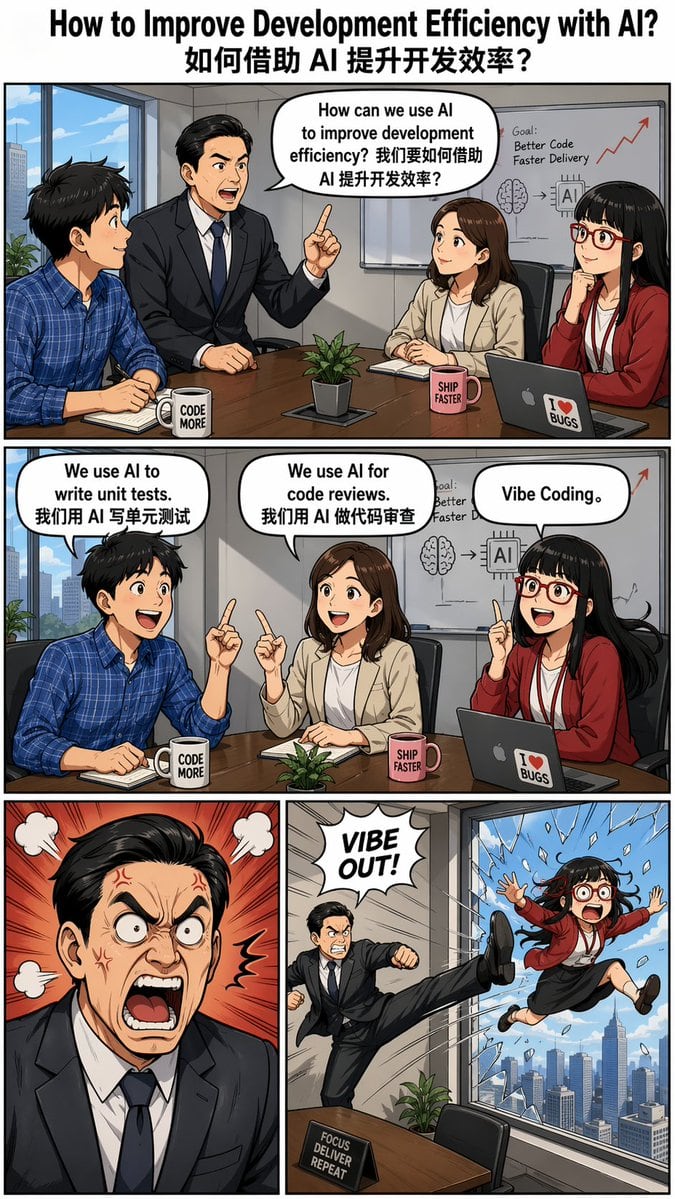
Create an "Out the Window" meme-style four-panel comic titled "How to Improve Development Efficiency with AI? 如何借助 AI 提升开发效率?", featuring dialogues in speech bubbles. --ar 9:16 Characters...

Create an "Out the Window" meme-style four-panel comic titled "How to Improve Development Efficiency with AI? 如何借助 AI 提升开发效率?", featuring dialogues in speech bubbles. --ar 9:16 Characters...
Prompt

Create an "{argument name="meme style" default="Out the Window"}" meme-style four-panel comic titled "{argument name="title" default="How to Improve Development Efficiency with AI? 如何借助 AI 提升开发效率?"}", featuring dialogues in speech bubbles. --ar 9:16 Characters: - Boss: Asian male wearing a suit, with neatly parted hair. - Employee Xiaoming: Male, wearing a blue checkered shirt. - Employee Xiaohong: Female. - Employee Xiaohu: Female, Asian, straight bangs hairstyle, wearing red-framed glasses. Panel Descriptions: - Top panel (single wide panel): The boss asks during a meeting: "How can we use AI to improve development efficiency? 我们要如何借助 AI 提升开发效率?" Three employees sit listening. - Second panel (single wide panel): Each employee responds individually: - Xiaoming: "We use AI to write unit tests. 我们用 AI 写单元测试" - Xiaohong: "We use AI for code reviews. 我们用 AI 做代码审查" - Xiaohu: “Vibe Coding。” - Third row (two panels): - Left panel: The boss looks furious. - Right panel: Employee Xiaohu is humorously kicked out of a high-rise window.

Prompt structure
  • Modelgpt-image-2
  • Use casesocial-media-post
  • Styleprompt-defined style
  • Aspect ratioFlexible
Best used for
  • Use casesocial-media-post
  • Styleprompt-defined style
  • Recommended specs1:1, 4:5, 16:9, or 9:16
  • ModelGPT Image 2
How to customize

Use this Create An "Out The Window" Meme-style Four-panel Comic Titled "How To Im prompt as a base. Replace the subject, product details, environment, lighting, brand colors, and output ratio while keeping the social-media-post intent and the visual style direction stable.

Editable variables
  • SubjectReplace the product, person, scene, interface, or object being generated.
  • Use caseKeep or rewrite the destination as social media post, ad creative, cover image, poster, or ecommerce hero.
  • FrameChoose 1:1, 4:5, 16:9, or 9:16 based on the final placement.
  • Brand cuesAdd colors, materials, props, text-safe space, and the platform where the image will be used.
Recommended specs

Choose the frame for the destination first, then use 1K, 2K, or 4K based on output quality needs. Product images and posters usually benefit from higher resolution.

Pre-generation checklist
  • CheckSubject, lighting, composition, and frame are specific enough to review.
  • CheckText-safe space is included when the image will carry a headline or ad copy.
  • CheckResolution, credit cost, and final destination are checked before generation.
Why this prompt works

Create An "Out The Window" Meme-style Four-panel Comic Titled "How To Im works because it starts from the image job, then controls subject, composition, lighting, style, and frame. It is best for social media post while keeping the prompt-defined style direction stable.

Common questions
  • Can I use it directly?Yes. Replace the subject, brand cues, and frame, then generate in Image2Studio.
  • Which ratio should I use?Choose 1:1, 4:5, 16:9, or 9:16 based on the destination.