
Image2Studio
Examples

gpt-image-2

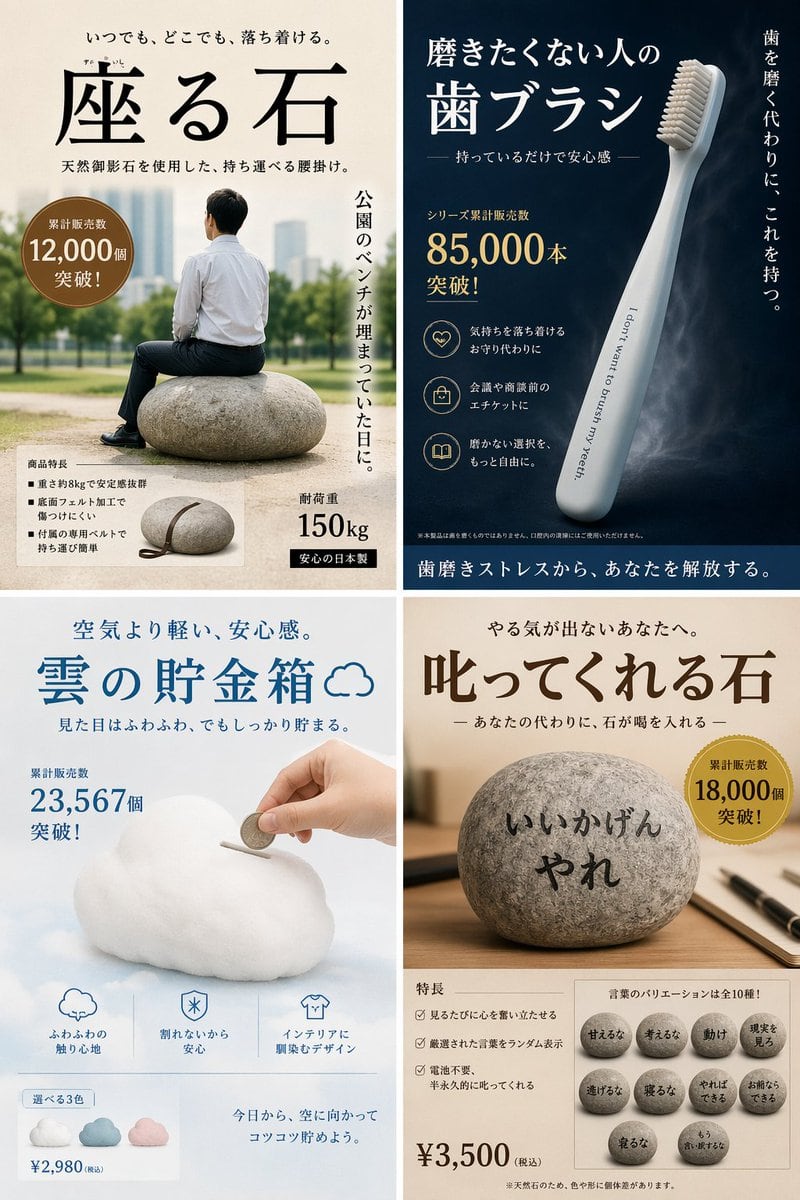
Satirical 4-Panel Product Ads

Generates a 4-panel grid of humorous, fictional product advertisements with detailed Japanese typography, badges, and feature lists.

Generates a 4-panel grid of humorous, fictional product advertisements with detailed Japanese typography, badges, and feature lists.
Prompt

{ "type": "4-panel satirical product advertisement grid", "layout": { "grid": "2x2", "panels": [ { "position": "top-left", "product_name": "{argument name=\"top left product name\" default=\"座る石\"}", "visual": "man in white shirt and dark pants sitting on a large round stone in a park", "catchphrase": "いつでも、どこでも、落ち着ける。", "sales_badge": "累計販売数 12,000個 突破!", "vertical_text": "公園のベンチが埋まっていた日に。", "features_count": 3, "features_labels": [ "重さ約8kgで安定感抜群", "底面フェルト加工で傷つけにくい", "付属の専用ベルトで持ち運び簡単" ], "extra_visual": "small inset image of the stone with a leather carrying strap", "specs": [ "耐荷重 150kg", "安心の日本製" ] }, { "position": "top-right", "product_name": "{argument name=\"top right product name\" default=\"磨きたくない人の歯ブラシ\"}", "visual": "sleek light blue toothbrush angled diagonally on a dark blue background", "toothbrush_text": "I don't want to brush my yeeth.", "catchphrase": "持っているだけで安心感", "vertical_text": "歯を磨く代わりに、これを持つ。", "sales_badge": "シリーズ累計販売数 85,000本 突破!", "features_count": 3, "features_labels": [ "気持ちを落ち着けるお守り代わりに", "会議や商談前のエチケットに", "磨かない選択を、もっと自由に。" ], "bottom_banner": "歯磨きストレスから、あなたを解放する。" }, { "position": "bottom-left", "product_name": "{argument name=\"bottom left product name\" default=\"雲の貯金箱\"}", "visual": "hand inserting a coin into a fluffy white cloud-shaped piggy bank", "catchphrase": "空気より軽い、安心感。", "sales_badge": "累計販売数 23,567個 突破!", "features_count": 3, "features_labels": [ "ふわふわの触り心地", "割れないから安心", "インテリアに馴染むデザイン" ], "color_variants_count": 3, "color_variants_labels": [ "blue", "pink", "white" ], "price": "¥2,980 (税込)", "bottom_text": "今日から、空に向かってコツコツ貯めよう。" }, { "position": "bottom-right", "product_name": "{argument name=\"bottom right product name\" default=\"叱ってくれる石\"}", "visual": "round stone on a wooden desk with a pen, text written on the stone", "stone_text": "{argument name=\"scolding phrase\" default=\"いいかげんやれ\"}", "catchphrase": "やる気が出ないあなたへ。", "sales_badge": "累計販売数 18,000個 突破!", "features_count": 3, "features_labels": [ "見るたびに心を奮い立たせる", "厳選された言葉をランダム表示", "電池不要、半永久的に叱ってくれる" ], "phrase_variants_count": 10, "phrase_variants_labels": [ "甘えるな", "考えるな", "動け", "現実を見ろ", "逃げるな", "寝るな", "やればできる", "お前ならできる", "寝るな", "もう言い訳するな" ], "price": "¥3,500 (税込)" } ] } }

Prompt structure
  • Modelgpt-image-2
  • Use casesocial-media-post
  • Styleeditorial
  • Aspect ratioFlexible
Best used for
  • Use casesocial-media-post
  • Styleeditorial
  • Recommended specs1:1, 4:5, 16:9, or 9:16
  • ModelGPT Image 2
How to customize

Use this Satirical 4-Panel Product Ads prompt as a base. Replace the subject, product details, environment, lighting, brand colors, and output ratio while keeping the social-media-post intent and editorial direction stable.

Editable variables
  • SubjectReplace the product, person, scene, interface, or object being generated.
  • Use caseKeep or rewrite the destination as social media post, ad creative, cover image, poster, or ecommerce hero.
  • FrameChoose 1:1, 4:5, 16:9, or 9:16 based on the final placement.
  • Brand cuesAdd colors, materials, props, text-safe space, and the platform where the image will be used.
Recommended specs

Choose the frame for the destination first, then use 1K, 2K, or 4K based on output quality needs. Product images and posters usually benefit from higher resolution.

Pre-generation checklist
  • CheckSubject, lighting, composition, and frame are specific enough to review.
  • CheckText-safe space is included when the image will carry a headline or ad copy.
  • CheckResolution, credit cost, and final destination are checked before generation.
Why this prompt works

Satirical 4-Panel Product Ads works because it starts from the image job, then controls subject, composition, lighting, style, and frame. It is best for social media post while keeping the editorial direction stable.

Common questions
  • Can I use it directly?Yes. Replace the subject, brand cues, and frame, then generate in Image2Studio.
  • Which ratio should I use?Choose 1:1, 4:5, 16:9, or 9:16 based on the destination.




