
Image2Studio
Examples

gpt-image-2

Side-by-side Comparison Image Presented As Two Stacked Documentary-style

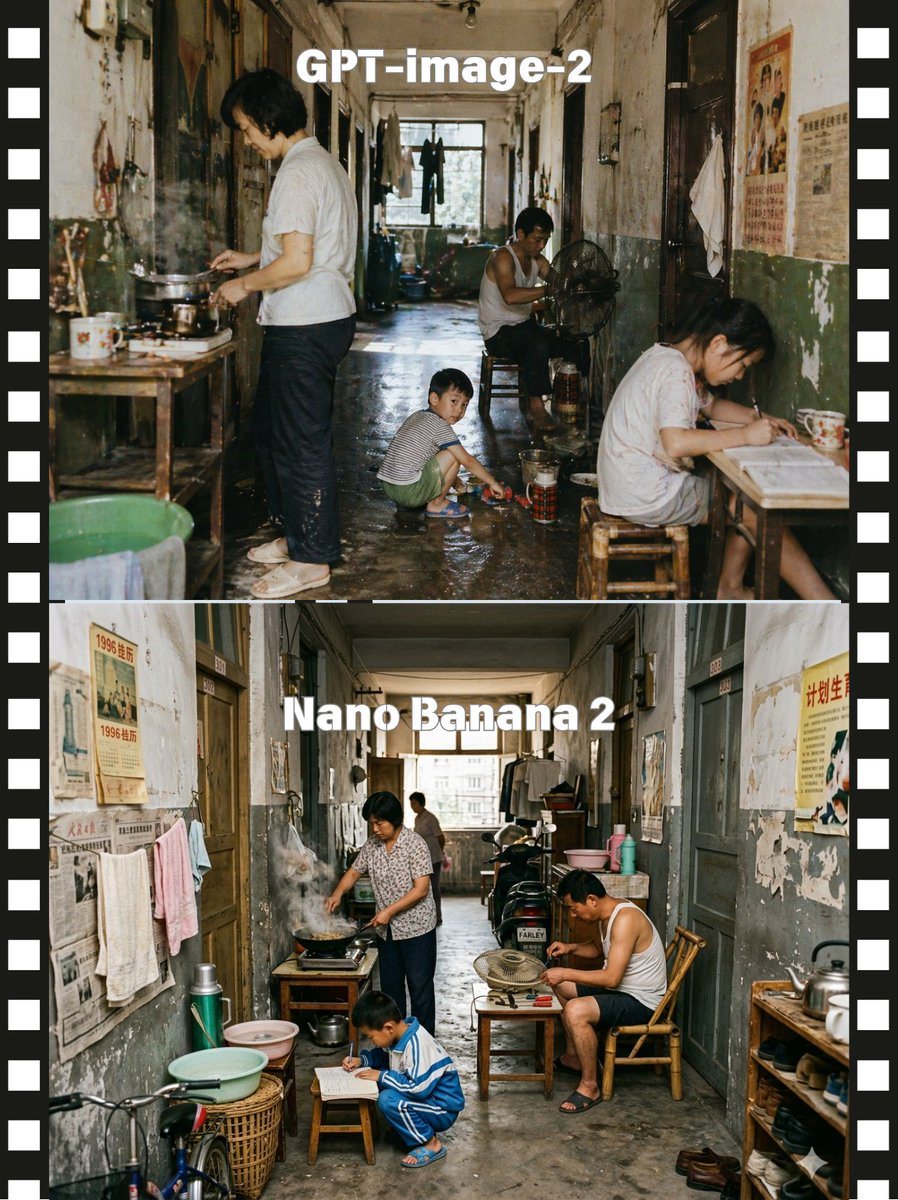
A side-by-side comparison image presented as two stacked documentary-style photographs of the same cramped old Chinese apartment corridor, framed by a black filmstrip border with white sp...

A side-by-side comparison image presented as two stacked documentary-style photographs of the same cramped old Chinese apartment corridor, framed by a black filmstrip border with white sp...
Prompt

A side-by-side comparison image presented as two stacked documentary-style photographs of the same cramped old Chinese apartment corridor, framed by a black filmstrip border with white sprocket holes on both left and right edges. The top half is labeled {argument name="top label" default="GPT-image-2"} in large bold white sans-serif text centered near the top, and the bottom half is labeled {argument name="bottom label" default="Nano Banana 2"} in the same style. Create a gritty, nostalgic, cinematic scene in a long, narrow shared hallway of a worn residential building from the late 20th century, with peeling paint, stained walls, faded propaganda posters and old newspapers on the walls, dark wooden doorways, hanging towels and laundry, a damp concrete floor, and daylight coming from a window at the far end. In the upper scene, show exactly 4 people: 1 adult standing at the left cooking over a small stove on a wooden table with visible steam, 1 adult man sitting deeper in the corridor beside an electric fan, 1 child crouching in the center playing near a basin on the wet floor, and 1 adult woman seated at a small table on the right writing or reading; include enamel mugs, metal pots, stools, buckets, thermos containers, and cluttered household items. In the lower scene, show exactly 4 people again: 1 adult woman at the left cooking at a stove with smoke rising, 1 adult man seated on the right in a bamboo chair leaning over a tabletop fan, 1 child crouching in front writing on paper on a low stool, and 1 distant adult figure near the back window; add more visible corridor clutter including a bicycle front wheel at lower left, wash basins, baskets, thermoses, shelves, shoes, and hanging clothes. Keep the camera straight-on and centered to emphasize the corridor depth, with realistic human proportions, candid slice-of-life behavior, muted aged colors, soft natural light, high detail, photojournalistic realism, and a subtle difference in arrangement between the top and bottom scenes while preserving the same overall environment and mood.

Prompt structure
  • Modelgpt-image-2
  • Use casesocial-media-post
  • Stylephotorealistic, cinematic
  • Aspect ratioFlexible
Best used for
  • Use casesocial-media-post
  • Stylephotorealistic, cinematic
  • Recommended specs1:1, 4:5, 16:9, or 9:16
  • ModelGPT Image 2
How to customize

Use this Side-by-side Comparison Image Presented As Two Stacked Documentary-style prompt as a base. Replace the subject, product details, environment, lighting, brand colors, and output ratio while keeping the social-media-post intent and photorealistic, cinematic direction stable.

Editable variables
  • SubjectReplace the product, person, scene, interface, or object being generated.
  • Use caseKeep or rewrite the destination as social media post, ad creative, cover image, poster, or ecommerce hero.
  • FrameChoose 1:1, 4:5, 16:9, or 9:16 based on the final placement.
  • Brand cuesAdd colors, materials, props, text-safe space, and the platform where the image will be used.
Recommended specs

Choose the frame for the destination first, then use 1K, 2K, or 4K based on output quality needs. Product images and posters usually benefit from higher resolution.

Pre-generation checklist
  • CheckSubject, lighting, composition, and frame are specific enough to review.
  • CheckText-safe space is included when the image will carry a headline or ad copy.
  • CheckResolution, credit cost, and final destination are checked before generation.
Why this prompt works

Side-by-side Comparison Image Presented As Two Stacked Documentary-style works because it starts from the image job, then controls subject, composition, lighting, style, and frame. It is best for social media post while keeping the photorealistic, cinematic direction stable.

Common questions
  • Can I use it directly?Yes. Replace the subject, brand cues, and frame, then generate in Image2Studio.
  • Which ratio should I use?Choose 1:1, 4:5, 16:9, or 9:16 based on the destination.




