
Image2Studio
Prompts

gpt-image-2

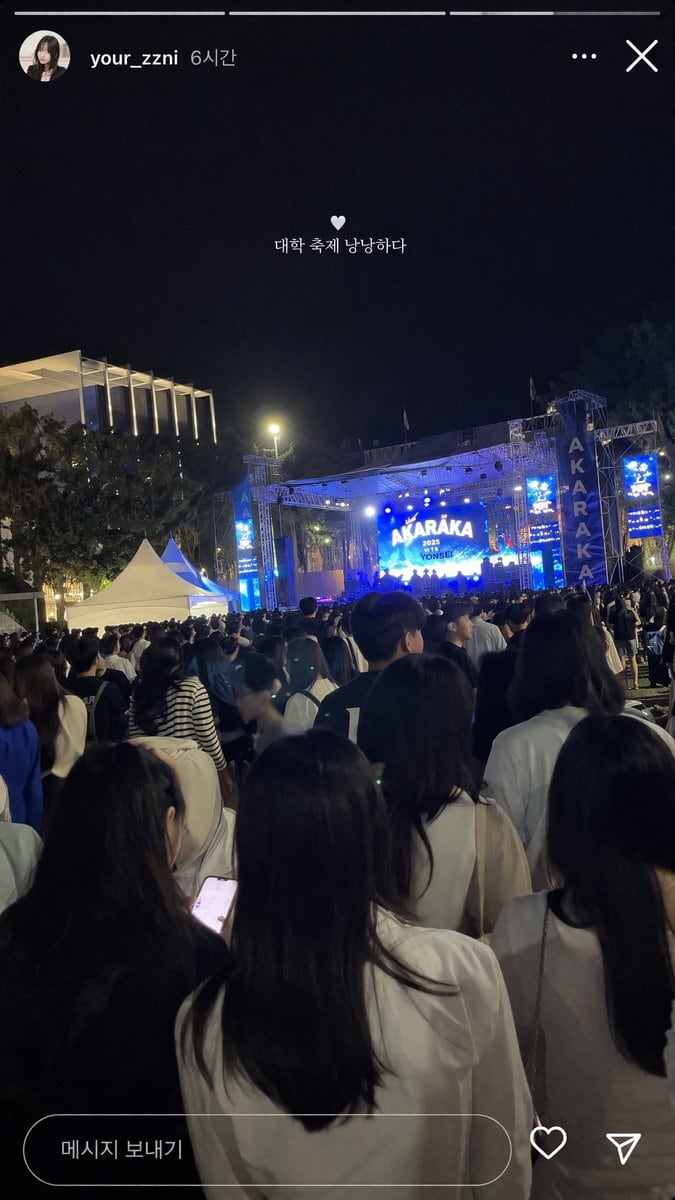
社交媒体演唱会 Story 样机

生成一张逼真的 Instagram 风格夜间大学音乐节 Story 截图,支持自定义 UI 文字和舞台图形。

Copy this GPT Image 2 prompt for social media post and social ads with Photorealistic styling. Use it in Image2Studio to generate, edit, and save.
Prompt

{ "type": "social media story screenshot", "background_photo": { "setting": "nighttime outdoor college festival", "perspective": "first-person view from the back of a dense crowd looking toward a brightly lit stage", "crowd": "dense gathering of young adults seen from behind, wearing casual clothing", "stage": "large outdoor concert stage emitting bright blue light, main LED screen displaying '{argument name=\"stage main text\" default=\"AKARAKA\"}' and '{argument name=\"stage sub text\" default=\"2025 YONSEI\"}', flanked by vertical banners reading 'AKARAKA'", "environment": "dark night sky, trees, a modern building with vertical illuminated slats on the left, two white event tents on the mid-left" }, "ui_overlay": { "top_header": "circular profile picture of a young woman, username '{argument name=\"username\" default=\"your_zzni\"}', timestamp '6시간', with standard three-dot menu and 'X' close icons on the right", "center_text": "small white heart icon followed by the text '{argument name=\"overlay text\" default=\"대학 축제 낭낭하다\"}' floating in the middle of the screen", "bottom_bar": "pill-shaped message input box containing the text '메시지 보내기', accompanied by a heart outline icon and a paper airplane icon on the right" } }

Prompt structure
  • Modelgpt-image-2
  • Use casesocial-media-post
  • Stylephotorealistic
  • Aspect ratioFlexible
Best used for
  • Use casesocial-media-post
  • Stylephotorealistic
  • Recommended specs1:1, 4:5, 16:9, or 9:16
  • ModelGPT Image 2
How to customize

Use this 社交媒体演唱会 Story 样机 prompt as a base. Replace the subject, product details, environment, lighting, brand colors, and output ratio while keeping the social-media-post intent and photorealistic direction stable.

Editable variables
  • SubjectReplace the product, person, scene, interface, or object being generated.
  • Use caseKeep or rewrite the destination as social media post, ad creative, cover image, poster, or ecommerce hero.
  • FrameChoose 1:1, 4:5, 16:9, or 9:16 based on the final placement.
  • Brand cuesAdd colors, materials, props, text-safe space, and the platform where the image will be used.
Recommended specs

Choose the frame for the destination first, then use 1K, 2K, or 4K based on output quality needs. Product images and posters usually benefit from higher resolution.

Pre-generation checklist
  • CheckSubject, lighting, composition, and frame are specific enough to review.
  • CheckText-safe space is included when the image will carry a headline or ad copy.
  • CheckResolution, credit cost, and final destination are checked before generation.
Why this prompt works

社交媒体演唱会 Story 样机 works because it starts from the image job, then controls subject, composition, lighting, style, and frame. It is best for social media post while keeping the photorealistic direction stable.

Common questions
  • Can I use it directly?Yes. Replace the subject, brand cues, and frame, then generate in Image2Studio.
  • Which ratio should I use?Choose 1:1, 4:5, 16:9, or 9:16 based on the destination.




