
Image2Studio
Prompts

gpt-image-2

Screenshot-style Composition Of An AI Image Generation Chat Interface On

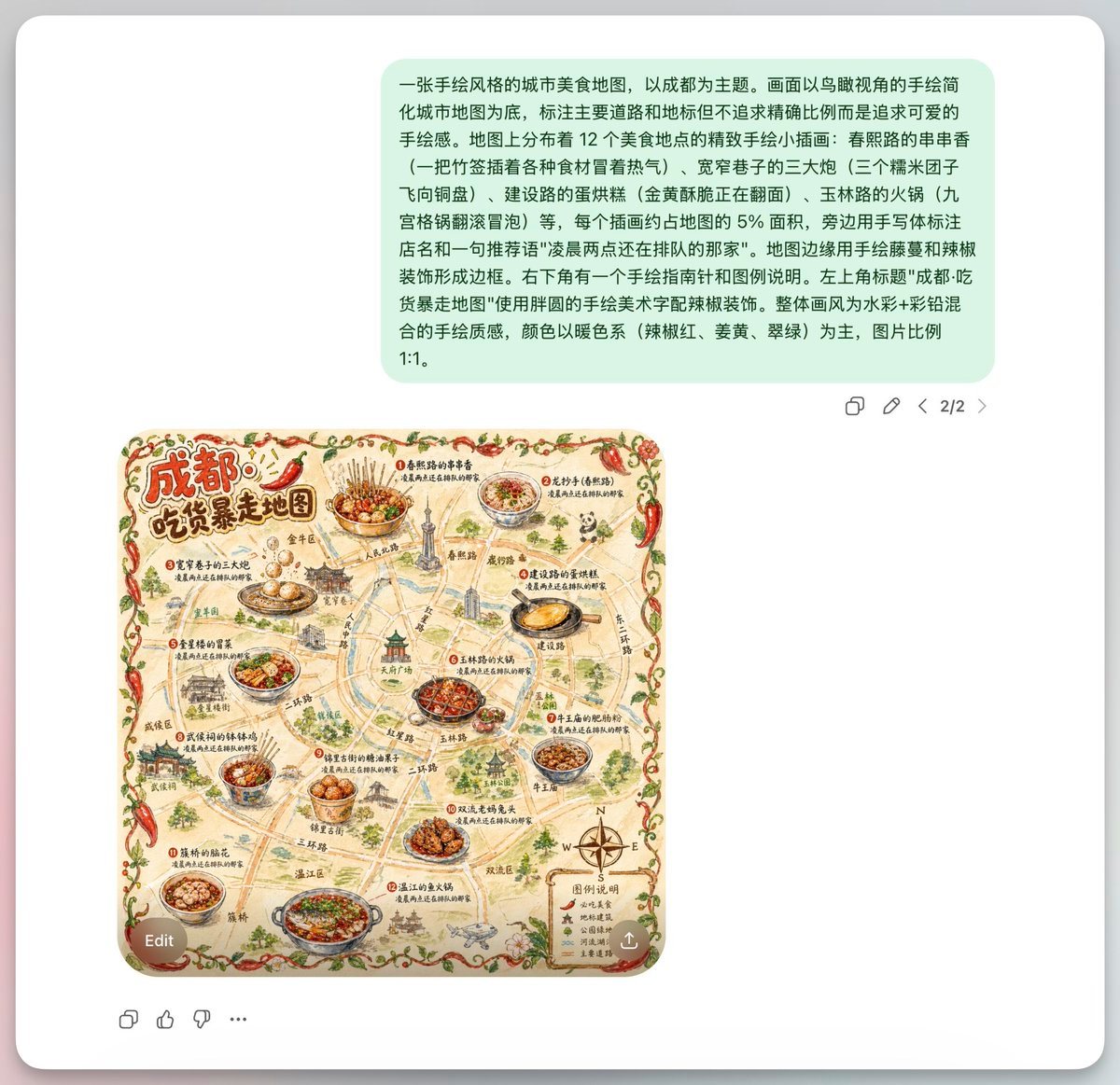
A screenshot-style composition of an AI image generation chat interface on a light gray app background, centered inside a rounded white panel with a soft drop shadow. Near the top is a la...

A screenshot-style composition of an AI image generation chat interface on a light gray app background, centered inside a rounded white panel with a soft drop shadow. Near the top is a la...
Prompt

A screenshot-style composition of an AI image generation chat interface on a light gray app background, centered inside a rounded white panel with a soft drop shadow. Near the top is a large pale mint-green chat bubble containing a long Chinese prompt in black sans-serif text, describing a hand-drawn food map of Chengdu. Beneath it, aligned slightly left of center, is a square illustrated map image with rounded corners. The map is a whimsical hand-painted tourist food map titled in large Chinese calligraphy at the upper left: {argument name="headline text" default="成都! 吃货暴走地图"}. The subject is {argument name="city name" default="Chengdu"}, presented as a vintage hand-drawn local cuisine map with warm beige paper texture, watercolor ink outlines, and a playful artisanal travel-poster feel. The map shows simplified streets, landmarks, and district labels in Chinese, not geographically exact, but cute and decorative. Place exactly 12 featured food locations, each marked with a numbered red dot and a small Chinese label, each paired with a detailed illustrated dish. Include 12 dishes total: 1) a bowl of skewers in red chili broth, 2) a bowl of sweet water noodles, 3) rabbit head specialty, 4) guokui or stuffed baked flatbread, 5) hot pot, 6) maocai, 7) dan dan noodles, 8) hongyou chaoshou or chili oil wontons, 9) bobo chicken, 10) fuqi feipian, 11) a spicy stir-fried dish, 12) another classic Chengdu snack platter. Add a few Chengdu landmarks sketched in miniature around the roads, including a pagoda-like tower, traditional gate architecture, modern city buildings, and a central emblematic structure. Frame the entire map with a decorative border made of red chili peppers, green vines, and small leaves. Use a warm color palette dominated by chili red, mustard yellow, olive green, tea brown, and muted jade. In the lower right corner of the map, include a small legend box labeled {argument name="legend title" default="图例说明"} with 4 legend items, each with a tiny icon and Chinese text, plus a compass rose with N, E, S, W. Add many handwritten-style Chinese road names and annotations throughout. Outside the image, the interface includes small gray action icons beneath the green chat bubble on the right, a page indicator reading 2/2, an Edit pill button overlapping the lower left of the map image, a circular download/share button at the lower right of the image, and a sparse bottom toolbar with 4 small reaction/action icons. Overall look: clean modern chat UI presenting a generated square illustration, with the map as the visual focus.

Prompt structure
  • Modelgpt-image-2
  • Use caseapp-ui-mockup
  • Stylewatercolor, minimal, isometric
  • Aspect ratioFlexible
Best used for
  • Use caseapp-ui-mockup
  • Stylewatercolor, minimal, isometric
  • Recommended specs1:1, 4:5, 16:9, or 9:16
  • ModelGPT Image 2
How to customize

Use this Screenshot-style Composition Of An AI Image Generation Chat Interface On prompt as a base. Replace the subject, product details, environment, lighting, brand colors, and output ratio while keeping the app-ui-mockup intent and watercolor, minimal, isometric direction stable.

Editable variables
  • SubjectReplace the product, person, scene, interface, or object being generated.
  • Use caseKeep or rewrite the destination as app ui mockup, ad creative, cover image, poster, or ecommerce hero.
  • FrameChoose 1:1, 4:5, 16:9, or 9:16 based on the final placement.
  • Brand cuesAdd colors, materials, props, text-safe space, and the platform where the image will be used.
Recommended specs

Choose the frame for the destination first, then use 1K, 2K, or 4K based on output quality needs. Product images and posters usually benefit from higher resolution.

Pre-generation checklist
  • CheckSubject, lighting, composition, and frame are specific enough to review.
  • CheckText-safe space is included when the image will carry a headline or ad copy.
  • CheckResolution, credit cost, and final destination are checked before generation.
Why this prompt works

Screenshot-style Composition Of An AI Image Generation Chat Interface On works because it starts from the image job, then controls subject, composition, lighting, style, and frame. It is best for app ui mockup while keeping the watercolor, minimal, isometric direction stable.

Common questions
  • Can I use it directly?Yes. Replace the subject, brand cues, and frame, then generate in Image2Studio.
  • Which ratio should I use?Choose 1:1, 4:5, 16:9, or 9:16 based on the destination.




