
Image2Studio
Examples

gpt-image-2

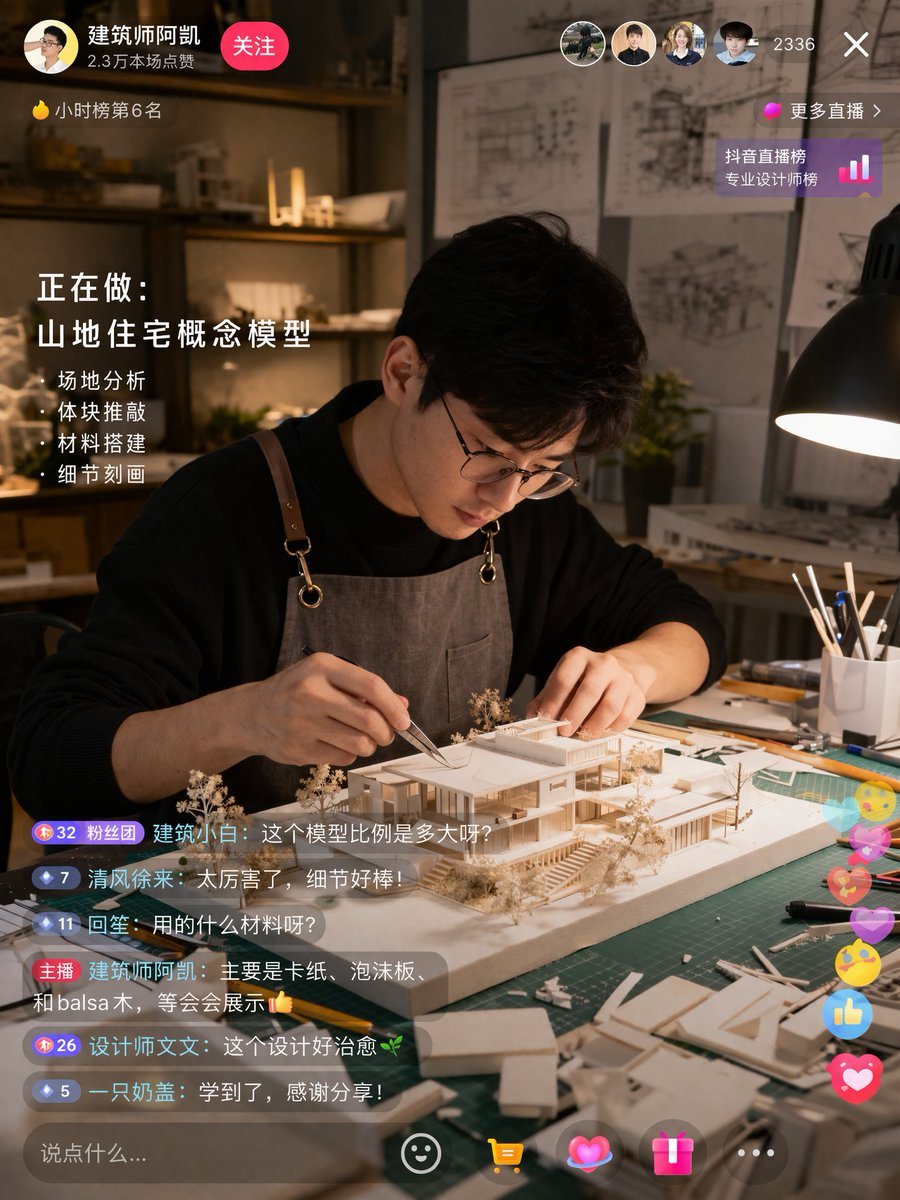
Live Stream Interface Mockup

Ready-to-edit live stream interface mockup image prompt.

Ready-to-edit live stream interface mockup image prompt.
Prompt

{ "type": "live stream interface mockup", "scene": { "subject": "{argument name=\"subject description\" default=\"young Asian male architect wearing glasses and a brown canvas apron\"}", "action": "focused on building a detailed white architectural scale model of a modern house using tweezers", "setting": "dimly lit design studio, green cutting mat, desk lamp, architectural blueprints on the wall in the background" }, "ui_elements": { "top_left": { "profile": "avatar, username '{argument name=\"username\" default=\"建筑师阿凯\"}', stats '2.3万本场点赞', pink '关注' button", "ranking": "yellow flame icon '小时榜第6名'" }, "top_right": { "viewers": "4 user avatars, count '2336', 'X' close button", "ranking_link": "pink dot '更多直播 >', '抖音直播榜 专业设计师榜' with bar chart icon" }, "mid_left_overlay": { "title": "正在做:", "subtitle": "{argument name=\"current task\" default=\"山地住宅概念模型\"}", "bullet_points_count": 4, "bullet_points": [ "· 场地分析", "· 体块推敲", "· 材料搭建", "· 细节刻画" ] }, "bottom_left_chat": { "message_count": 6, "messages": [ "Badge 32 粉丝团 建筑小白: {argument name=\"chat message 1\" default=\"这个模型比例是多大呀?\"}", "Badge 7 清风徐来: 太厉害了,细节好棒!", "Badge 11 回笙: 用的什么材料呀?", "主播 {argument name=\"username\" default=\"建筑师阿凯\"}: {argument name=\"host reply\" default=\"主要是卡纸、泡沫板、和balsa木,等会会展示👍\"}", "Badge 26 设计师文文: 这个设计好治愈🌿", "Badge 5 一只奶盖: 学到了,感谢分享!" ] }, "bottom_right_interactions": "floating colorful icons including hearts, thumbs up, and smiley faces", "bottom_bar": "input field '说点什么...', smiley icon, yellow shopping cart icon, pink heart icon, pink gift box icon, '...' icon" } }

Prompt structure
  • Modelgpt-image-2
  • Use casesocial-media-post
  • Stylephotorealistic
  • Aspect ratioFlexible
Best used for
  • Use casesocial-media-post
  • Stylephotorealistic
  • Recommended specs1:1, 4:5, 16:9, or 9:16
  • ModelGPT Image 2
How to customize

Use this Live Stream Interface Mockup prompt as a base. Replace the subject, product details, environment, lighting, brand colors, and output ratio while keeping the social-media-post intent and photorealistic direction stable.

Editable variables
  • SubjectReplace the product, person, scene, interface, or object being generated.
  • Use caseKeep or rewrite the destination as social media post, ad creative, cover image, poster, or ecommerce hero.
  • FrameChoose 1:1, 4:5, 16:9, or 9:16 based on the final placement.
  • Brand cuesAdd colors, materials, props, text-safe space, and the platform where the image will be used.
Recommended specs

Choose the frame for the destination first, then use 1K, 2K, or 4K based on output quality needs. Product images and posters usually benefit from higher resolution.

Pre-generation checklist
  • CheckSubject, lighting, composition, and frame are specific enough to review.
  • CheckText-safe space is included when the image will carry a headline or ad copy.
  • CheckResolution, credit cost, and final destination are checked before generation.
Why this prompt works

Live Stream Interface Mockup works because it starts from the image job, then controls subject, composition, lighting, style, and frame. It is best for social media post while keeping the photorealistic direction stable.

Common questions
  • Can I use it directly?Yes. Replace the subject, brand cues, and frame, then generate in Image2Studio.
  • Which ratio should I use?Choose 1:1, 4:5, 16:9, or 9:16 based on the destination.




