
Image2Studio
Examples

gpt-image-2

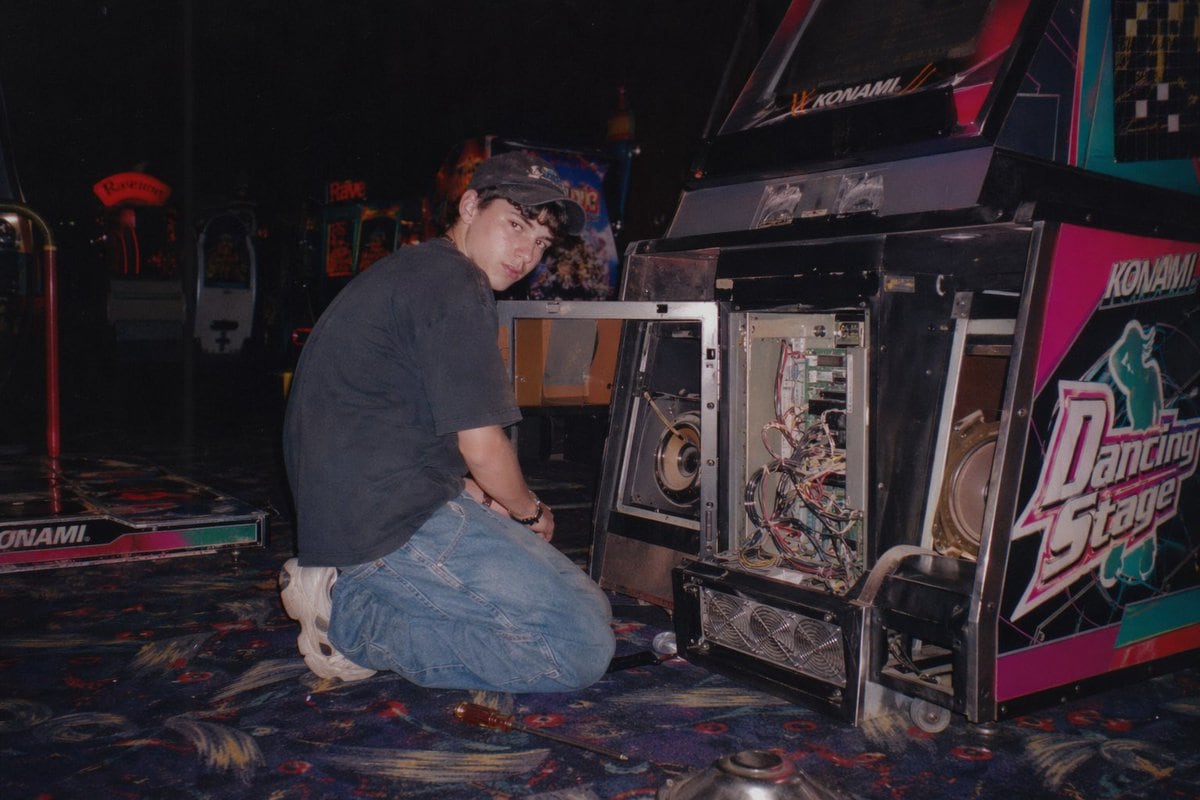
Vintage Arcade Repair Flash Photography

Generates a nostalgic, flash-lit photograph of someone repairing an open arcade cabinet in a dimly lit gaming center.

Generates a nostalgic, flash-lit photograph of someone repairing an open arcade cabinet in a dimly lit gaming center.
Prompt

A vintage, late 90s amateur flash photograph of a young man repairing an arcade machine. He is kneeling on a dark, patterned arcade carpet, looking back over his shoulder directly at the camera with a neutral expression. He wears a dark short-sleeved t-shirt, baggy blue jeans, chunky white sneakers, and a dark baseball cap. The lower front panel of the arcade cabinet is wide open, exposing its complex internal electronics, including a tangle of wires, green circuit boards, a large speaker, and metal cooling fans at the base. The side of the cabinet features vibrant pink, black, and white graphics with the text "{argument name="arcade game title" default="Dancing Stage"}" and the brand "{argument name="arcade brand" default="KONAMI"}". The setting is a dimly lit arcade interior with other glowing game cabinets visible in the blurred background. A screwdriver lies on the carpet near the man's knee. The image features harsh direct flash lighting, a slightly grainy film texture, deep shadows, and a nostalgic Y2K aesthetic.

Prompt structure
  • Modelgpt-image-2
  • Use casesocial-media-post
  • Stylephotorealistic, cinematic
  • Aspect ratioFlexible
Best used for
  • Use casesocial-media-post
  • Stylephotorealistic, cinematic
  • Recommended specs1:1, 4:5, 16:9, or 9:16
  • ModelGPT Image 2
How to customize

Use this Vintage Arcade Repair Flash Photography prompt as a base. Replace the subject, product details, environment, lighting, brand colors, and output ratio while keeping the social-media-post intent and photorealistic, cinematic direction stable.

Editable variables
  • SubjectReplace the product, person, scene, interface, or object being generated.
  • Use caseKeep or rewrite the destination as social media post, ad creative, cover image, poster, or ecommerce hero.
  • FrameChoose 1:1, 4:5, 16:9, or 9:16 based on the final placement.
  • Brand cuesAdd colors, materials, props, text-safe space, and the platform where the image will be used.
Recommended specs

Choose the frame for the destination first, then use 1K, 2K, or 4K based on output quality needs. Product images and posters usually benefit from higher resolution.

Pre-generation checklist
  • CheckSubject, lighting, composition, and frame are specific enough to review.
  • CheckText-safe space is included when the image will carry a headline or ad copy.
  • CheckResolution, credit cost, and final destination are checked before generation.
Why this prompt works

Vintage Arcade Repair Flash Photography works because it starts from the image job, then controls subject, composition, lighting, style, and frame. It is best for social media post while keeping the photorealistic, cinematic direction stable.

Common questions
  • Can I use it directly?Yes. Replace the subject, brand cues, and frame, then generate in Image2Studio.
  • Which ratio should I use?Choose 1:1, 4:5, 16:9, or 9:16 based on the destination.




