
Image2Studio
Examples

gpt-image-2

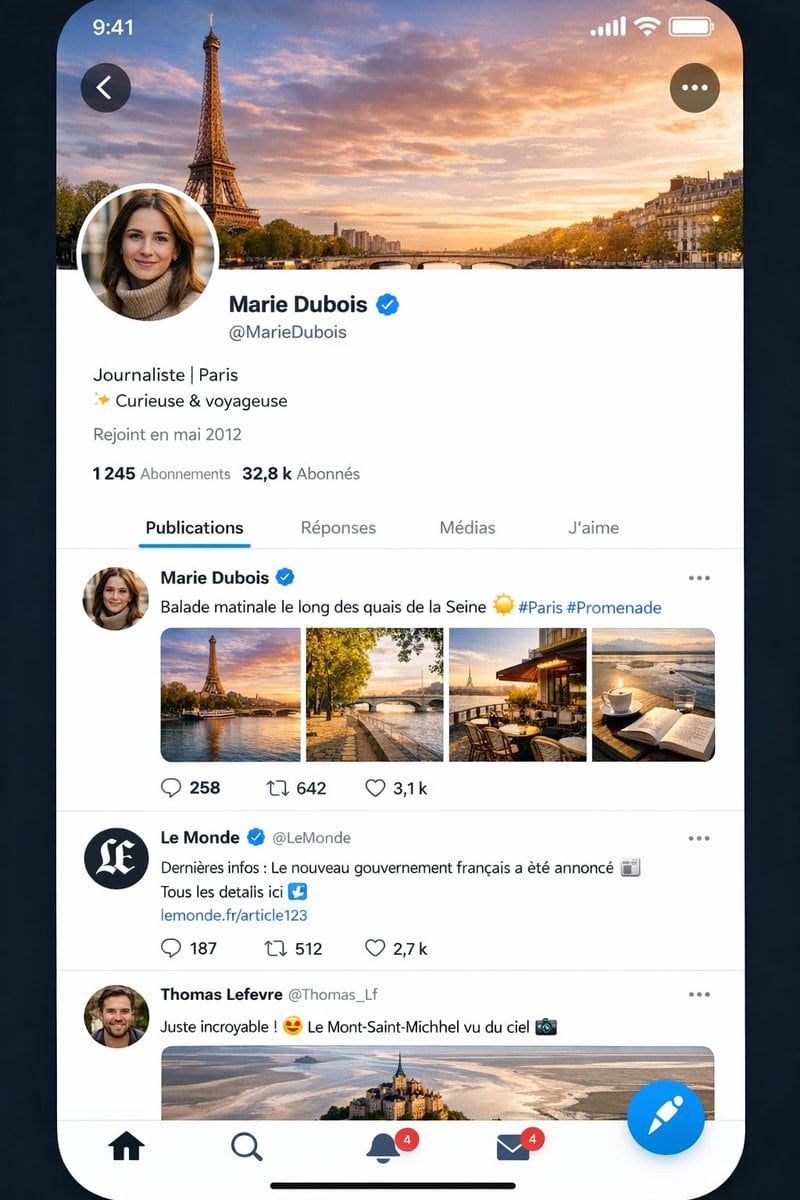
Highly Realistic Smartphone App Screenshot Mockup Of A Social Media Inte

A highly realistic smartphone app screenshot mockup of a social media interface almost identical to X/Twitter, shown on an iPhone-style full-screen display with rounded corners against a...

A highly realistic smartphone app screenshot mockup of a social media interface almost identical to X/Twitter, shown on an iPhone-style full-screen display with rounded corners against a...
Prompt

A highly realistic smartphone app screenshot mockup of a social media interface almost identical to X/Twitter, shown on an iPhone-style full-screen display with rounded corners against a dark blue-black background. The status bar at the top shows the time 9:41 on the left and cellular, Wi‑Fi, and battery icons on the right. The screen displays a French-language profile page for {argument name="profile name" default="Marie Dubois"}, with a large cover photo of the Eiffel Tower and the Seine at sunset under a dramatic orange-blue sky. A circular profile photo overlaps the lower-left of the header, partially obscuring the face. A back arrow button appears in a dark translucent circle at top left, and a three-dot menu button in a matching circle at top right. Below the header, show the verified profile name {argument name="profile name" default="Marie Dubois"} with a blue verification badge, the handle {argument name="handle" default="@MarieDubois"}, a short bio in French reading "Journaliste | Paris" on one line and "✨ Curieuse & voyageuse" on the next, then "Rejoint en mai 2012" beneath. Show follower stats in French: "1 245 Abonnements" and "32,8 k Abonnés". Add a tab bar with exactly 4 tabs labeled "Publications", "Réponses", "Médias", and "J'aime", with "Publications" selected and underlined in blue. In the feed, include exactly 3 visible posts. Post 1 is by {argument name="profile name" default="Marie Dubois"} with blue verified badge and the French caption {argument name="post caption" default="Balade matinale le long des quais de la Seine ☀️ #Paris #Promenade"}, followed by a 4-image collage in one row: 1) Eiffel Tower by the river at golden hour, 2) a Paris riverside walkway with a bridge and autumn trees, 3) a cozy terrace café with Eiffel Tower view, 4) a coffee cup beside an open notebook overlooking water. Below it, show engagement icons and counts: reply 258, repost 642, like 3,1 k. Post 2 is from verified news account "Le Monde" with handle "@LeMonde", black circular avatar with white monogram, and French text: "Dernières infos : Le nouveau gouvernement français a été annoncé 📰 Tous les details ici ↓" followed by a blue link "lemonde.fr/article123"; below it show counts 187, 512, and 2,7 k. Post 3 is from "Thomas Lefevre" with handle "@Thomas_Lf" and text "Juste incroyable ! 😍 Le Mont-Saint-Michel vu du ciel 📷", followed by a wide aerial photo of Mont-Saint-Michel. At the bottom, include an iOS-style navigation bar with exactly 5 elements: home icon, search icon, notifications bell with a red badge showing 4, messages envelope with a red badge showing 4, and a large floating blue compose button with a white quill/feather icon. Add the thin black iPhone home indicator centered at the very bottom. Use crisp modern UI typography, subtle gray dividers, realistic spacing, authentic X-like iconography, polished mobile app rendering, and near-photographic screenshot realism.

Prompt structure
  • Modelgpt-image-2
  • Use casesocial-media-post
  • Stylephotorealistic, cinematic
  • Aspect ratioFlexible
Best used for
  • Use casesocial-media-post
  • Stylephotorealistic, cinematic
  • Recommended specs1:1, 4:5, 16:9, or 9:16
  • ModelGPT Image 2
How to customize

Use this Highly Realistic Smartphone App Screenshot Mockup Of A Social Media Inte prompt as a base. Replace the subject, product details, environment, lighting, brand colors, and output ratio while keeping the social-media-post intent and photorealistic, cinematic direction stable.

Editable variables
  • SubjectReplace the product, person, scene, interface, or object being generated.
  • Use caseKeep or rewrite the destination as social media post, ad creative, cover image, poster, or ecommerce hero.
  • FrameChoose 1:1, 4:5, 16:9, or 9:16 based on the final placement.
  • Brand cuesAdd colors, materials, props, text-safe space, and the platform where the image will be used.
Recommended specs

Choose the frame for the destination first, then use 1K, 2K, or 4K based on output quality needs. Product images and posters usually benefit from higher resolution.

Pre-generation checklist
  • CheckSubject, lighting, composition, and frame are specific enough to review.
  • CheckText-safe space is included when the image will carry a headline or ad copy.
  • CheckResolution, credit cost, and final destination are checked before generation.
Why this prompt works

Highly Realistic Smartphone App Screenshot Mockup Of A Social Media Inte works because it starts from the image job, then controls subject, composition, lighting, style, and frame. It is best for social media post while keeping the photorealistic, cinematic direction stable.

Common questions
  • Can I use it directly?Yes. Replace the subject, brand cues, and frame, then generate in Image2Studio.
  • Which ratio should I use?Choose 1:1, 4:5, 16:9, or 9:16 based on the destination.




