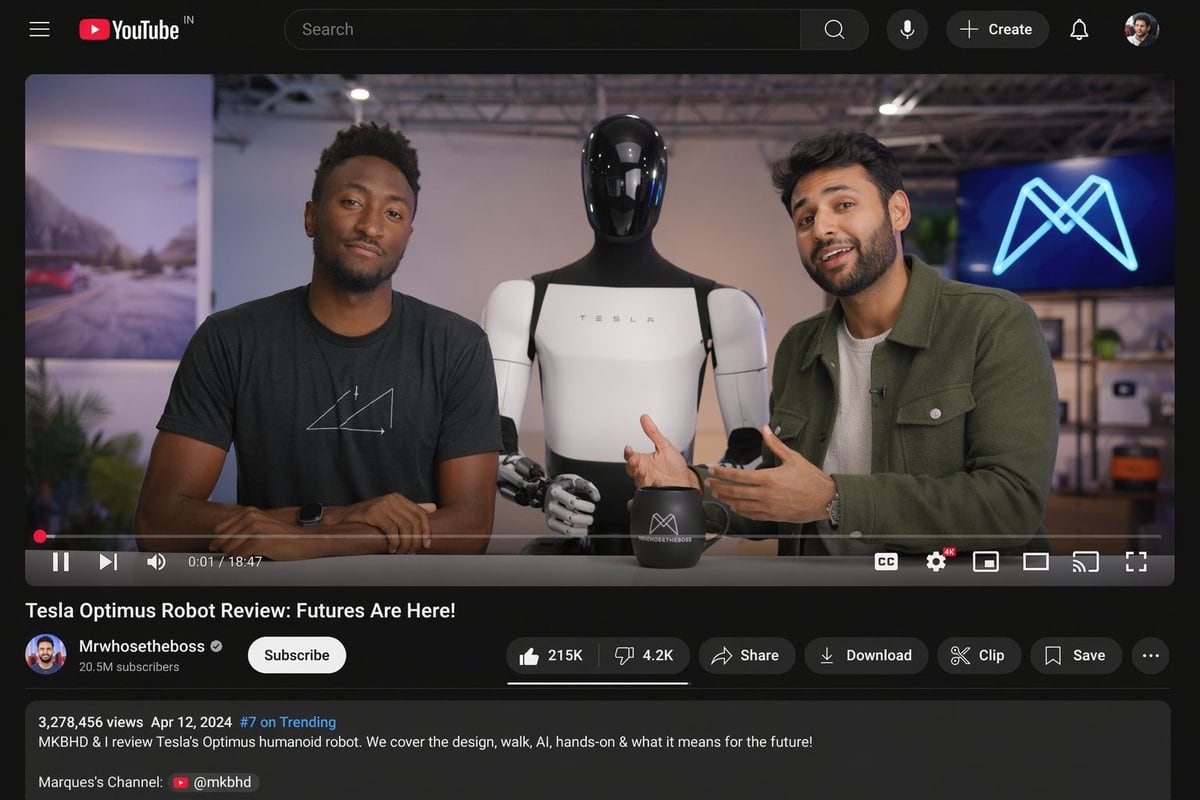
Prompt{
"type": "desktop video platform UI mockup",
"theme": "dark mode",
"header": {
"logo": "YouTube IN",
"search_bar": "centered, with magnifying glass icon",
"right_icons": {
"count": 4,
"items": ["microphone", "+ Create button", "notifications bell", "user profile picture"]
}
},
"video_player": {
"scene": "Studio setting with two tech reviewers at a desk.",
"subjects": [
"{argument name=\"left person\" default=\"Marques Brownlee (MKBHD)\"} in black t-shirt",
"{argument name=\"right person\" default=\"Arun Maini (Mrwhosetheboss)\"} in green overshirt",
"{argument name=\"robot model\" default=\"Tesla Optimus humanoid robot\"} standing between them"
],
"props": ["black mug with logo", "background screen with glowing blue neon M logo"],
"controls_bar": {
"progress_bar": "red, near the beginning",
"timestamp": "0:01 / 18:47",
"left_icons": {
"count": 3,
"items": ["play/pause", "next track", "volume"]
},
"right_icons": {
"count": 6,
"items": ["CC", "settings with 4K badge", "miniplayer", "theater mode", "cast", "fullscreen"]
}
}
},
"video_details": {
"title": "{argument name=\"video title\" default=\"Tesla Optimus Robot Review: Futures Are Here!\"}",
"channel_info": {
"name": "{argument name=\"channel name\" default=\"Mrwhosetheboss\"}",
"badges": ["verified checkmark"],
"subscribers": "20.5M subscribers",
"button": "white Subscribe button"
},
"action_buttons": {
"count": 6,
"items": ["Like (215K) / Dislike (4.2K) pill", "Share", "Download", "Clip", "Save", "More (...)"]
}
},
"description_box": {
"metadata": "3,278,456 views Apr 12, 2024 #7 on Trending",
"text": "MKBHD & I review Tesla's Optimus humanoid robot. We cover the design, walk, AI, hands-on & what it means for the future!",
"links": ["Marques's Channel: @mkbhd"]
}
}
Prompt structure- Modelgpt-image-2
- Use casesocial-media-post
- Stylephotorealistic, cyberpunk
- Aspect ratioFlexible
Best used for- Use casesocial-media-post
- Stylephotorealistic, cyberpunk
- Recommended specs1:1, 4:5, 16:9, or 9:16
- ModelGPT Image 2
How to customizeUse this Desktop Video Platform UI Mockup prompt as a base. Replace the subject, product details, environment, lighting, brand colors, and output ratio while keeping the social-media-post intent and photorealistic, cyberpunk direction stable.
Editable variables- SubjectReplace the product, person, scene, interface, or object being generated.
- Use caseKeep or rewrite the destination as social media post, ad creative, cover image, poster, or ecommerce hero.
- FrameChoose 1:1, 4:5, 16:9, or 9:16 based on the final placement.
- Brand cuesAdd colors, materials, props, text-safe space, and the platform where the image will be used.
Recommended specsChoose the frame for the destination first, then use 1K, 2K, or 4K based on output quality needs. Product images and posters usually benefit from higher resolution.
Pre-generation checklist- CheckSubject, lighting, composition, and frame are specific enough to review.
- CheckText-safe space is included when the image will carry a headline or ad copy.
- CheckResolution, credit cost, and final destination are checked before generation.
Why this prompt worksDesktop Video Platform UI Mockup works because it starts from the image job, then controls subject, composition, lighting, style, and frame. It is best for social media post while keeping the photorealistic, cyberpunk direction stable.
Common questions- Can I use it directly?Yes. Replace the subject, brand cues, and frame, then generate in Image2Studio.
- Which ratio should I use?Choose 1:1, 4:5, 16:9, or 9:16 based on the destination.