
Image2Studio
Examples

gpt-image-2

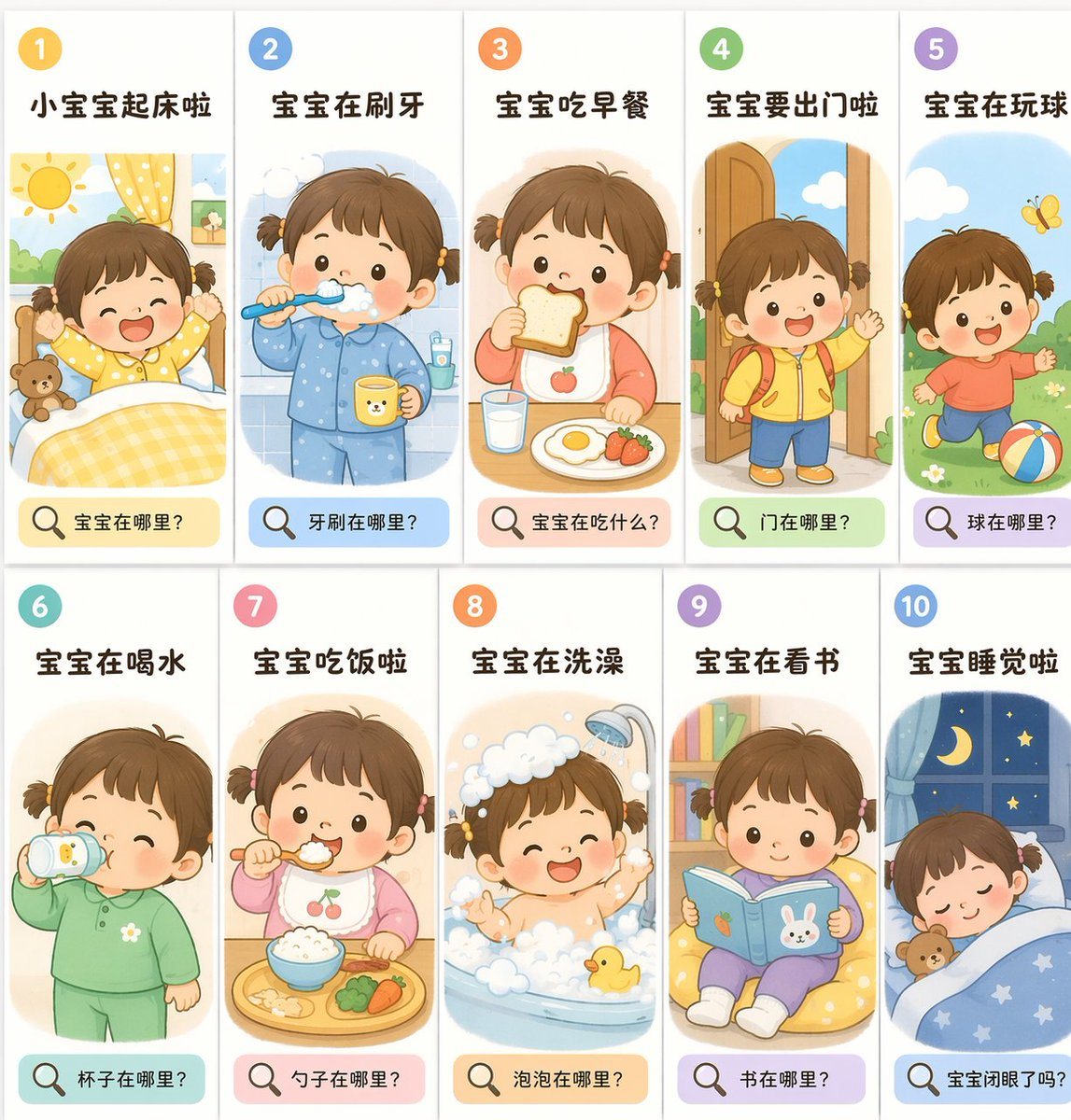
Educational Flashcard Grid

Ready-to-edit educational flashcard grid image prompt.

Ready-to-edit educational flashcard grid image prompt.
Prompt

{ "type": "educational flashcard grid", "theme": "{argument name=\"theme\" default=\"toddler daily routine\"}", "art_style": "{argument name=\"art style\" default=\"flat vector illustration, soft pastel colors, children's book style\"}", "character": "{argument name=\"character description\" default=\"cute toddler girl with short brown hair tied in two small pigtails, rosy cheeks, dot eyes\"}", "layout": { "grid": "2 rows by 5 columns", "total_panels": 10, "panel_structure": { "top_left": "number in a colored circle", "top_center": "action title in bold text", "center": "illustration of the character performing the action", "bottom": "colored pill-shaped box containing a magnifying glass icon and a question" } }, "panels": [ { "number": 1, "title": "小宝宝起床啦", "illustration": "waking up in bed, stretching arms, sun shining, teddy bear", "bottom_question": "宝宝在哪里?" }, { "number": 2, "title": "宝宝在刷牙", "illustration": "brushing teeth, wearing blue pajamas, holding a yellow cup", "bottom_question": "牙刷在哪里?" }, { "number": 3, "title": "宝宝吃早餐", "illustration": "eating toast, glass of milk, fried egg, strawberries on table", "bottom_question": "宝宝在吃什么?" }, { "number": 4, "title": "宝宝要出门啦", "illustration": "wearing yellow jacket and red backpack, waving goodbye at an open door", "bottom_question": "门在哪里?" }, { "number": 5, "title": "宝宝在玩球", "illustration": "running on grass, kicking a colorful striped ball, yellow butterfly", "bottom_question": "球在哪里?" }, { "number": 6, "title": "宝宝在喝水", "illustration": "drinking from a sippy cup, wearing green pajamas", "bottom_question": "杯子在哪里?" }, { "number": 7, "title": "宝宝吃饭啦", "illustration": "eating rice with a spoon, wearing a cherry bib, food tray with broccoli and carrots", "bottom_question": "勺子在哪里?" }, { "number": 8, "title": "宝宝在洗澡", "illustration": "taking a bath in a tub full of bubbles, showerhead running, yellow rubber duck", "bottom_question": "泡泡在哪里?" }, { "number": 9, "title": "宝宝在看书", "illustration": "sitting on a yellow beanbag chair, reading a blue book with a bunny cover, bookshelf in background", "bottom_question": "书在哪里?" }, { "number": 10, "title": "宝宝睡觉啦", "illustration": "sleeping peacefully in bed under a blue starry blanket, teddy bear, window showing night sky with crescent moon", "bottom_question": "宝宝闭眼了吗?" } ] }

Prompt structure
  • Modelgpt-image-2
  • Use casesocial-media-post
  • Stylewatercolor, editorial
  • Aspect ratioFlexible
Best used for
  • Use casesocial-media-post
  • Stylewatercolor, editorial
  • Recommended specs1:1, 4:5, 16:9, or 9:16
  • ModelGPT Image 2
How to customize

Use this Educational Flashcard Grid prompt as a base. Replace the subject, product details, environment, lighting, brand colors, and output ratio while keeping the social-media-post intent and watercolor, editorial direction stable.

Editable variables
  • SubjectReplace the product, person, scene, interface, or object being generated.
  • Use caseKeep or rewrite the destination as social media post, ad creative, cover image, poster, or ecommerce hero.
  • FrameChoose 1:1, 4:5, 16:9, or 9:16 based on the final placement.
  • Brand cuesAdd colors, materials, props, text-safe space, and the platform where the image will be used.
Recommended specs

Choose the frame for the destination first, then use 1K, 2K, or 4K based on output quality needs. Product images and posters usually benefit from higher resolution.

Pre-generation checklist
  • CheckSubject, lighting, composition, and frame are specific enough to review.
  • CheckText-safe space is included when the image will carry a headline or ad copy.
  • CheckResolution, credit cost, and final destination are checked before generation.
Why this prompt works

Educational Flashcard Grid works because it starts from the image job, then controls subject, composition, lighting, style, and frame. It is best for social media post while keeping the watercolor, editorial direction stable.

Common questions
  • Can I use it directly?Yes. Replace the subject, brand cues, and frame, then generate in Image2Studio.
  • Which ratio should I use?Choose 1:1, 4:5, 16:9, or 9:16 based on the destination.




