
Image2Studio
Examples

gpt-image-2

Create A Clean

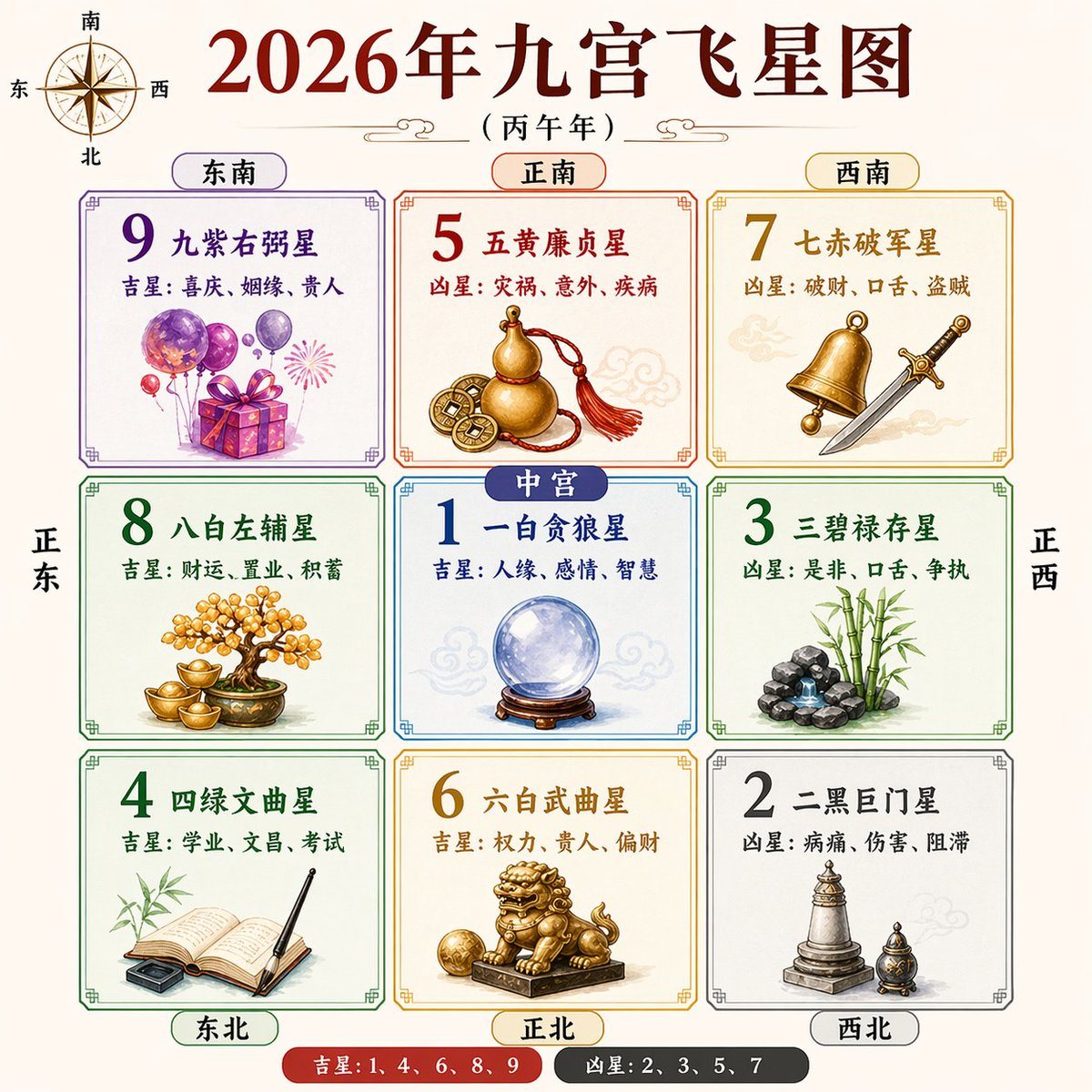
Create a clean, symmetrical Chinese feng shui infographic poster in a traditional almanac style on a warm light beige background. The main title at the top is large dark red Chinese calli...

Create a clean, symmetrical Chinese feng shui infographic poster in a traditional almanac style on a warm light beige background. The main title at the top is large dark red Chinese calli...
Prompt

Create a clean, symmetrical Chinese feng shui infographic poster in a traditional almanac style on a warm light beige background. The main title at the top is large dark red Chinese calligraphy text reading {argument name="headline text" default="2026年九宫飞星图"}, with a smaller subtitle beneath in black reading {argument name="subtitle text" default="(丙午年)"}. Add a decorative compass rose in the upper left corner labeled with the four cardinal directions in Chinese: 南 at top, 北 at bottom, 东 at left, 西 at right. Center the composition around a 3x3 grid of 9 bordered square panels with thin ornamental Chinese-style corners, evenly spaced and perfectly aligned. Each square contains a large colored number, a Chinese star name, one line beginning with 吉星 or 凶星, and an illustrative symbolic object. Top row has 3 panels: top-left labeled 东南 with a purple-framed panel for number 9 and text 九紫右弼星, plus 吉星: 喜庆、姻缘、贵人, illustrated with purple balloons, a gift box, and a small firework burst; top-center labeled 正南 with an orange-framed panel for number 5 and text 五黄廉贞星, plus 凶星: 灾祸、意外、疾病, illustrated with a gold gourd and ancient Chinese coins tied with a red tassel; top-right labeled 西南 with a gold-framed panel for number 7 and text 七赤破军星, plus 凶星: 破财、口舌、盗贼, illustrated with a brass bell and a silver sword. Middle row has 3 panels: middle-left aligned with 正东 in large vertical side text, a green-framed panel for number 8 and text 八白左辅星, plus 吉星: 财运、置业、积蓄, illustrated with a bonsai-like money tree and gold ingots; middle-center labeled 中宫 in a blue capsule tag overlapping the top edge of the center square, a blue-framed panel for number 1 and text 一白贪狼星, plus 吉星: 人缘、感情、智慧, illustrated with a crystal ball on a wooden stand; middle-right aligned with 正西 in large vertical side text, a green-framed panel for number 3 and text 三碧禄存星, plus 凶星: 是非、口舌、争执, illustrated with bamboo and a small stacked rock fountain. Bottom row has 3 panels: bottom-left labeled 东北 with a green-framed panel for number 4 and text 四绿文曲星, plus 吉星: 学业、文昌、考试, illustrated with an open book, brush pen, and ink stone with bamboo leaves behind; bottom-center labeled 正北 with a gold-framed panel for number 6 and text 六白武曲星, plus 吉星: 权力、贵人、偏财, illustrated with a golden guardian lion statue on a pedestal holding a ball; bottom-right labeled 西北 with a gray-framed panel for number 2 and text 二黑巨门星, plus 凶星: 病痛、伤害、阻滞, illustrated with a stone pagoda and a small incense burner. Use exactly 6 outer direction labels around the grid: 东南, 正南, 西南 above the top row, and 东北, 正北, 西北 below the bottom row, each inside rounded capsules matching the panel colors. Add exactly 2 large vertical side direction labels outside the grid: 正东 on the left side and 正西 on the right side. At the bottom center, add a pill-shaped legend with 2 segments: a red segment reading 吉星: 1、4、6、8、9 and a dark gray segment reading 凶星: 2、3、5、7. Include faint pale cloud motifs behind some objects for traditional atmosphere. Style is crisp vector-infographic with soft watercolor-like object rendering, high readability, balanced spacing, and an elegant Chinese metaphysical chart aesthetic.

Prompt structure
  • Modelgpt-image-2
  • Use casesocial-media-post
  • Styleluxury, minimal, watercolor
  • Aspect ratioFlexible
Best used for
  • Use casesocial-media-post
  • Styleluxury, minimal, watercolor
  • Recommended specs1:1, 4:5, 16:9, or 9:16
  • ModelGPT Image 2
How to customize

Use this Create A Clean prompt as a base. Replace the subject, product details, environment, lighting, brand colors, and output ratio while keeping the social-media-post intent and luxury, minimal, watercolor direction stable.

Editable variables
  • SubjectReplace the product, person, scene, interface, or object being generated.
  • Use caseKeep or rewrite the destination as social media post, ad creative, cover image, poster, or ecommerce hero.
  • FrameChoose 1:1, 4:5, 16:9, or 9:16 based on the final placement.
  • Brand cuesAdd colors, materials, props, text-safe space, and the platform where the image will be used.
Recommended specs

Choose the frame for the destination first, then use 1K, 2K, or 4K based on output quality needs. Product images and posters usually benefit from higher resolution.

Pre-generation checklist
  • CheckSubject, lighting, composition, and frame are specific enough to review.
  • CheckText-safe space is included when the image will carry a headline or ad copy.
  • CheckResolution, credit cost, and final destination are checked before generation.
Why this prompt works

Create A Clean works because it starts from the image job, then controls subject, composition, lighting, style, and frame. It is best for social media post while keeping the luxury, minimal, watercolor direction stable.

Common questions
  • Can I use it directly?Yes. Replace the subject, brand cues, and frame, then generate in Image2Studio.
  • Which ratio should I use?Choose 1:1, 4:5, 16:9, or 9:16 based on the destination.




