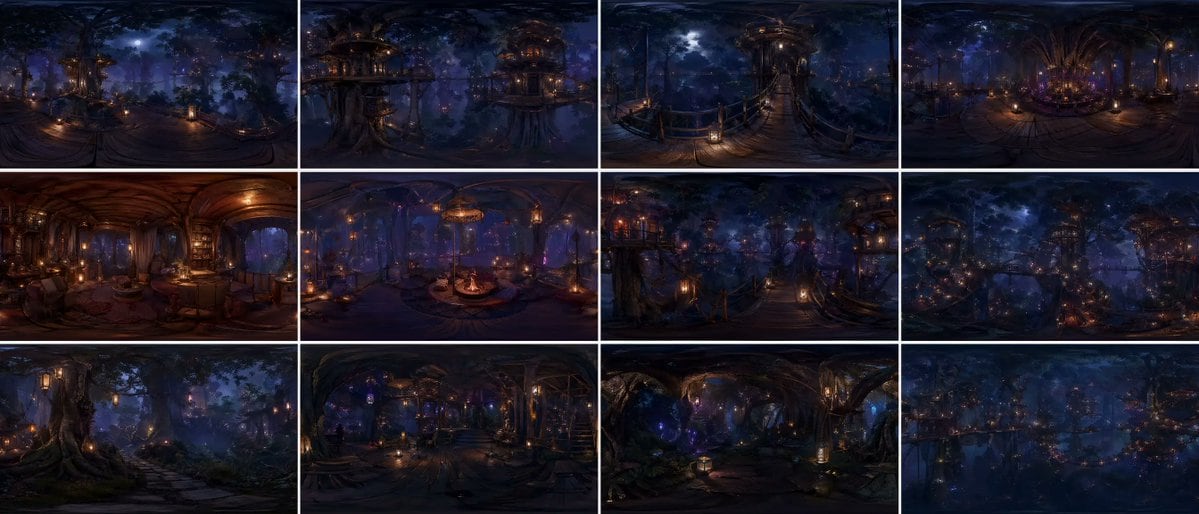
Prompt{argument name="grid layout" default="12-panel grid (4x3)"}, each panel is an independent FULL equirectangular 360° panorama of the SAME continuous {argument name="environment" default="forest world"}
each panel = complete spherical environment (360° horizontal, 180° vertical)
true equirectangular projection with natural distortion:
stretched edges, curved horizon, vertical compression toward zenith and nadir
STRICT global consistency across panels:
same forest biome, same architectural language, same materials, same lighting logic, same scale, same color palette, no visual drift
cinematic photorealism, live-action quality, physically accurate rendering
natural light behavior, realistic exposure, subtle lens response, filmic dynamic range
ultra-detailed environment, grounded material response (wood, moss, fabric, stone), believable imperfections, micro-detail variation
massive forest environment with large-scale vertical structures integrated into trees
multi-layered platforms, bridges, embedded interiors, organic construction logic
lighting:
motivated light sources only (lanterns, windows, bioluminescence)
soft volumetric fog interacting with light beams
physically correct falloff, no overglow, no artificial bloom
balanced contrast, filmic highlights, deep but readable shadows
atmosphere:
dense air perspective, layered depth, subtle particle presence
natural haze, humidity, soft diffusion
CAMERA (IMPORTANT):
each panel = fixed central capture point of a spherical camera
true 360° capture, no framing, no composition bias, no cropped view
but with subtle real-world camera characteristics:
slight lens softness toward edges, mild exposure adaptation, natural highlight rolloff
each panel represents a different location within the SAME world:
canopy height, mid-bridge level, interior spaces, vertical clearings, forest floor transitions
continuous spatial logic between panels
viewer always positioned at the center of the environment
environment fully resolved in ALL directions:
above (canopy, sky gaps, light sources) and below (structures, roots, depth layers)
COLOR:
{argument name="color scheme" default="deep indigo night base, warm amber practical lights, restrained violet accents"}
cinematic color grading, natural color separation, no oversaturation
STYLE:
cinematic spherical realism, VR-ready environment, physically coherent world
high-end film production quality, not stylized, not game-like
no labels, no text, no numbers
Prompt structure- Modelgpt-image-2
- Use casesocial-media-post
- Stylephotorealistic, cinematic, editorial, luxury
- Aspect ratioFlexible
Best used for- Use casesocial-media-post
- Stylephotorealistic, cinematic, editorial, luxury
- Recommended specs1:1, 4:5, 16:9, or 9:16
- ModelGPT Image 2
How to customizeUse this 12-panel Grid (4x3) prompt as a base. Replace the subject, product details, environment, lighting, brand colors, and output ratio while keeping the social-media-post intent and photorealistic, cinematic, editorial, luxury direction stable.
Editable variables- SubjectReplace the product, person, scene, interface, or object being generated.
- Use caseKeep or rewrite the destination as social media post, ad creative, cover image, poster, or ecommerce hero.
- FrameChoose 1:1, 4:5, 16:9, or 9:16 based on the final placement.
- Brand cuesAdd colors, materials, props, text-safe space, and the platform where the image will be used.
Recommended specsChoose the frame for the destination first, then use 1K, 2K, or 4K based on output quality needs. Product images and posters usually benefit from higher resolution.
Pre-generation checklist- CheckSubject, lighting, composition, and frame are specific enough to review.
- CheckText-safe space is included when the image will carry a headline or ad copy.
- CheckResolution, credit cost, and final destination are checked before generation.
Why this prompt works12-panel Grid (4x3) works because it starts from the image job, then controls subject, composition, lighting, style, and frame. It is best for social media post while keeping the photorealistic, cinematic, editorial, luxury direction stable.
Common questions- Can I use it directly?Yes. Replace the subject, brand cues, and frame, then generate in Image2Studio.
- Which ratio should I use?Choose 1:1, 4:5, 16:9, or 9:16 based on the destination.